Troubleshooting
28.03.2022 105 / 112
8 Troubleshooting
8.1 Error messages
Info
Error messages appear when there is a malfunction on the
device.
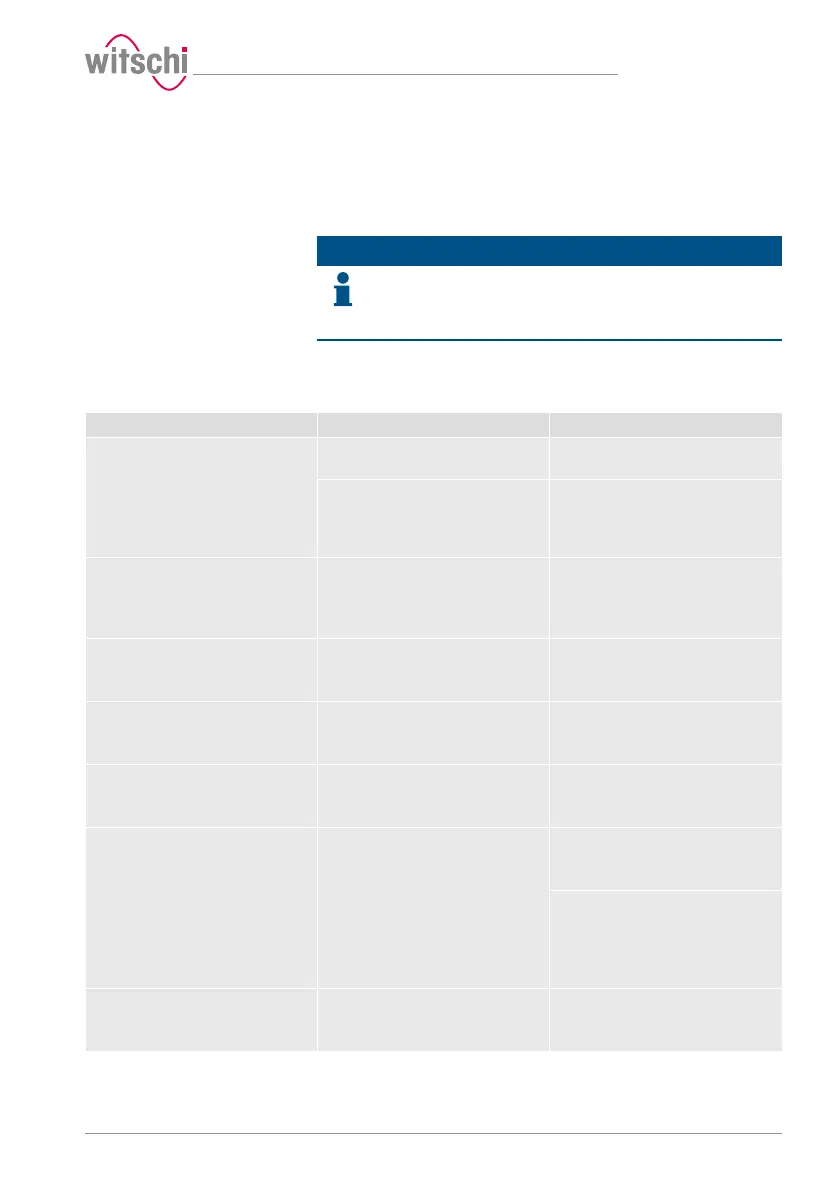
The following table contains information on the possible causes of an
error message and information about troubleshooting.
The most important malfunctions are described below. Contact
customer service if the error continues after taking all troubleshooting
measures.
Error message Cause Remedy
No input pressure or input pressure
too low!
Test pressure cannot be reached.
Input pressure is too low. Check the output pressure of the
compressor.
The maximum vacuum that can be
generated depends on the current
atmospheric pressure (location,
height above sea level).
The output pressure must be at least
1 bar higher than the selected test
pressure.
No test specimen detected!
Deformation sensor has reached
lower limit. Probably no test
specimen inserted.
No test specimen was inserted. Insert test specimen.
Bell blocked!
Please check whether free movement
is possible.
Object jammed. Remove object.
Catch blocked!
Please check whether free movement
is possible.
Object jammed. Remove object.
Deformation sensor blocked!
Please check whether free movement
is possible.
Object jammed. Remove object.
Overpressure or vacuum in test
chamber!
Chamber cannot be opened or
closed.
Pressure could not be released from
the chamber.
Deformation sensor was not fitted
correctly.
With open bell cover:
Check whether the deformation
sensor is fitted correctly.
With closed bell cover:
Release the pressure manually and
open the bell cover (see Opening the
bell cover in an emergency
[}Page107]).
Communication error!
Check whether the deformation
sensor is fitted.
Deformation sensor was not fitted
correctly.
Check whether the deformation
sensor was fitted correctly.



 To Next Page