Description
28 / 112 28.03.2022
4 Description
4.1 Proofmaster
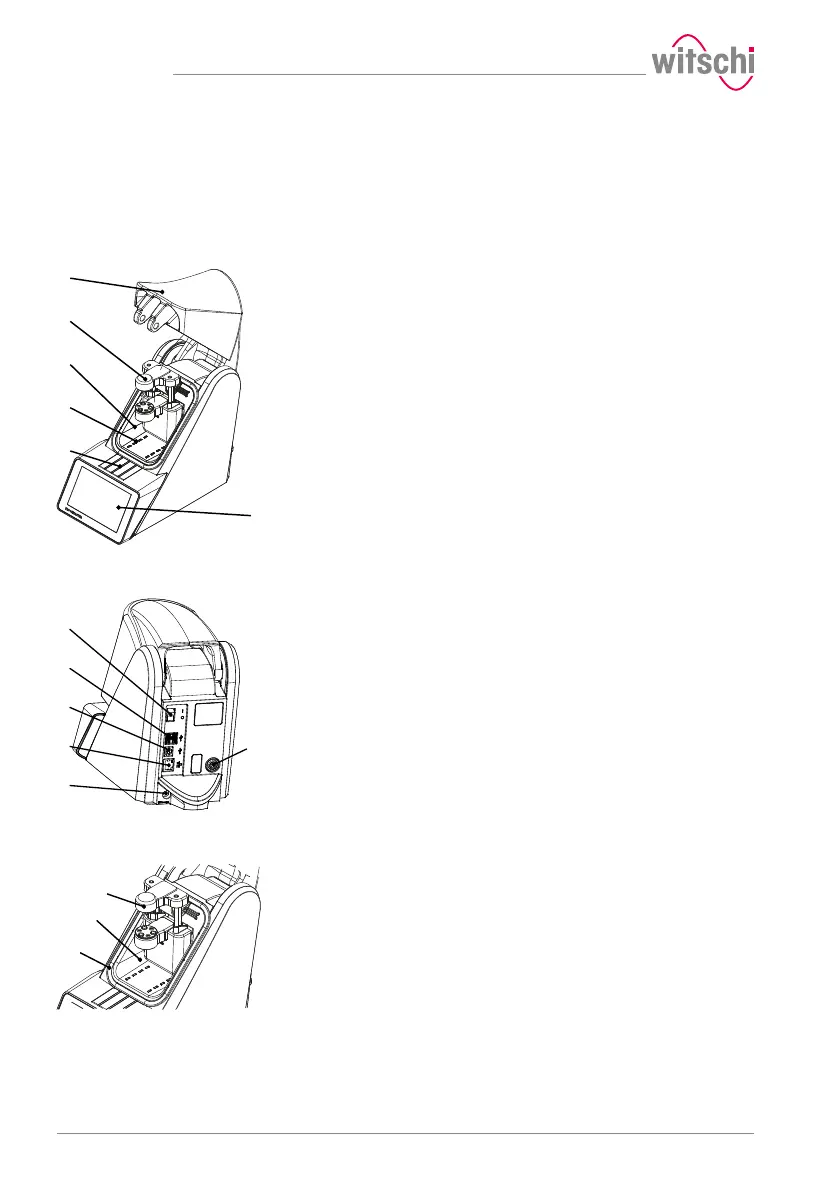
Front view
1 Bell cover
2 Deformation sensor
3 Test chamber
4 Compressed air inlet and outlet
5 Flap over catch
6 Touchscreen
The bell cover covers the test chamber. During testing, the bell cover 1
is closed and locked by the catch under flap 5.
The bell cover opens and closes automatically before and after testing a
watch.
Rear view
1 Main switch
2 2x USB type A ports
3 USB type B port
4 Network connection
5 Electrical connection
6 Compressed air plug connection
Test chamber
1 Deformation sensor
2 Test chamber
3 Seal (O ring)
The tightness test is performed in the test chamber 2. The deformation
sensor 1 and watch support are located inside the test chamber. When
the test procedure is started, the bell cover closes so that it rests
against the seal 3. This ensures that the test chamber is sealed. The
pressure required for the test can now be built up and maintained in the
test chamber.



 To Next Page