Settings
28.03.2022 103 / 112
7.10 ChronoMaster Air (establishing a connection for
Bluetooth)
Initial setup
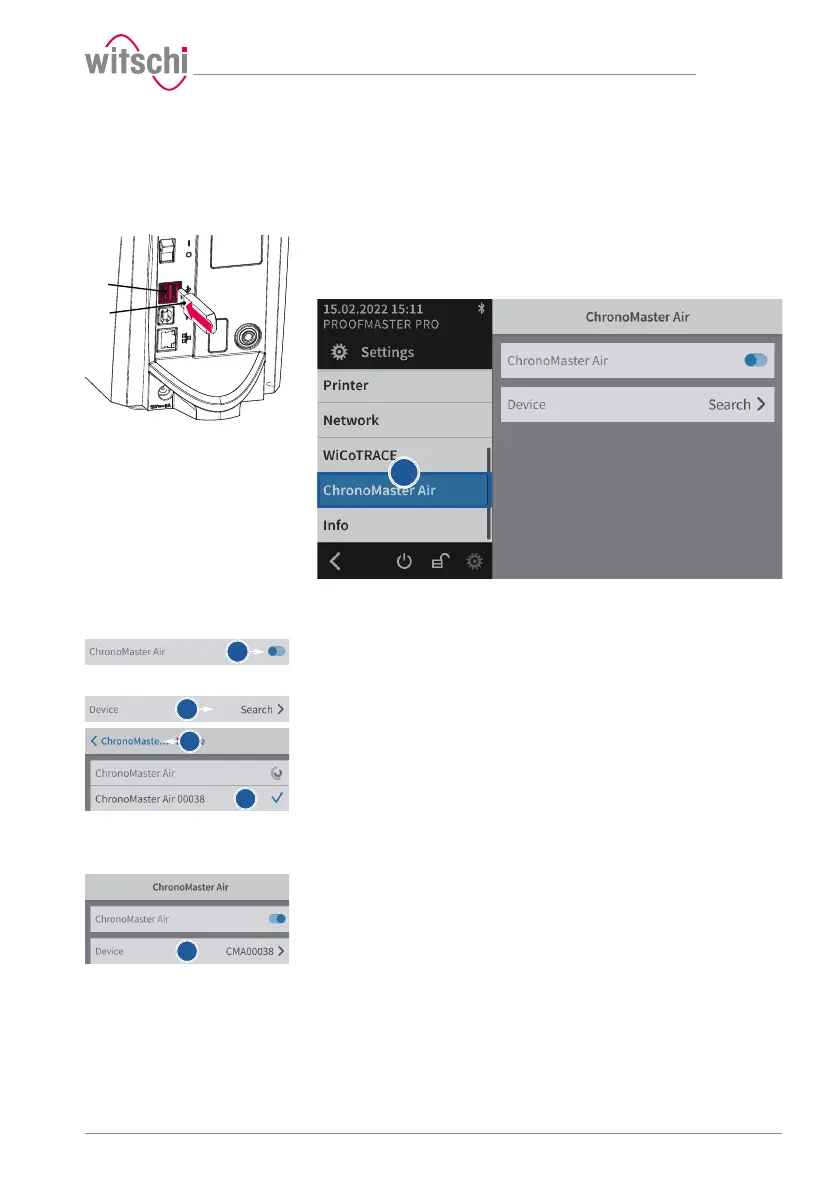
a) Plug the USB adapter 2 into one of the two USB type A ports on
the ProofMaster 1.
ð The Bluetooth dongle is automatically recognised by the
ProofMaster.
ð Switch on the ProofMaster and the ChronoMaster Air.
b) Select ChronoMaster Air from the list.
ð ChronoMaster Air is highlighted in blue and the right window
displays the device options.
c) Activate the ChronoMaster Air.
ð The button is blue when the function is enabled and grey
when it is not.
d) Search for a device.
e) Check the identity and selection of the device.
f) Press <ChronoMaste… to save and return to the previous screen.
ð The ChronoMaster Air is coupled.
ChronoMaster Air coupled
a) Activate the ChronoMaster Air.
ð The button is blue when the function is enabled and grey
when it is not.



 To Next Page