Settings
80 / 112 28.03.2022
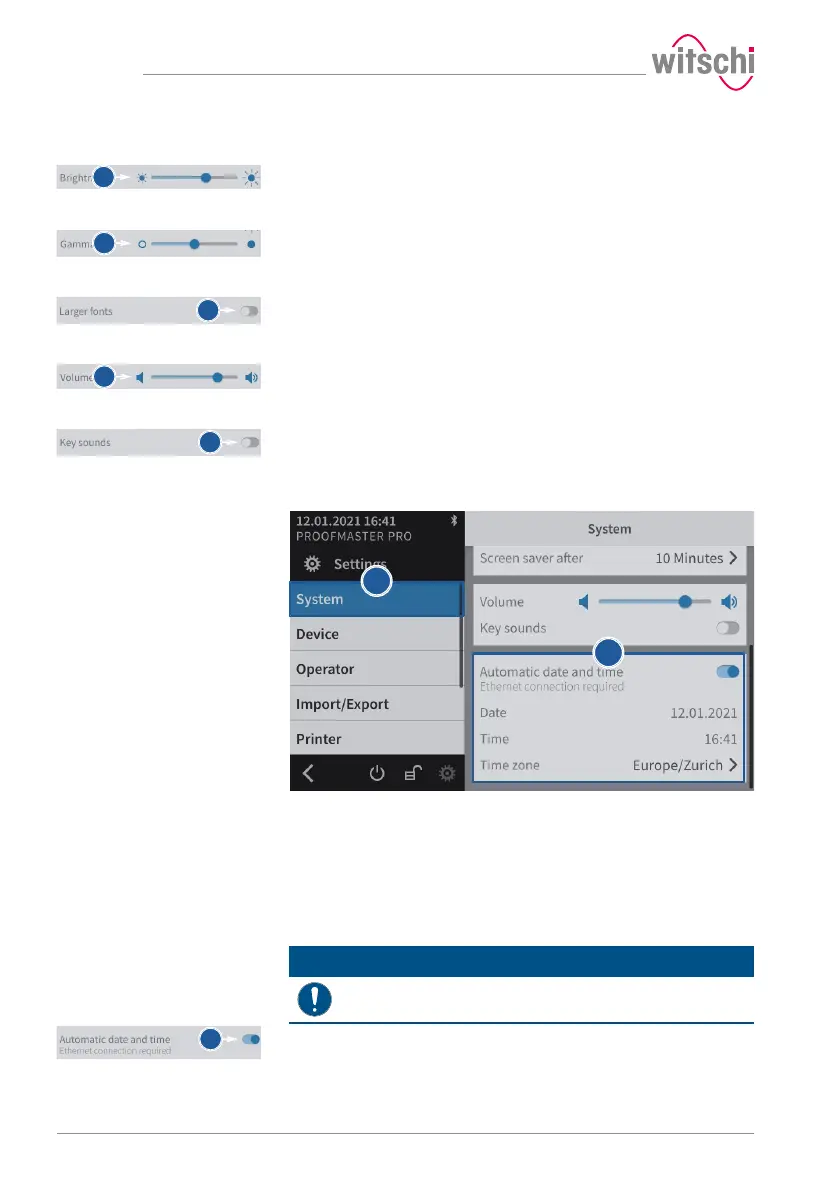
Brightness
a) Move the cursor left to decrease the brightness and right to
increase the brightness.
Contrast
a) Move the cursor left to decrease the contrast and right to increase
the contrast.
Font sizes
a) Enable or disable the large font display.
ð The button is blue when the function is enabled and grey
when it is not.
Volume level
a) Move the cursor left to decrease the volume level and right to
increase the volume level.
Enabling the button sound
a) Enable or disable the button sound.
ð The button is blue when the function is enabled and grey
when it is not.
7.3.4 Date & time
a) Select System from the list.
ð System is highlighted in blue and the right window displays
the system options.
b) Set the date and time.
ð See the details below for the settings of each option.
Automatically setting the
date and time
When this function is enabled, the date and time of the unit are set
automatically.
Mandatory
The ProofMaster must have an Internet connection!
a) Enable or disable the automatic setting of the date and time.
ð The button is blue when the function is enabled and grey
when it is not.



 To Next Page