Initial operation
28.03.2022 27 / 112
Disconnecting
a) Ensure that the thermal printer and the ProofMaster are switched
off.
b) When connecting using a USB cable, disconnect it from the
thermal printer.
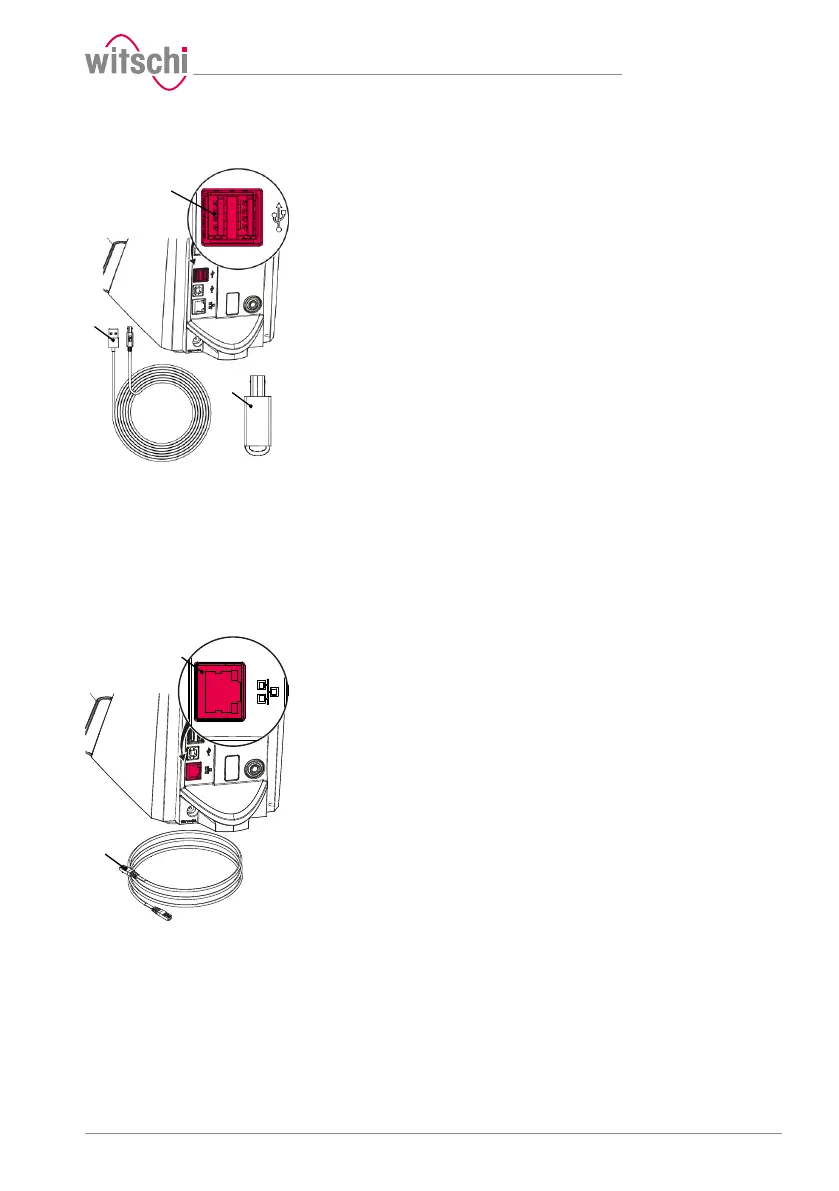
c) Disconnect the USB cable 2 or the Bluetooth dongle 3 from the
ProofMaster 1.
ð The ProofMaster is now no longer connected to the thermal
printer.
ð Configure the ProofMaster again without the thermal printer. See
Configuring the printer [}Page96].
3.8.4 Network
The following steps are necessary when using a PC within a network.
Required equipment
• ProofMaster
• Ethernet cable (not included in the scope of delivery of ProofMaster)
• PC incl. network environment (not included in the scope of delivery of
ProofMaster)
Connecting
a) Ensure that the ProofMaster is switched off.
b) Connect the Ethernet cable 2 to the network.
c) Connect the Ethernet cable 2 to the network connection 1 of the
ProofMaster and switch on the ProofMaster.
ð The ProofMaster is now connected to the network.
ð For the configuration of the network, see the Network settings
[}Page100] section.
Disconnecting
a) Ensure that the ProofMaster is switched off.
b) Disconnect the Ethernet cable 2 from the network.
c) Disconnect the Ethernet cable 3 from the ProofMaster.
ð The ProofMaster is now no longer connected to the network.



 To Next Page