Use
48 / 112 28.03.2022
5.2.12 Identifying the tests
All measurements are identified by the measured test specimen
(model). It is possible to add further identification elements:
• Prefix (for example, part number)
• User
• Comment (4lines with maximum 32characters)
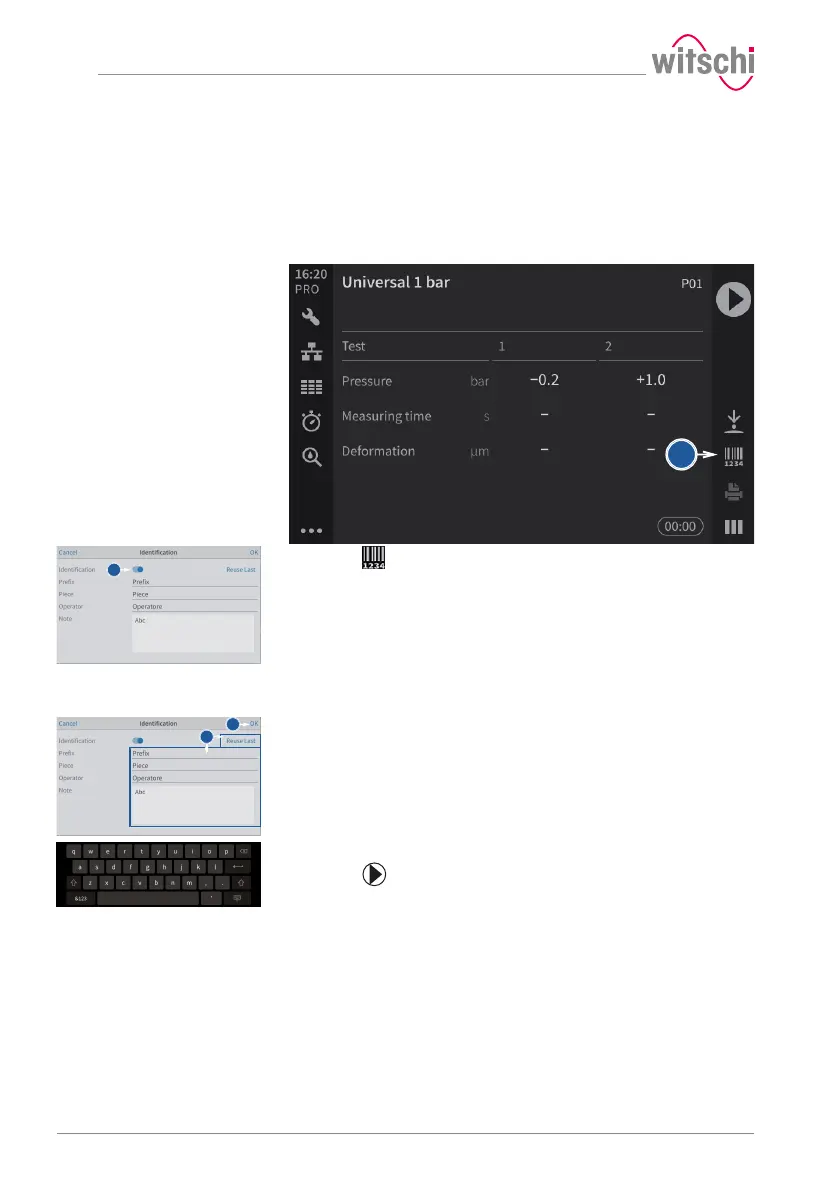
Enabling identification
a) Press to open the identification window.
b) Enable the identification.
ð The button 1 is blue when the function is enabled and grey
when it is not.
ð The identification parameters entered are saved with the
measurement result and also printed on the label.
Entering the identification
settings
ü The program is selected, Identification is enabled and the
Identification menu is displayed.
a) Press Apply last entries to fill in the input fields with the settings
from the last measurement, or press one of the input fields to open
the alphanumeric keypad.
b) If necessary, enter the desired settings.
ð Use the alphanumeric keypad.
c) Press OK to confirm the entry.
d) Press to perform the measurement.



 To Next Page