Use
28.03.2022 55 / 112
5.4 LeakFinder (ProofMaster PRO)
Info
This function is available in the ProofMaster PRO software
version.
To locate a leak, the ProofMaster uses the LeakFinder. This program
creates a positive pressure inside the watch case. When the watch is
then placed in a container filled with water, the rising bubbles indicate
the point of leakage.
The LeakFinder program can also be used without a previous leak test.
Mandatory
Wear safety goggles during the entire leak detection
process!
Pressure is applied to the inside of the watch. This can cause the watch
glass to burst.
Pressurising the watch
ü The result of the leak test of a watch was "bad".
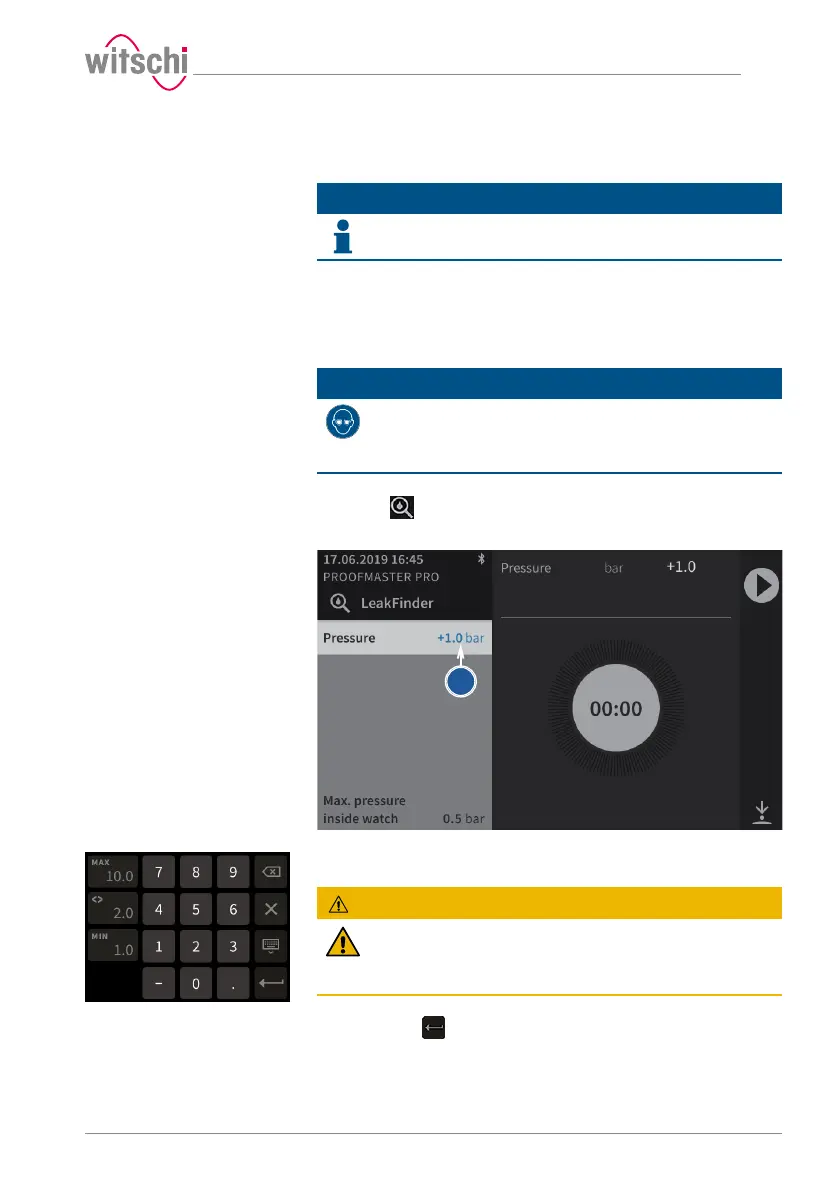
a) Press to enter LeakFinder mode.
ð The LeakFinder window appears.
b) To define the test pressure, press on the pressure value (blue).
ð A number field appears.
CAUTION
Observe all safety regulations for the test pressures in
order to avoid accidents and damage to the watch or the
ProofMaster!
See Safety regulations [}Page15].
c) Enter the desired test pressure between 1.0bar and 10.0bar and
then press to confirm the entry.
ð The test pressure is programmed.
d) Place the watch you want to test in the ProofMaster.
ð See Positioning the watch [}Page46].



 To Next Page