Use
28.03.2022 41 / 112
5.2.5 Programming a quick test
Test pressure
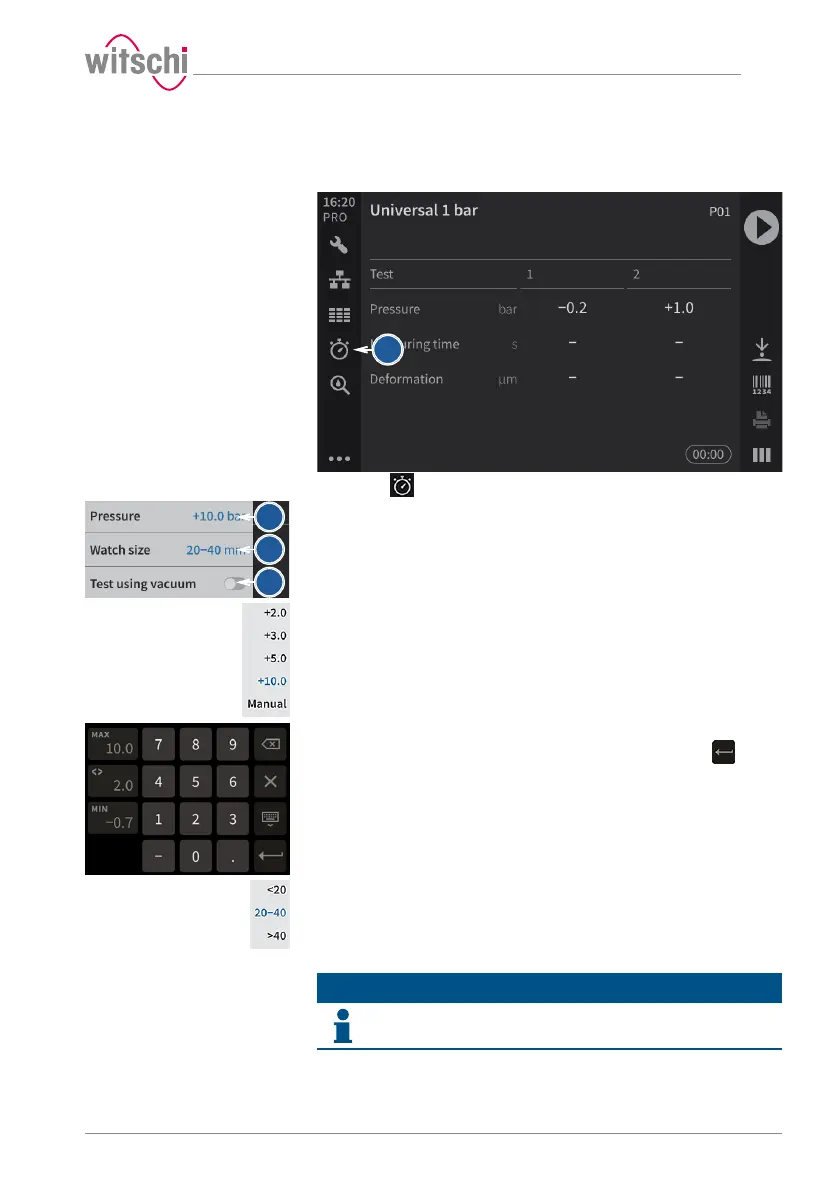
ü The ProofMaster shows the start screen.
a) Press .
ð The Quick select screen appears.
b) Press Pressure.
ð The selection of test pressure values appears.
c) Press the required test pressure or Manual.
ð The test pressure will be programmed or, if Manual is
selected, a number field appears.
d) Enter the required test pressure value for an individual test
pressure between -0.7bar and 10.0bar and then press to
confirm the entry.
ð The individual test pressure is programmed.
e) Press Watch size to program the size of the watch.
ð The selection of watch sizes appears.
f) Press the value that corresponds to the size of the watch glass.
g) Where necessary, press Test using vacuum to carry out a vacuum
test before the pressure test.
Info
The pressure for the vacuum test is non-adjustable.
The pressure for the vacuum test is -0.3bar and cannot be changed.
ð The Test using vacuum button is shown in blue.



 To Next Page