FUEL INJECTION SYSTEM
DIAGNO
STIC
MODE
Setting the diagnostic mode
1. Turn the main switch to "
OFF
".
2. Disconnect the wire
ha
rness
coup
l
er
from the fuel pu
mp
.
3. Sim
ul
taneously press and
ho
ld the
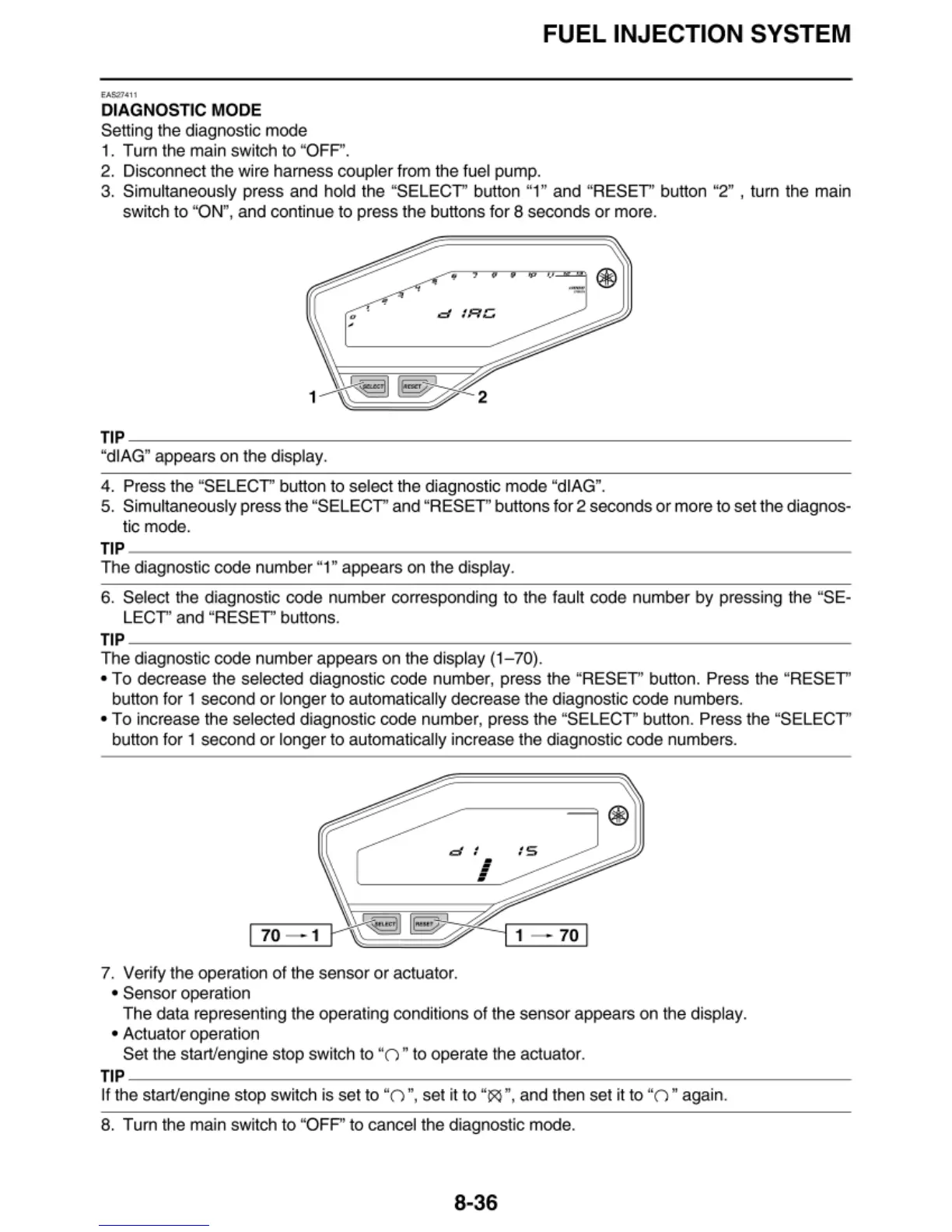
"SELECT
' button "1" and "
RESET
' button "2" , turn the main
sw
it
ch
to "ON", and
cont
i
nue
to press the buttons for 8 seconds or more.
•
,
dlRG
TIP
----------------------------------
"dlAG" appears on the display.
4. Press the
"S
ELECT" button to select the diagnostic mode "dlAG".
5. Sim
ul
taneously press t
he
"SELECT
' and
"RESET'
buttons for 2 secon
ds
or
more to set the diagnos-
tic mode.
TIP
-------------------------------~
The
diagnostic code number "1" appears on the display.
6. Select the diagnostic code number corresponding to the fault
code
numb
er
by pressing the "SE-
LECT'
and
"RESET" buttons.
TIP
-------------------------------~
The
diagnostic code number appears on the di
sp
l
ay
(1
-70).
•T
o decrease the selected diagnostic
code
number, press the
"RESET
' button. Press the "RESET"
button for
1 second or longer to au
toma
tica
ll
y decrease the diagnostic code numbers.
•T
o increase the selected diagnostic code number, press the "SELECT" button. Press the
"SELECT
'
button
fo
r 1 second or
lo
n
ger
to automatically
in
crease the diagnostic code numbers.
d :
i
70 - 1
~
8
7-~~:_r
-=-
1
-----:::
70~
7. Veri
fy
the operation
of
the sensor
or
actuator.
• Sensor operation
The data representing the operating conditions
of
the sensor appears on the display.
• Actuator operation
Set the start/engine stop
sw
itch to "
()"
to operate the actuator.
TIP
----------------------------------
lf the start/engine stop
sw
i
tc
h is set to "O ", set it
to
"15<)
", and then set it
to
"O " again.
8. T
um
the main switch
to
"
OF
P' to cancel the diagnostic mode.
8-36


 To Next Page