SEQTRAK User Guide
e [PAGE] button
Used to switch the range of patterns (pages) displayed on the Drum keys and to change
the length of the patterns on the Drum tracks.
f [ /PLAY] button
Used to turn the power on/off and to play/stop a project.
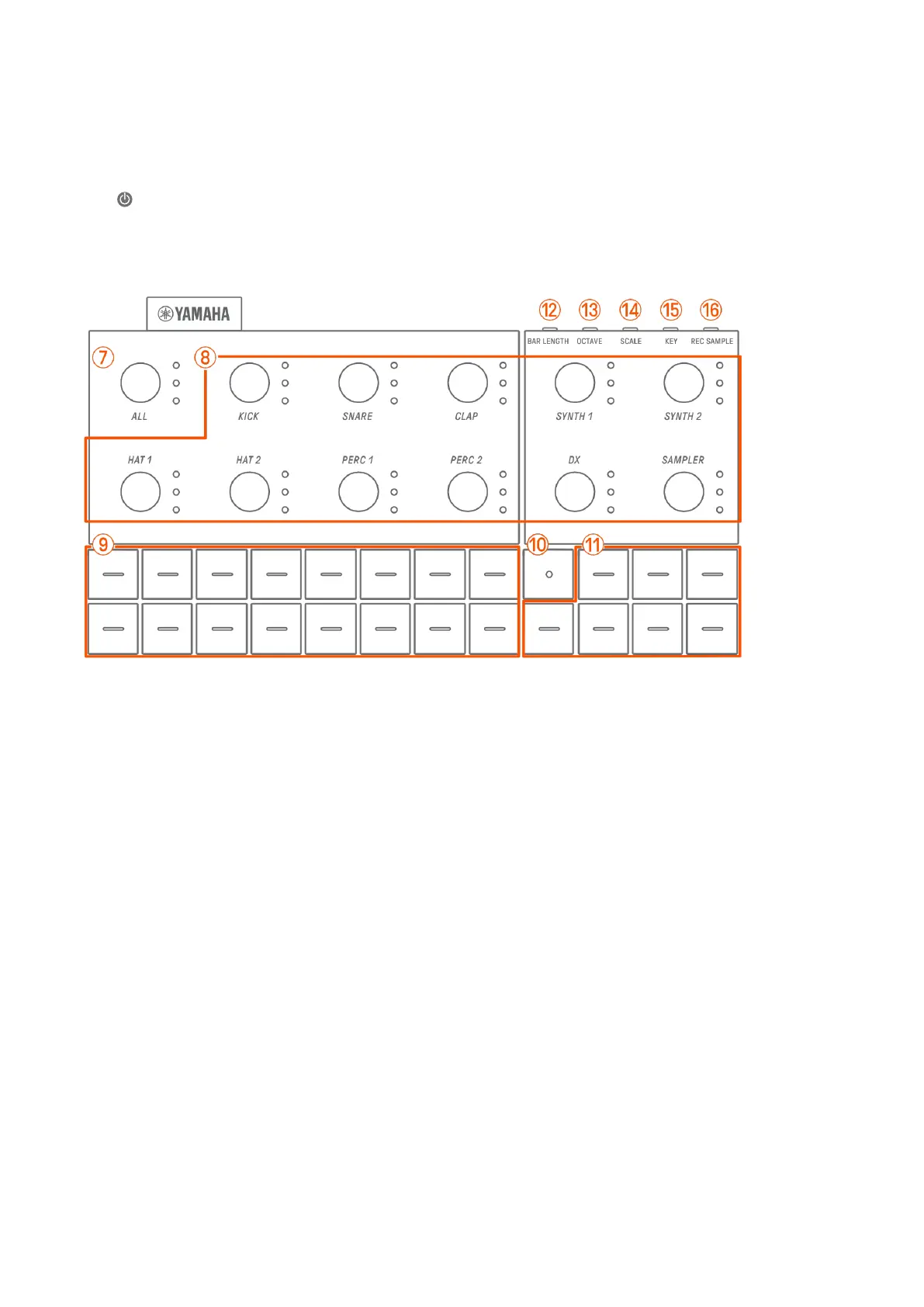
g–p Top Left (Drum section, Synth section)
g [ALL] knob
Turn this knob to change the patterns for all 11 tracks simultaneously.
h Track knobs
Turn these knobs to change the pattern for each individual track. Press to select a track.
Press a knob while playback is stopped to audition the sound for that track.
i Drum keys
Press these keys to turn each step on/off. Hold down a Drum key and turn a Sound Design
knob to lock a parameter.
j Record key
Used to execute real-time recording. You can record a performance with the Synth keys or
record MIDI input from an external source. You can also execute Motion Recording of
parameters.
k Synth keys
Press to play the selected Synth track (SYNTH 1, SYNTH 2, or DX) or SAMPLER track.
l [BAR LENGTH] button
Used to change the length of the pattern in the currently selected Synth track (SYNTH 1,
SYNTH 2, DX) and SAMPLER track.



 To Next Page