SEQTRAK User Guide
NOTE
・ Press a Track knob and watch the LED lamps to check which pattern 1–6 is selected for
that track. If patterns 1–3 are selected, the LED lamp flashes in yellow; if patterns 4–6 are
selected, it flashes in cyan blue.
5.4 Deleting a Pattern
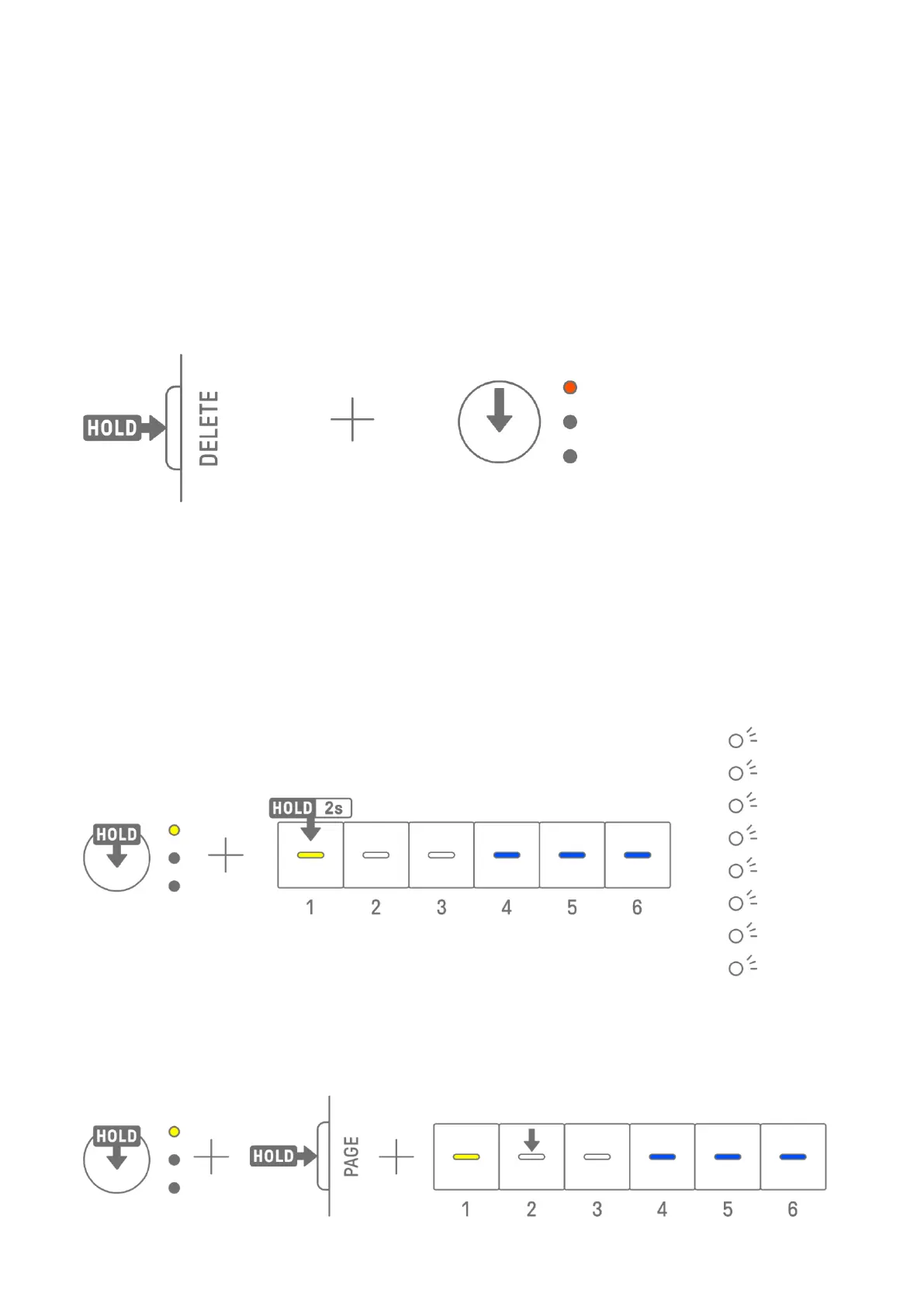
Hold down the [DELETE] button and press a Track knob to delete the currently selected
pattern on that track. When the pattern has been deleted, the LED lamp of the target track
flashes in red.
Hold down the [DELETE] button and press the [ALL] knob to delete the currently selected
pattern on all tracks.
5.5 Copying and Pasting Patterns [Ver. 1.1]
To copy the currently selected pattern, press and hold the Track knob or the [ALL] knob while
pressing a Drum key for at least 2 seconds. If copying is successful, the Global Meter flash in
white.
To paste a copied pattern, hold down the Track knob or [ALL] knob together with the [Page]
button and press a Drum key. If pasting is successful, the Drum key that is the paste
destination will flash for 1 second.



 To Next Page