SEQTRAK User Guide
16.1.1 Formatting a USB flash drive
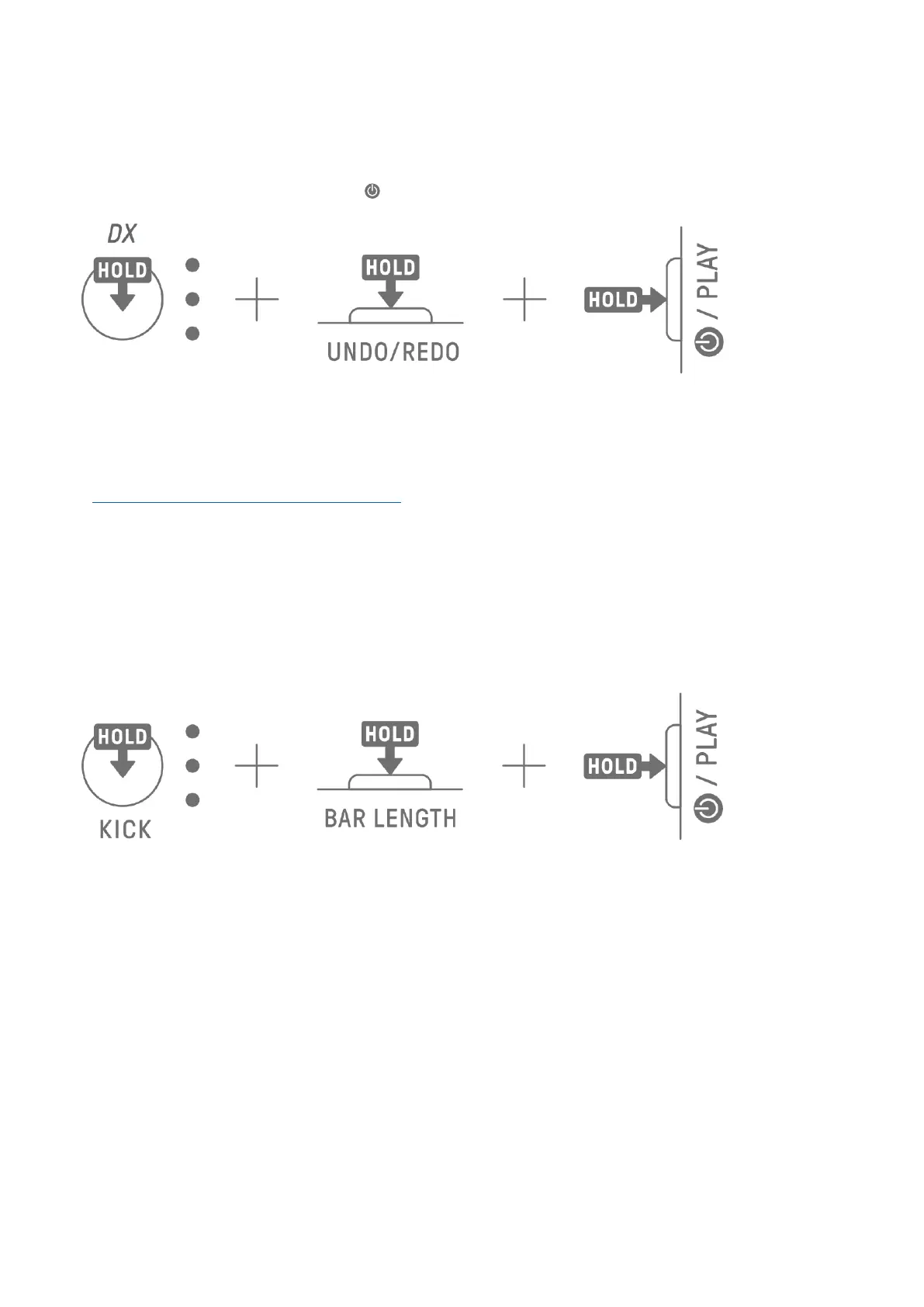
Hold down the [DX] knob and the [UNDO/REDO] button and turn on SEQTRAK to format the
connected USB flash drive. When formatting is complete, all index light in white. When
formatting is complete, press the [ /PLAY] button to turn off the power.
16.1.2 Updating the firmware
1. Use a computer or other device to download the latest SEQTRAK firmware from the
downloads page on the following website.
https://www.yamaha.com/2/seqtrak/
2. Save the update file (8Z33OS_.PGM) in the downloaded .zip file to the USB flash drive.
3. Turn off the power to SEQTRAK.
4. Connect the USB flash drive that contains the update file to SEQTRAK.
5. Hold down the [KICK] knob and the [BAR LENGTH] button and turn on SEQTRAK.
The LED lamps on SEQTRAK will flash as the update progresses.
When the update has successfully completed, all index will light up for a period of time, after
which SEQTRAK will automatically restart. After restarting, SEQTRAK can be used as usual.
If the update fails, the Global Meter flashes in red. In this case, try updating again.



 To Next Page