Home
Yamaha
Recording Equipment
SEQTRAK
Page 9
Yamaha SEQTRAK - Page 9
99 pages
Manual
Save Page as PDF
To Next Page
To Next Page
To Previous Page
To Previous Page
Loading...
S
EQT
R
A
K User Guide
9
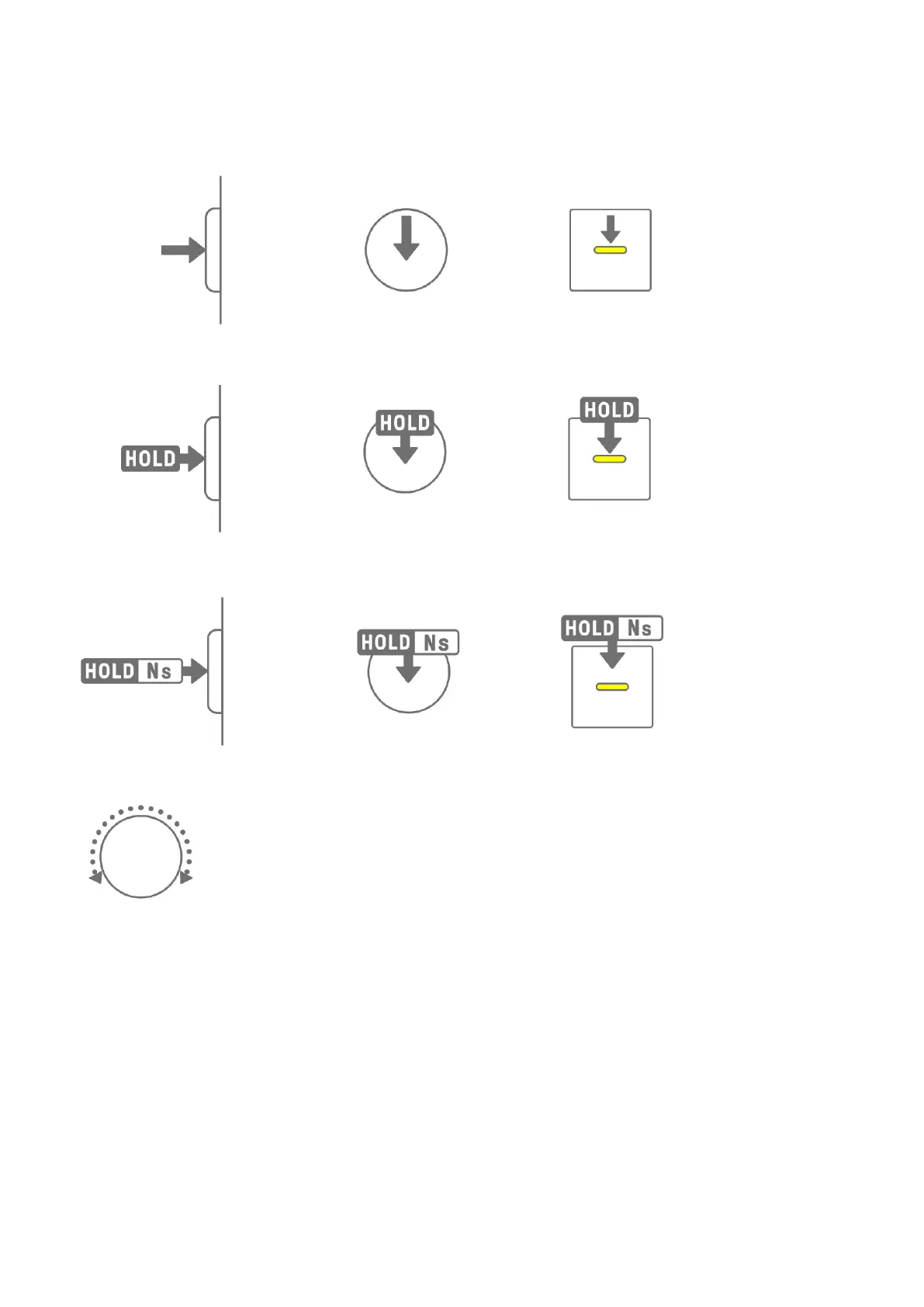
The various oper
ations of
S
EQT
RA
K
are indic
at
ed as shown below
.
・
Pressing a button, knob, or key
・
Pressing and holding a button, knob, or key
・
Pressing and hol
ding a but
ton
, knob, or key for N seconds or longer
・
T
urning a kno
b
8
10
Table of Contents
Main Page
SEQTRAK User Guide
1
1. What is SEQTRAK?
8
1.1 About the Manuals
8
1.1.1 Notation
8
1.2 SEQTRAK Configuration
10
1.2.1 Drum section
10
1.2.2 Synth section
11
1.2.3 Sound Design & FX section
11
1.3 Projects, Tracks, and Patterns
11
1.3.1 Projects
11
1.3.2 Tracks
11
1.3.3 Patterns
12
1.3.4 Conceptual diagram of projects, tracks, and patterns
12
1.4 About the SEQTRAK App
12
1.4.1 Obtaining the SEQTRAK app
12
1.4.2 Connecting to the SEQTRAK app
12
2. Panel Sections and Main Functions
13
a–f Left side
13
g–p Top Left (Drum section, Synth section)
14
q–A Top Right (Sound Design & FX section)
15
B–H Right side
16
3. Charging and Power Supply
18
3.1 Charging
18
3.1.1 Charge status (when the power is on)
19
3.1.2 Charge status (when the power is off)
20
3.2 Power Supply
21
3.2.1 Turning the power on/off
21
3.2.2 Forced termination
21
3.2.3 Setting Auto Power Off
21
USB power adapter / USB mobile battery requirements
19
4. Projects
22
4.1 Switching Projects
22
4.2 Saving a Project
22
4.3 Backing Up and Restoring a Project
22
4.4 Deleting a Project
23
4.5 Setting the Tempo of a Project
23
4.5.1 Changing the playback tempo of a project
23
4.5.2 Applying a swing feeling to a project
24
4.5.3 Turning the metronome on/off
24
4.6 Temporarily Saving a Project [Ver. 1.1]
25
5. Tracks and Patterns
26
5.1 Switching Patterns
26
5.1.1 Using a Track knob to switch patterns
26
5.1.2 Using a Drum key to switch patterns
26
5.1.3 Changing Launch Quantize
27
5.2 Changing the Length of a Pattern
28
5.2.1 Drum tracks
28
5.2.2 Synth tracks (SYNTH 1, SYNTH 2, DX), SAMPLER track
28
5.3 Changing the Number of Patterns (3 Patterns ⇔ 6 Patterns)
29
5.4 Deleting a Pattern
30
5.5 Copying and Pasting Patterns [Ver. 1.1]
30
5.6 Selecting and Auditioning Tracks
31
5.7 Changing the Sound of a Track
31
5.7.1 Selecting a sound category (category jump)
32
5.7.2 Drum track sound categories
32
5.7.3 Synth track (SYNTH 1, SYNTH 2, and DX) sound categories
32
5.7.4 SAMPLER track sound categories
32
5.8 Muting and Soloing a Track
33
5.8.1 Mute
33
5.8.2 Solo
33
5.9 Copying and Pasting Track Steps [Ver. 1.1]
34
6. Drum Tracks
35
6.1 Entering Steps
35
6.2 Switching Pages
35
6.3 Fine-tuning the Rhythmic Timing of a Step (Micro Timing)
36
6.4 Setting the Consecutive Number of Times a Step is Triggered (Substep)
36
6.5 Real-time Input
37
6.6 Changing the Probability of Triggering a Step [Ver. 1.1]
38
7. Synth Tracks (SYNTH 1, SYNTH 2, DX)
39
7.1 Real-time Input
39
7.2 Turning Quantize On/Off
40
7.3 Changing the Octave
40
7.4 Changing the Scale
41
7.5 Changing the Key
41
7.6 Playing Chords
42
7.7 Editing Chords
43
7.8 Switching to Keyboard Input Mode
44
7.9 Entering Steps [Ver. 1.1]
44
8. SAMPLER Track
46
8.1 Real-Time Input
46
8.2 Sampling (Built-In Microphone/AUDIO IN and USB Audio Input)
46
8.3 Changing the Sampling Source
47
8.4 Resampling
47
8.5 Canceling Sampling
47
8.6 Setting the Count-In to Start Sampling
48
8.7 Switching to Monitoring Mode
48
8.8 Turning Auto-Normalize On/Off
48
8.9 Deleting Patterns for Each Sample [Ver. 1.1]
49
8.10 Entering Steps [Ver. 1.1]
49
9. Sound Design
51
9.1 Adjusting Sound Parameters
51
9.1.1 Switching between the sound parameter operation pages
52
9.1.2 Drum track sound parameter adjustment items
52
9.1.3 Synth track (SYNTH 1 and SYNTH 2) sound parameter adjustment items
53
9.1.4 Synth track (DX) sound parameter adjustment items
54
9.1.5 SAMPLER track sound parameter adjustment items
55
9.2 Setting Sound and Effect Parameters for Each Step (Parameter Lock)
56
9.2.1 Deleting a Parameter Lock
57
9.3 Recording the Movement of Sound and Effect Parameters in Steps (Motion Recording)
59
9.3.1 Deleting a Motion
59
9.4 Undoing/Redoing Sound and Effect Parameters
60
9.5 Saving a Sound
60
9.6 Deleting a Sound
60
9.7 Importing a Sound
61
10. Effects
62
10.1 Configuration of Effects
62
10.1.1 Track effects
62
10.1.2 Send effects
63
10.1.3 Master effects
64
10.2 Changing and Adjusting Effects
65
10.2.1 Switching the effect to be controlled
65
10.2.2 Changing the type of effect
65
10.2.3 Adjusting effect parameters
65
10.2.4 Effect parameters when MASTER is selected
66
10.2.5 Effect parameters when SINGLE is selected
66
10.2.6 Example: Parameters when MASTER is selected and preset No. 1 [LPF - NO RESONANCE] of FILTER is selected
66
10.3 Minimizing the Level of Effect Parameters (CLEAR FX)
66
11. Mixer Mode
67
11.1 Switching to Mixer Mode
67
11.2 Adjusting Sound Parameters
67
11.3 Changing and Adjusting Send Effects (REVERB, DELAY)
68
11.3.1 Changing the type of send effect (REVERB, DELAY SEND)
68
11.3.2 Adjusting send effect (REVERB, DELAY) parameters
68
11.3.3 Send effect (REVERB, DELAY) parameters
69
11.3.4 Example: Send effect parameters for preset No. 1 [HD Room] in REVERB
69
12. Song Mode
70
12.1 Switching to Song Mode
70
12.1.1 Switching to scene mode [Ver. 1.1]
70
12.2 Playing/Stopping a Scene
71
12.2.1 Changing the scene to be played back
71
12.2.2 Repeating a scene (Loop Playback)
72
12.2.3 Repeating an entire song (Loop Playback)
72
12.3 Adding Scenes
73
12.4 Deleting a Scene
73
12.5 Editing a Scene
74
12.5.1 Changing the combination of patterns in a scene
74
12.5.2 Changing the length of a scene
74
13. SEQTRAK App
76
13.1 GUI Functions [GUI EDITOR]
76
13.2 Content Management Function [PROJECT/SOUND MANAGER]
77
13.3 Visualizer Function [VISUALIZER]
78
13.4 Dynamic Tutorial Function [DYNAMIC TUTORIAL]
79
14. Connections
80
14.1 Connecting to the SEQTRAK App
80
14.1.1 Wired connection
80
14.1.2 Wireless connection (Bluetooth)
81
14.1.3 Wireless connection (Wi-Fi)
81
14.2 Connecting to MIDI Devices
82
14.2.1 Using a USB-C to USB-C cable
82
14.2.2 Using a MIDI conversion cable
83
14.3 Connecting to a Computer
83
14.3.1 Connecting to a computer (Windows)
83
14.3.2 Connecting to a computer (Mac)
83
15. Settings
84
15.1 Restoring the Factory Defaults (Factory Reset)
84
15.2 Changing the Sensitivity Settings of the Track Knobs
84
15.3 Configuring MIDI Settings
84
15.3.1 Setting the MIDI clock
84
15.3.2 Setting MIDI output filters
84
16. Firmware Updates
85
16.1 Using a USB Flash Drive
85
16.1.1 Formatting a USB flash drive
86
16.1.2 Updating the firmware
86
16.2 Using the SEQTRAK App (for a Wired Connection)
87
16.3 Using the SEQTRAK App (for a Wireless Connection)
87
17. Documentation
88
17.1 Product Specifications
88
17.2 MIDI Channels
89
17.3 MIDI Control Change Parameters
90
17.3.1 Sound Design parameters
90
17.3.2 Effect parameters
91
17.3.3 Mute/Solo
91
17.3.4 Other
92
17.4 MASTER EFFECT Presets
92
17.4.1 FILTER
92
17.4.2 REVERB
92
17.4.3 DELAY
93
17.4.4 COMPRESSOR
93
17.4.5 DISTORTION
93
17.4.6 MODULATION
94
17.4.7 DUCKER
94
17.4.8 OTHER
94
17.5 SINGLE EFFECT Presets
95
17.5.1 FILTER
95
17.5.2 REVERB
95
17.5.3 DELAY
95
17.5.4 COMPRESSOR
96
17.5.5 DISTORTION
96
17.5.6 MODULATION
96
17.5.7 DUCKER
97
17.5.8 OTHER
97
17.6 SEND EFFECT Presets
97
17.6.1 REVERB
97
17.6.2 DELAY
98
17.7 Description of Sound Parameters
98
17.8 Open-source Software
99
Related product manuals
Yamaha SU10
89 pages
Yamaha SPX90
31 pages
Yamaha SU700
354 pages
Yamaha SU200
62 pages
Yamaha SU-10
2 pages
Yamaha SPX900
146 pages
Yamaha SPX990
53 pages
Yamaha SPX50D
31 pages
Yamaha SPX1000
55 pages
Yamaha SPX2000
108 pages
Yamaha QY70
252 pages
Yamaha MOTIF-RACK
92 pages



 To Next Page