3
Screen Operations
- 3.1
Home Menu
9
3
The AD-4971 is equipped with a touch screen that can
operate the buttons, icons, input boxes, etc. on the screen.
(The same operation as the "single click" of a personal
computer.)
Caution
The AD-4971 does not use the computer interface
operations "Double click", "Drag", "Flip" and "Long
touch". In order to avoid operation errors do not attempt
to use these operations.
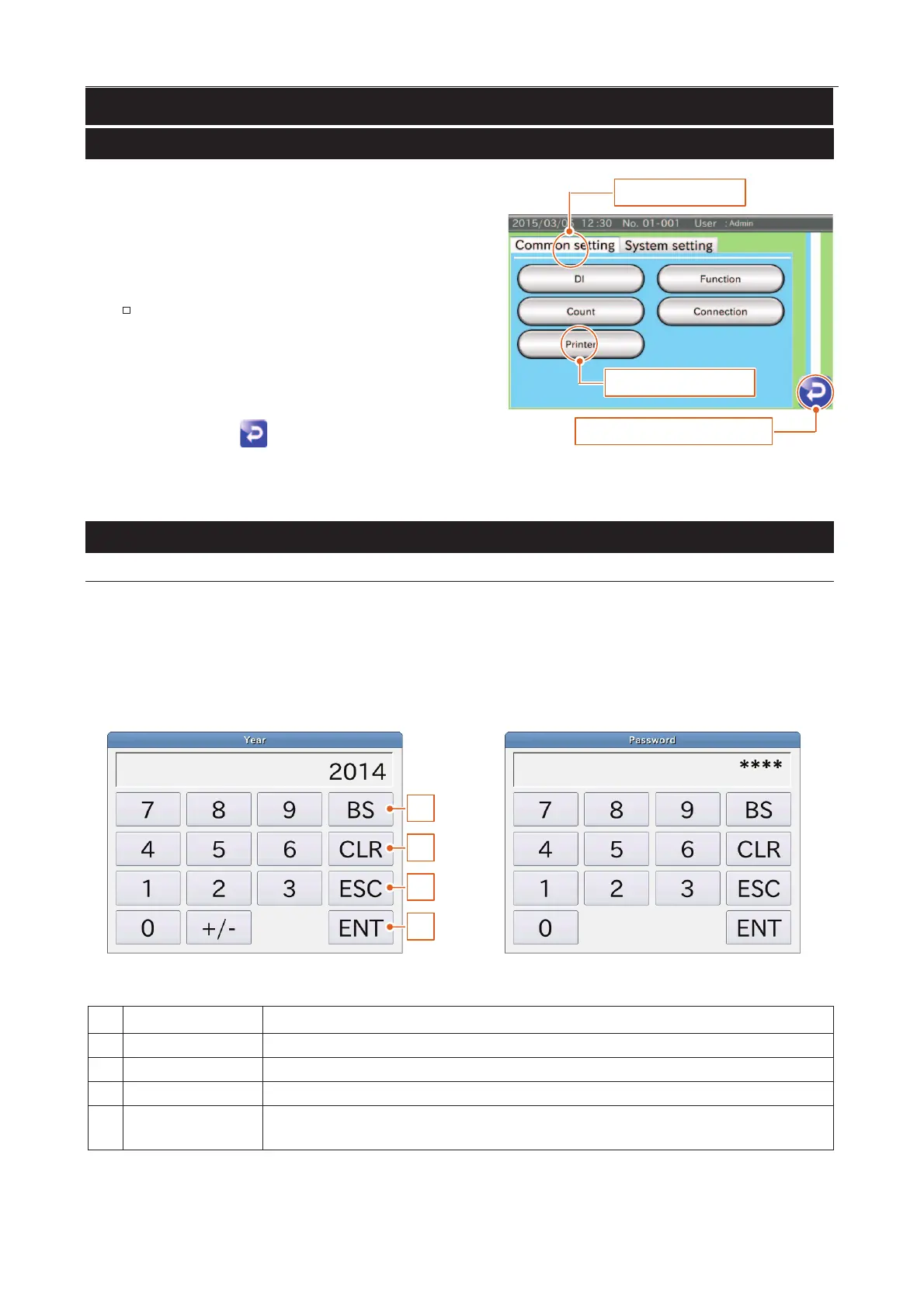
Touch the tab header to change tabs.
Touch the "Return
" icon to return to the last display.
1.Touch the button
3.Touch the "Return" icon
3.Touch the tab
Fig. 44 SScreen Operations
Numerical Input Dialog Box࣭Password Input Dialog Box
When a numerical value is required, the numerical input dialog box is displayed.
When a password is required for a user login or user registration, the password input dialog box is displayed. Input is
the same as the numerical input dialog box. The inputted characters are displayed using "
*
" so secrecy can be
maintained.
1
2
3
4
Fig. 55 NNumerical Input Dialog Box
Fig. 66 PPassword Input Dialog Box
Deletes the numerical character before the cursor.
Deletes all of the numerical values inputted.
Cancels the current input and returns to the last display.
Accepts the value inputted.
When the input value is out of range, it is not displayed.



 To Next Page