4
Basic Operations
- 4.5
Management of User List
18
4
The user list can store up to a maximum of 100 users.
Password and user level in the list can be changed after user registration.
The AD-4971 has default user information registered before shipment as follows:
User name: Admin
Password: 0000 (four zeros)
User level: Administrator
Only an "Administrator" can edit user data.
To edit an unregistered user, log in by the default user Admin.
In the user edition, users can be registered, changed or deleted.
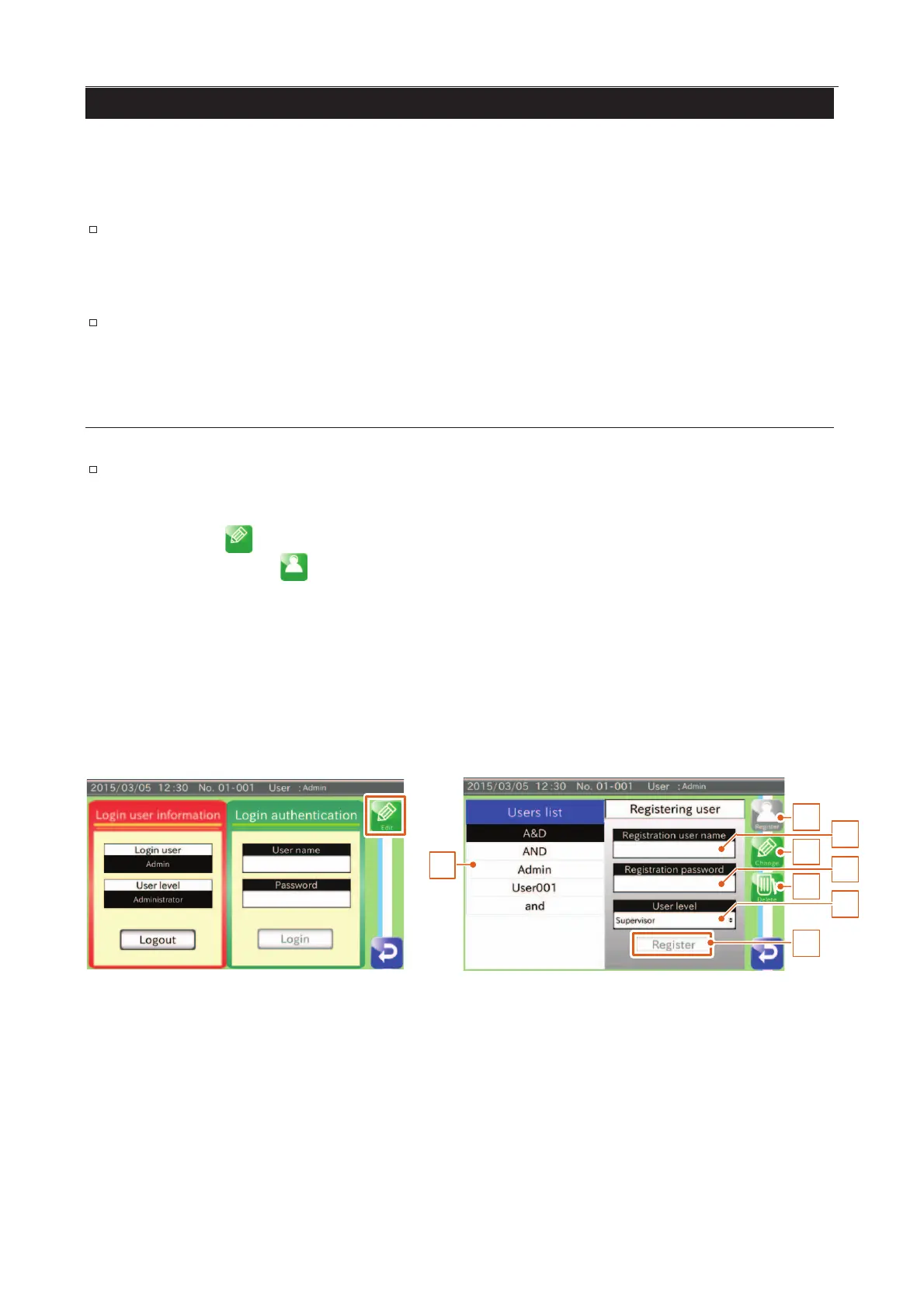
Registering a New User
Note
The user list cannot register a new user name which is the same as an existing one. However,
the AD-4971 distinguishes upper and lower case characters so they can be used separately.
1. Touch the "Edit " icon to display the "Edit" screen.
2. Touch the "Registration
" icon to display the "User registration" screen.
Input a user name (number of characters: 1 to 10).
Lowercase and uppercase are distinguished separately.
Input a four-digit password.
Select a user level from "Administrator", "Quality Manager" and "Supervisor".
3. Touch the "Register" button.
4. Confirm the new user to be registered in the list.
1
2
3
4
5
6
7
8
Fig. 119 RRegistering a New User Screen



 To Next Page