4
Basic Operations
- 4.7
Product Registration
22
4
Touch the "Product " icon in the "Home" screen to display the "Product selection" screen.
Select the product using the "Left " and "Right " icons.
Select a product number.
Input a group number. Range: 1 to 10.
Select a product registered in the group. Input product
number. Range: 1 to 100.
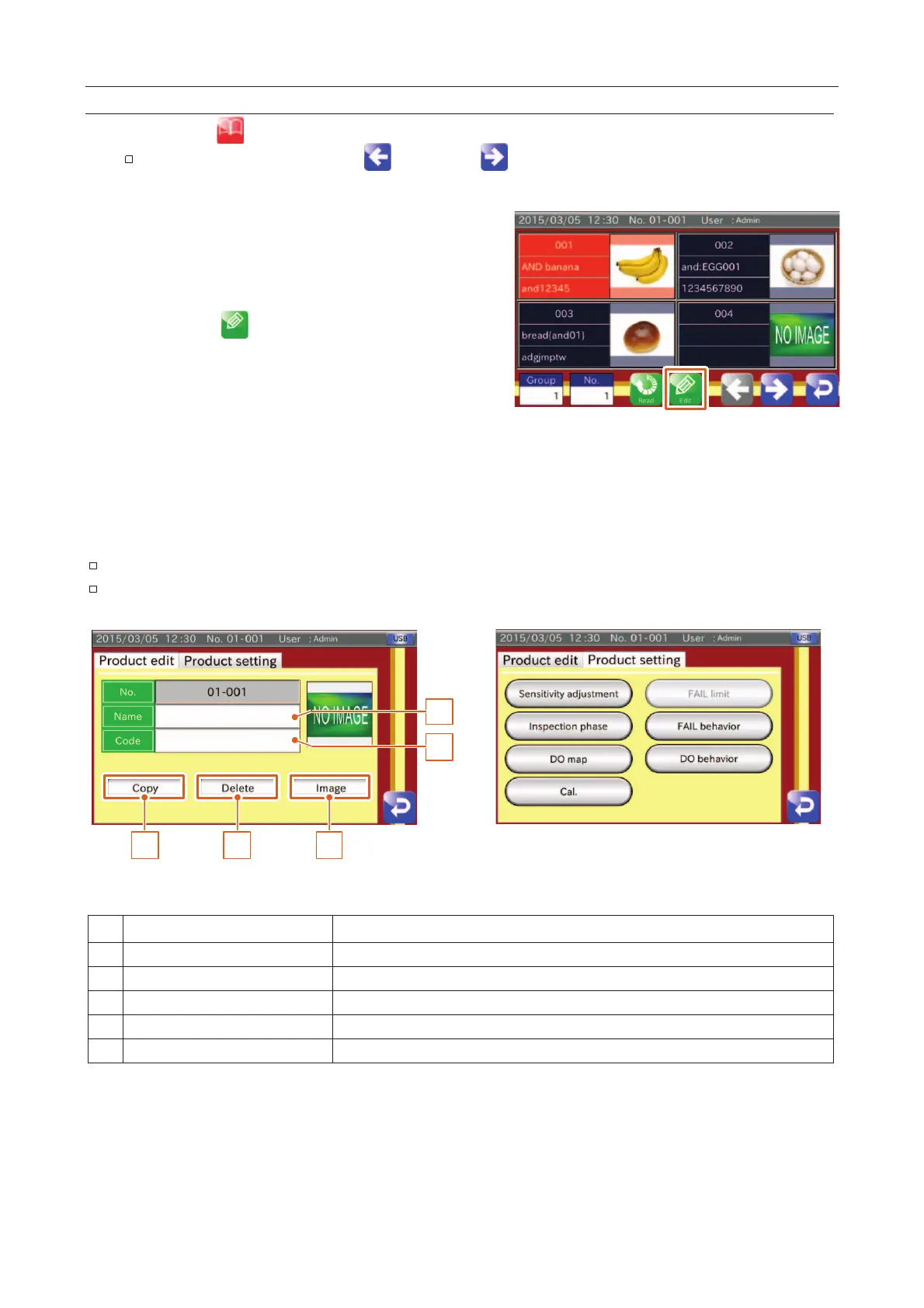
Touch the "Edit " icon to display the "Product edit"
screen.
Input a product name (Length: 0 to 15).
Input a code for the product (Length: 0 to 20).
Touch the "Product setting" screen (Tab) to display the
menu.
5. Adjust sensitivity and set necessary settings.
Fig. 224 PProduct Selection Screen
Refer to "
4.8. Sensitivity Adjustment and Inspection Mode
"
Refer to "
7. Reference Table of Screens and Menu Items
"
1
2
3 4 5
Fig. 225 PProduct Edit Screen (Tab)
Input a product name. Length: 0 to 15 characters.
Input a code for the product. Length: 0 to 20 characters.
The product specified for inspection is copied.
The current product registration is deleted.
The button can select an image in the USB memory.



 To Next Page