4
Basic Operations
- 4.6
Target Product
21
4
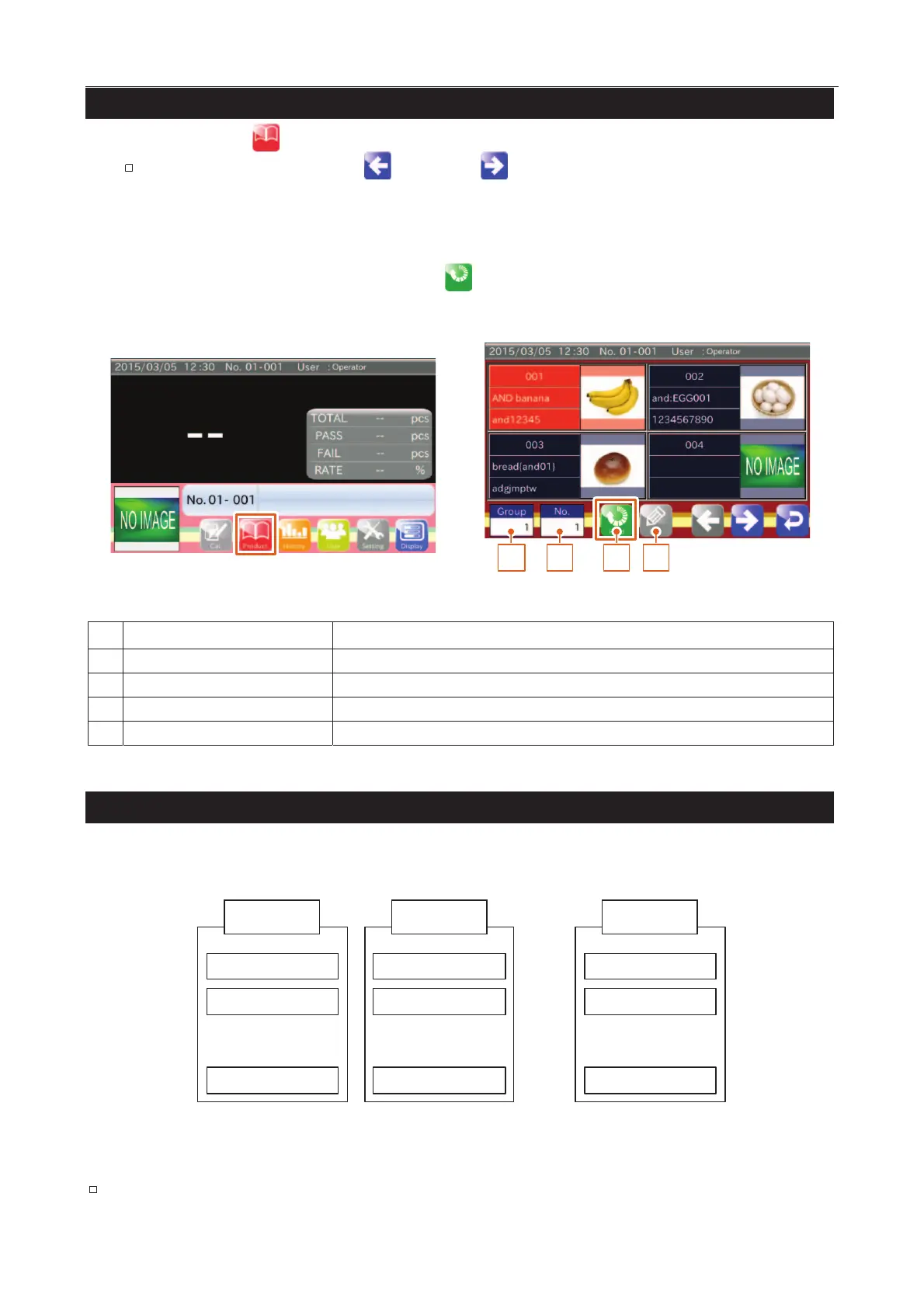
1. Touch the "Product " icon in the "Home" screen to display the "Product selection" screen.
Select the product using the "Left " and "Right " icons.
2. Select a product number.
Input a group number. Range: 1 to 10.
Select a product registered in the group. Input product number. Range: 1 to 100.
3. With the product number selected, touch the "Read
" icon to read the product settings.
4. Check new product information at the bottom of the screen (and new "No. " at the top).
1 2 3 4
Fig. 222 PProduct Selection Screen
Input group number (number of product list). Range: 1 to 10.
Input product number. Range: 1 to 100.
The data of the specified number is inputted.
The screen is displayed to edit the product data.
The AD-4971 can use 10 product lists (groups) that can register a maximum of 100 products (items) each. The
AD-4971 can register a maximum of 1000 products (items) in total.
Product 001
Group01
Product 002
Product 100
呍
呍
呍
䞉䞉䞉
Product 001
Group02
Product 002
Product 100
呍
呍
呍
Product 001
Group10
Product 002
Product 100
呍
呍
呍
Fig. 223 PProduct Registration List
Performing product registration requires a user level of "Supervisor" or higher.



 To Next Page