4
Basic Operations
- 4.9
Calibration Mode
27
4
As calibration is an important aspect of regular maintenance and checks, always perform calibrations before and
after inspection.
Perform a safety check on the belt and areas surrounding the AD-4971 before operation.
Ensure clothes or other loose items do not get caught in the AD-4971.
Stop the AD-4971 immediately if the gear cover is removed during operation.
Stop the AD-4971 immediately if the electric motor generates excessive heat or produces
unusual sounds
Avoid any shock, impact or excessive load to the conveyor belt during operation.
It may not be possible to achieve stable inspections immediately after operation starts due to
noise generated by the machine starting up.
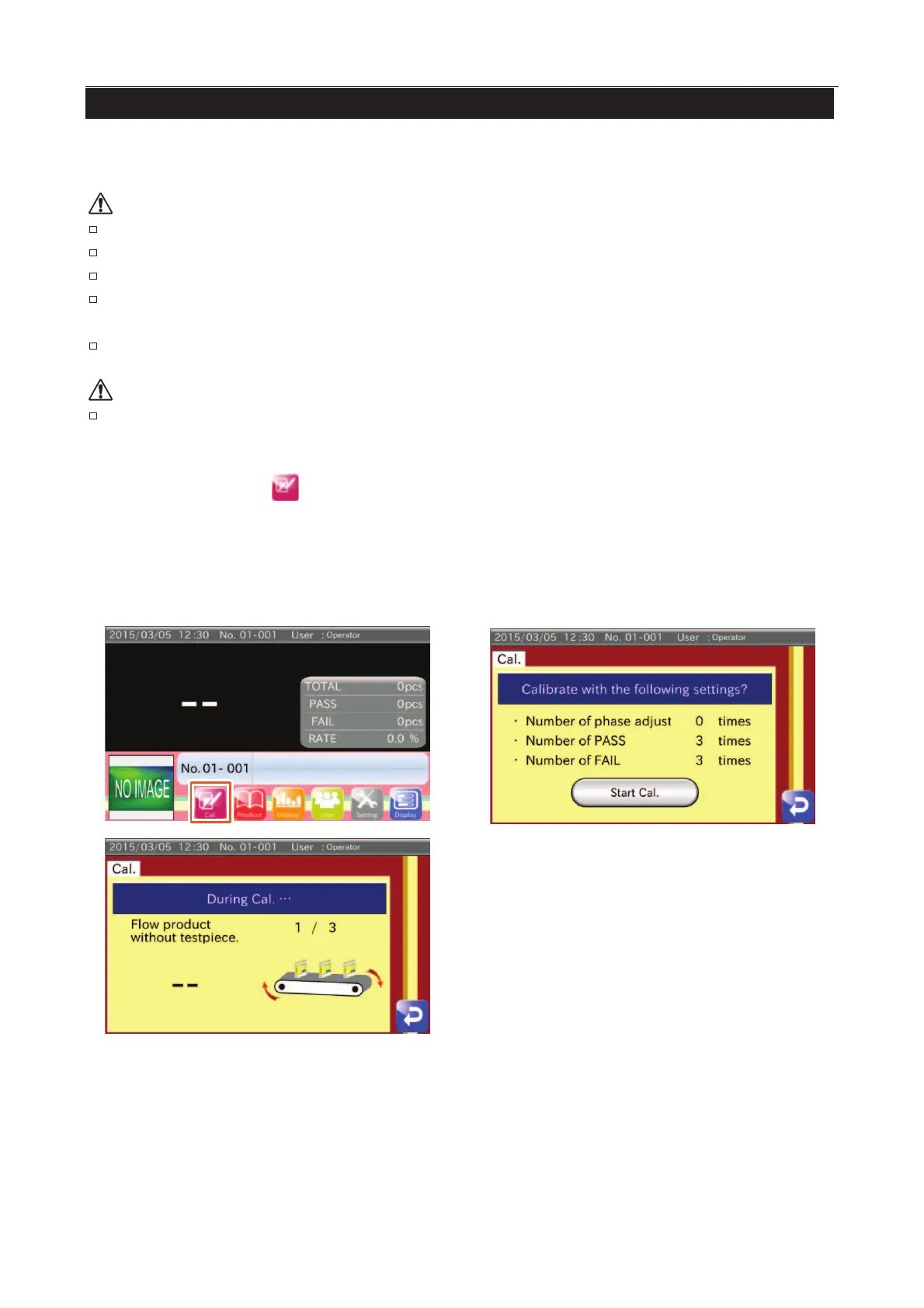
1. Touch the "Calibration " icon in the "Home" screen. The "Calibration" screen is displayed.
2. Check the settings and touch the "Start to Calibrate" switch.
3. According to the instructions on the screen, feed the products through the sensor.
Feed the product through the sensor for inspection.
Feed the product and test piece consisting of Fe or SUS through the sensor for inspection.
Fig. 30 Calibration Screens



 To Next Page