4
Basic Operations
- 4.11
History Management
30
4
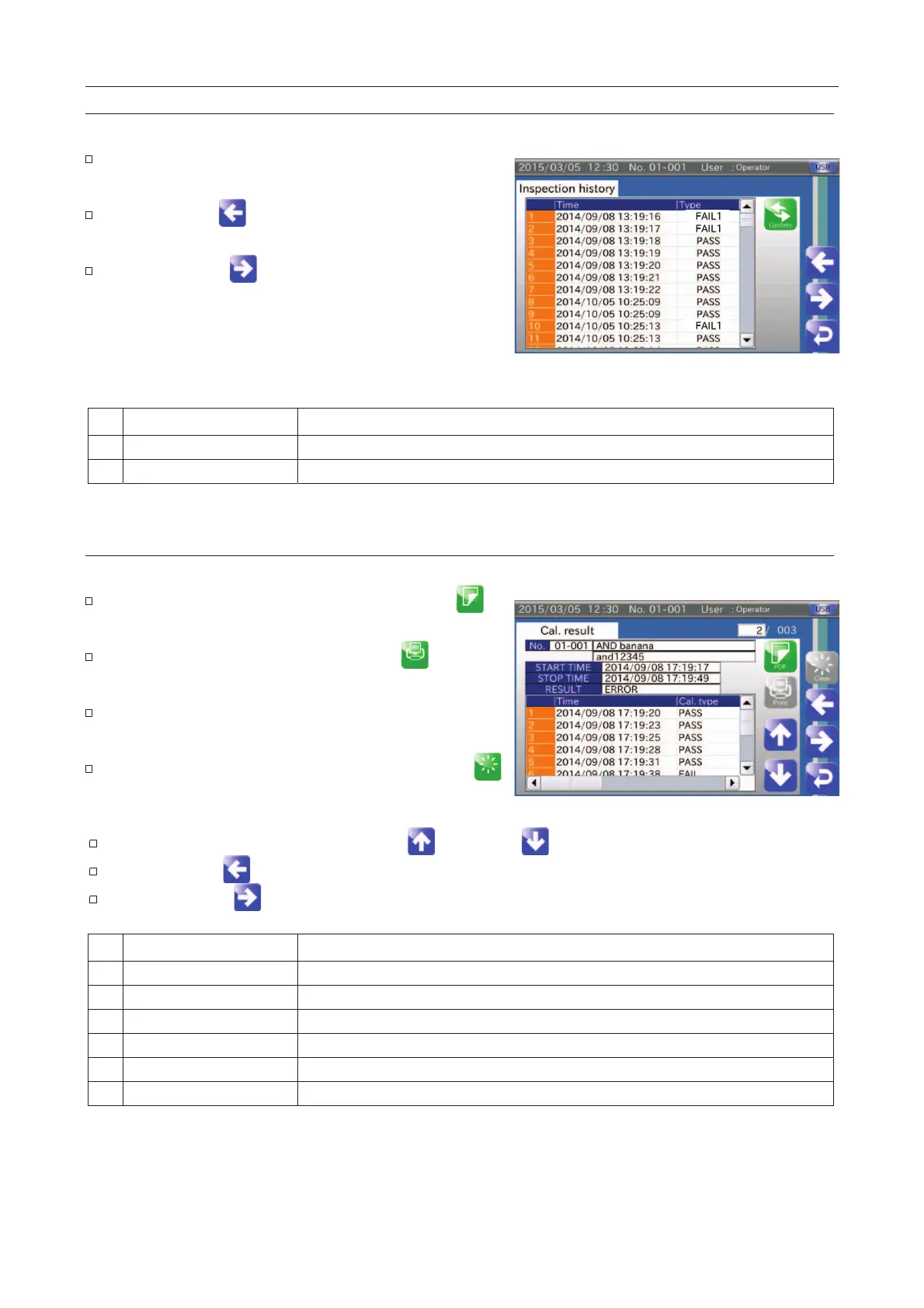
Inspection History Screen
The screen can display a maximum of the last 100 items.
When connecting the USB flash drive, the history of the
inspection results can be stored.
Touch the "Left " icon to display the "
screen.
Touch the "Right " icon to display the "Calibration
results" screen.
Fig. 332 IInspection History Screen
Time that a good product or defective product is detected.
Calibration Results Screen
The screen can display a maximum of the last 100 items.
When connecting the USB flash drive, touch the "PDF
icon to store the calibration results.
When connecting the printer, touch the "Print
print the calibration results.
When inputting the Display No., the calibration result is
displayed.
If the "Quality Manager" or higher user touches the "Clear
" icon, all of the calibration results are deleted.
Fig. 333 CCalibration Results Screen
The calibration results are switched using the "Up " and "Down " icons.
Touch the "Left " icon to display the "Inspection history" screen.
Touch the "Right " icon to display the "Operation history" screen.
Time that the calibration is started.
Time that the calibration is finished.
Displays the calibration results.
Time that a good product or defective product is detected.
Calibration record of good product or defective product.
Inspection result detected in the calibration.



 To Next Page