5
Using a USB Flash Drive
- 5.1
Using a USB Flash Drive
32
5
USB memory can be used to register product images and to store results and histories.
Using a USB Flash Drive
Note
The AD-4971 can use a USB flash drive with FAT32 format.
Do not remove an active USB flash drive while it is accessing data.
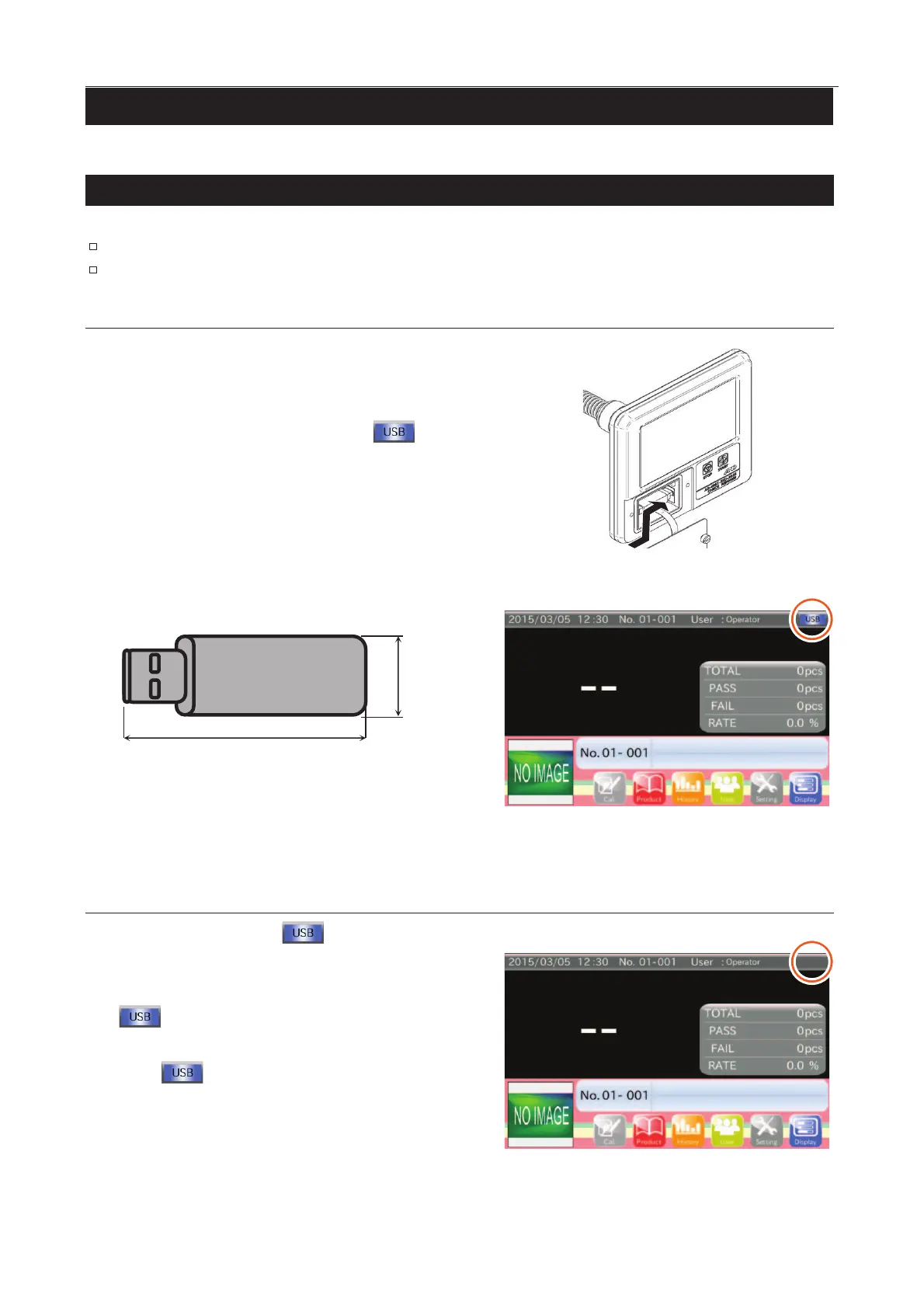
Connecting a USB Flash Drive
When connecting the USB flash drive, remove the screws
and open the cover on the display module, and then
connect the USB flash drive to the connector.
When connection is complete, the "USB " icon
is displayed on the screen.
If the icon is not displayed
within 10 seconds, remove and
re-
connect it again. (It may need some time to display the icon
because of total capacity and used capacity.)
Fig. 336 TTerminal for USB Flash Drive
23 mm
70 mm
USB
Fig. 338 UUSB Flash Drive Connection
Removing a USB Flash Drive
Touch and hold the "USB
" icon on the screen until
it disappears.
When disconnection has been completed, the "USB
" icon will disappear.
If the icon does not
disappear after 10 seconds, touch the
"USB " icon again.
Remove the USB flash drive. (It may take some time to
disconnect because of the total capacity and used capacity.)
Fig. 339 UUSB Flash Drive Disconnection



 To Next Page