6243/44 DC Voltage Current Source/Monitor Operation Manual
4.1.6 Connecting to the Fixture 12701A
4-9
4.1.6 Connecting to the Fixture 12701A
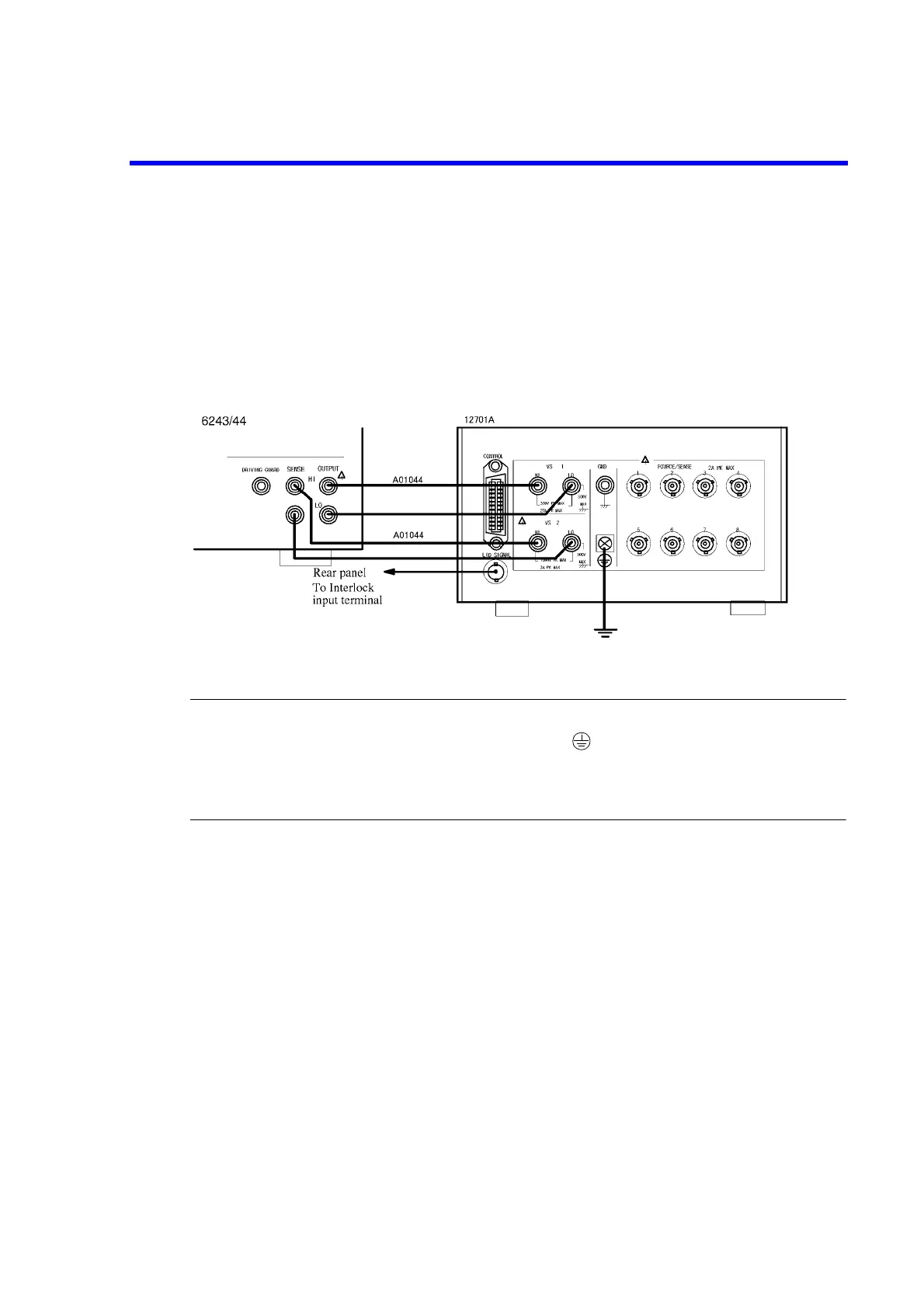
Connect to the 12701A as shown in Figure 4-8.
A 4-wire connection is shown here.
For a 2-wire connection, the SENSE connection is not required.
For device connection inside the 12701A, refer to the 12701A instruction manual.
Figure 4-8 Connecting to the 12701A
NOTE: Adhere to the following precautions to prevent electric shock.
1. Be sure to ground the 12701A’s protective ground terminal .
2. Be sure to connect the 12701A’s LID SIGNAL and the INTERLOCK terminal on the rear panel of the 6243/
44, and set the 6243/44’s Operate Signal parameter to Interlock In.
This will activate the interlock function so that the 6243/44 enters Standby status when the cover of the
12701A is opened.



 To Next Page