178 Maintenance
4510001 REV B – 220620
Replacing the Applicator Wheels
The Applicator Wheels should be replaced every year or as needed.
Items Needed to Replace the Film Drive Wheels:
• Allen Wrench (included in Tool Kit)
• Cut-Resistant Work Gloves
• New Applicator Wheels (Part Number 4500128)
To Replace the Applicator Wheels:
1. Power off the LX-150 (see “Powering the System Off” on page 145) and unplug it from
the power source.
2. Remove the Mandrel (see “Removing the Mandrel” on page 152).
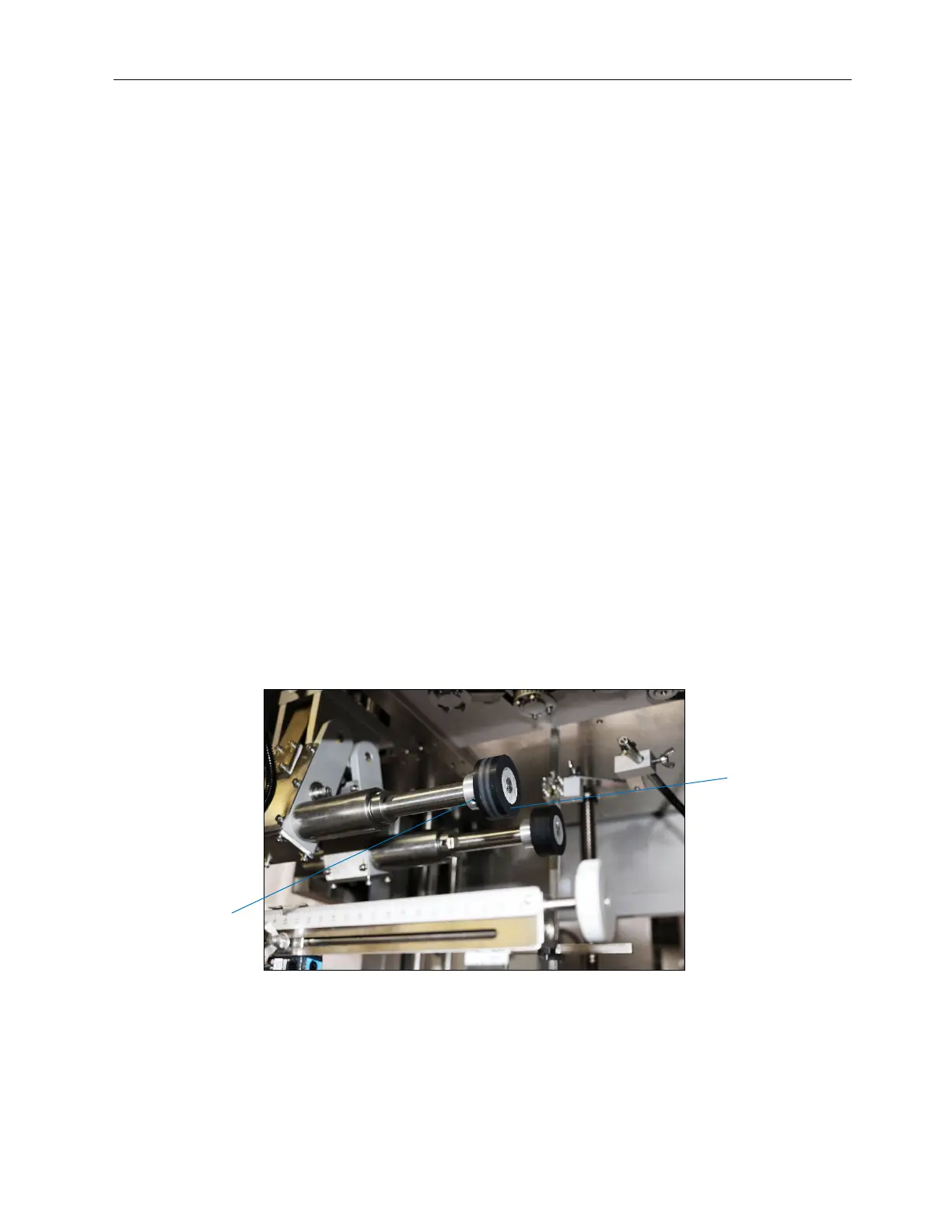
4. Each Applicator Wheel has two Set Screws at 90° to each other holding it in place. The
Set Screws are located on the Shaft just behind the Applicator Wheel. They may be on
the top, bottom, or side, depending on the rotation of the Wheel at the time.
a. Use the Allen Wrench to loosen the Set Screws.
b. Pop off the old Applicator Wheel.
a. Put a new Applicator Wheel in its place.
b. Tighten the Set Screws with the Allen Wrench to secure the new Applicator Wheel in
position.
Applicator
Wheel
Hole for
Set Screw



 To Next Page