96 Software
4510001 REV B – 220620
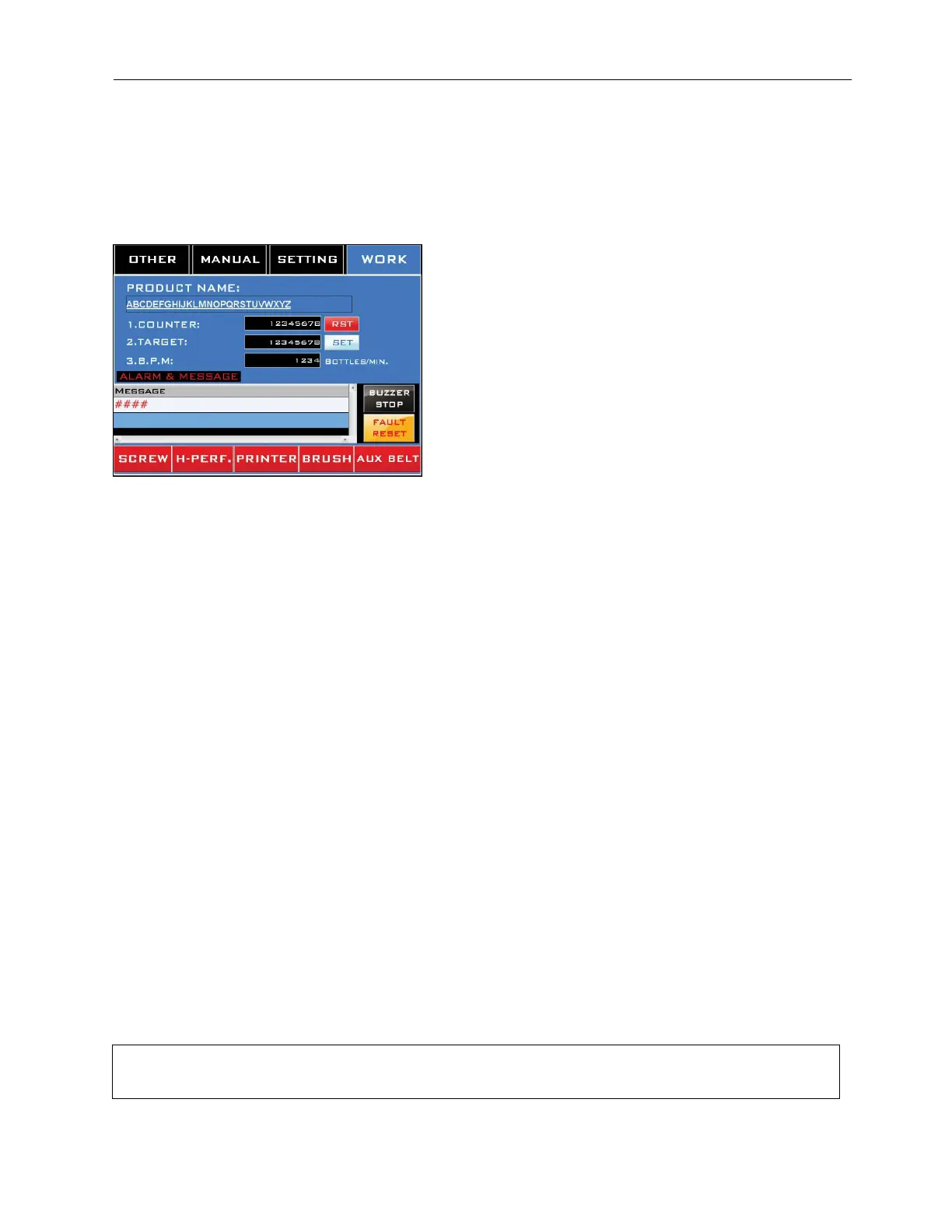
Work Screen
Accessed by pressing the “Work” Tab at the top.
This is the screen that will be in use most often during labeling. It controls the most basic
aspects of labeling and provides real-time feedback.
“Product Name” Field:
Displays the recipe currently being used for labeling.
“Counter” Field:
Displays the number of bottles that have been labeled during the current run. Press the
“Rst” Button to reset the number to “0.”
“Target” Field:
Sets the desired number of bottles to be labeled during the current run. Touching this field
displays the Product Target Setting Screen. Select “Set” to accept the value in the field.
“BPM” Field:
Displays real-time information on the rate at which bottles are being labeled (in bottles per
minute).
“Alarm & Message” Field:
Displays current information on any faults that have occurred.
“Buzzer Stop” Button:
Turns off the Buzzer.
“Fault Reset” Button:
Resets the fault/alarm to be able to be triggered again. This button does not resolve the
problem that led to the alarm being triggered.
The red buttons along the bottom enable – but do not necessarily turn on – the peripherals for
the system.
NOTE: It is possible that one or more of these buttons may have been reassigned to enable a
different peripheral at the factory or during installation, at the request of the purchaser. Some



 To Next Page