Software 83
4510001 REV B - 220620
Knife Offset Screen
Accessed from the Other Screen.
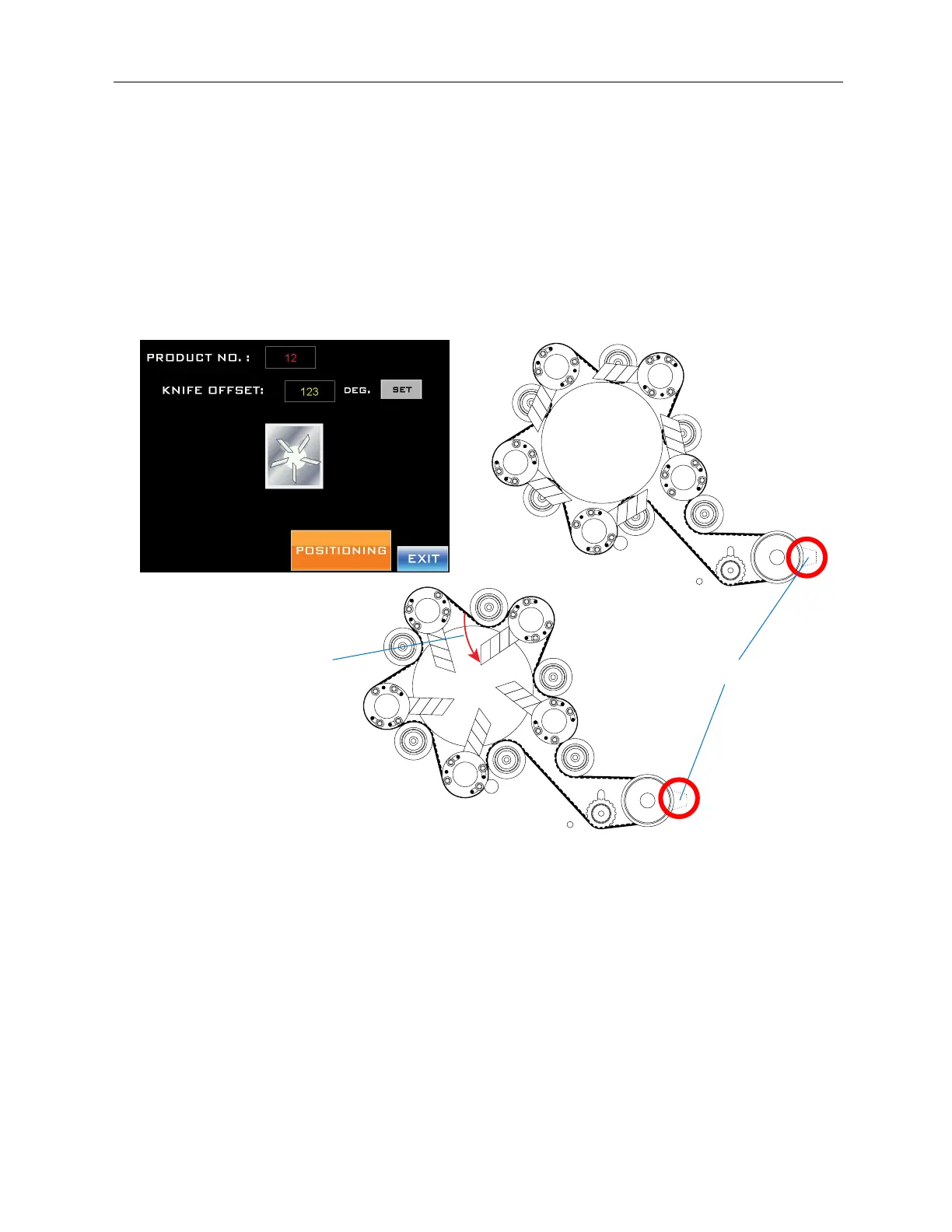
This Screen relates to the Cutter Blades, enabling the user to input an offset angle relative
to the Cutter Home Tab.
When the Cutter Blades are in the home position, they are at a certain angle in relation to
the Cutter Home Tab, which always must be directly beneath the Cutter Home Position
Sensor. If the Cutter Blades have just been replaced, they may not be aligned at the same
angle to the Cutter Home Tab. The Knife Offset Screen allows this to be corrected.
“Knife Offset” Field:
Enters an angle to recalibrate the home position for the blades relative to the Cutter
Home Tab. In the example above, Position A (above) shows the Blades in their correct
home position relative to the Cutter Home Tab. In Position B, the Blades are 40° out of
alignment from their home position. By entering “40” in the Knife Offset Field, pressing
the “Set” Button, and pressing and holding the “Positioning” Button, the Cutter Blades
realign to their correct home position relative to the Cutter Home Tab (Position A).
“Set” Button:
Accepts the value entered into the “Knife Offset” Field.
“Positioning” Button:
Moves the Cutter Blades to the angle entered into the “Knife Offset” Field.
Cutter Home Tab
Position A
Position B
40°



 To Next Page