Software 91
4510001 REV B - 220620
Setting Screen (1)
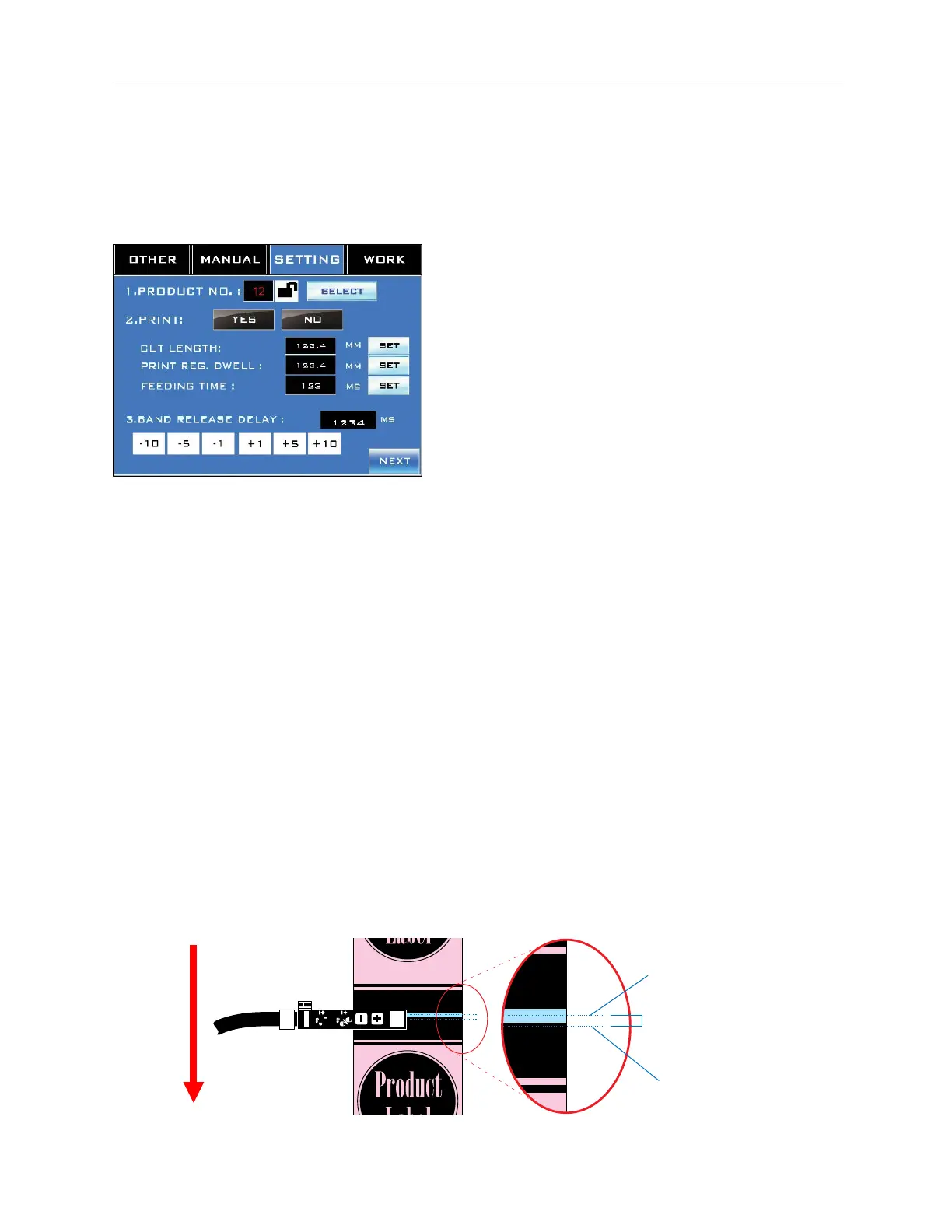
Accessed by pressing the “Setting” Tab at the top.
Setting Screen 1 is used to select a preset label “recipe” and make adjustments to how the
labels are cut and applied.
“Product No.” Field:
Displays the currently selected preset label recipe. The “Lock” Button can be used to
prevent this preset from being changed.
“Select” Button:
Accesses the Product Number Screen to select a preset label recipe or create a new one.
Print:
Yes: Cuts are triggered by the transparent “cut areas” in the label design, as seen by the
Print-Reading Sensor.
No: Cuts are triggered each time the label film has advanced a specified distance.
“Cut Length” Field:
Sets the length of a label. A value must be entered in this field regardless of which kind of
cut trigger was selected in “Print.” “Cut Length” tells the LX-150 how long to expect a label to
be. Select “Set” to accept the value.
“Print Reg. Dwell” Field:
This field is for use when “Print” is set to “Yes.” It adjusts the cut position on the label film
without having to physically move the Print Reading Sensor. It can be used to make upward
adjustments to the cut position. Enter the distance in mm between the actual cut and the
desired cut location. Select “Set” to accept the value.
Actual Cut
Center of Cut Area
(Desired Cut Location)
Print Reg Dwell
Label Film Direction
on Mandrel



 To Next Page