MM-400A
8. Operation Screens
8-34
Data array (actual data column)
Delete “TIME” at the beginning and each item name, and input sampled
interval time in column A and WAVEFORM 1 or 2 data in column B. Do not
input anything in other columns.
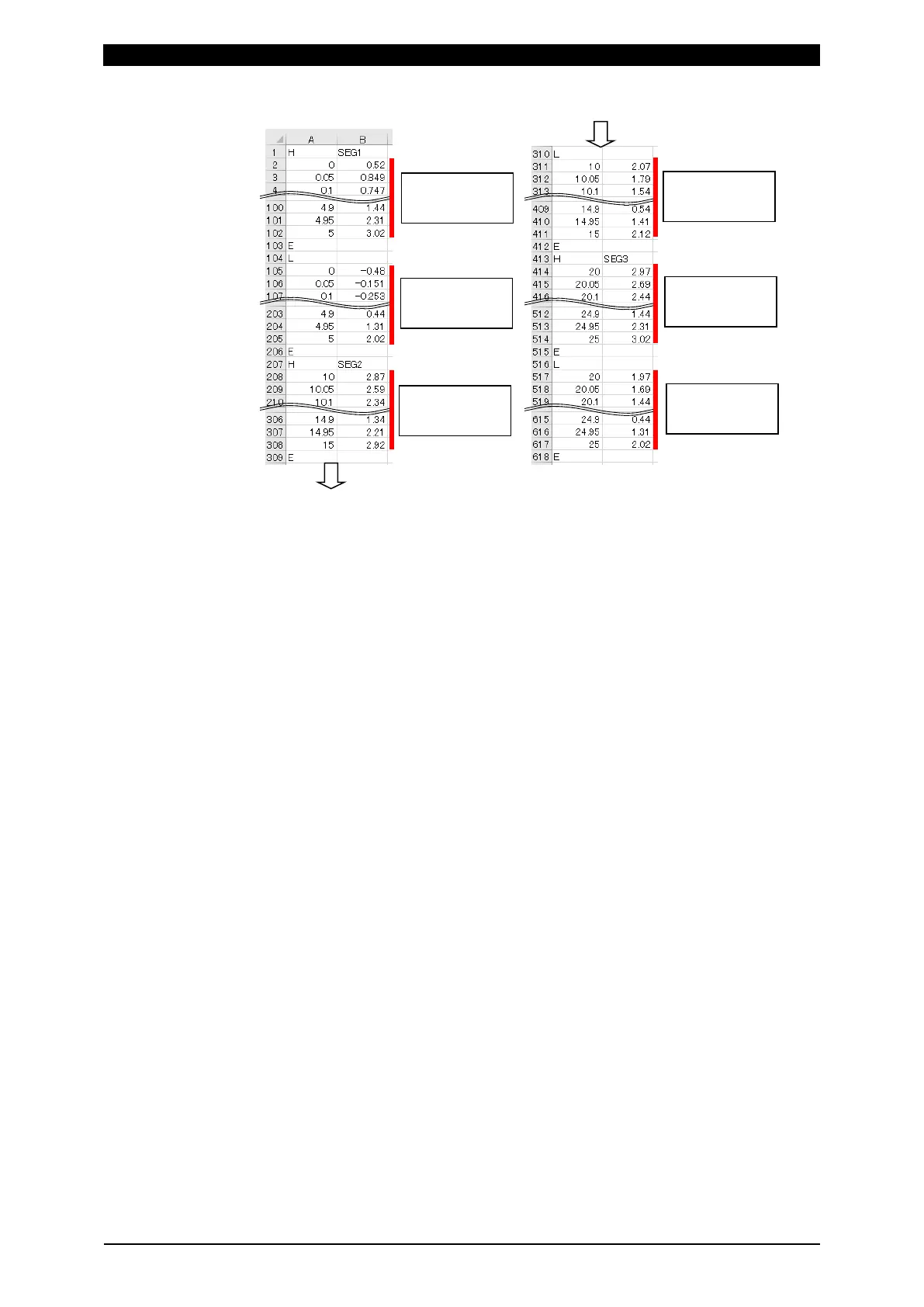
• Insert the upper limit threshold waveform between "H-E", and the lower limit
threshold waveform between "L-E." Input "H" at the beginning of upper limit
of SEGMENT, "E" at the end of upper limit, "L" at the beginning of lower limit,
and "E" at the end of lower limit. (Do not delete characters "H", "L", "E",
"SEG1", "SEG2", and "SEG3.")
• Make the time interval the same as ENVELOPE INTERVAL in the
ENVELOPE (3) screen.
• Create the envelope data in the order of the upper limit of SEGMENT#1, the
lower limit of SEGMENT#1, the upper limit of SEGMENT#2, the lower limit of
SEGMENT#2, the upper limit of SEGMENT#3, the lower limit of
SEGMENT#3.
• Set both upper limit value and lower limit value for SEGMENT.
• For unused SEGMENT, input "H" and "E" for upper limit, and "L" and "E" for
lower limit.
• Make sure that the number of data does not exceed 5000 in upper limit and
lower limit in each SEGMENT, respectively.
Name of folder and CSV file in the USB
Create a folder named ¥env_set in the USB to save data.
The name of CSV file saved in the folder is as shown below. Upper/lower limit
threshold data of WAVEFORM 1 and 2 becomes ENVELOPE# 1 and 2,
respectively.
Saved filename: Env01_1_C.csv
a
 ̄
b
 ̄
c
 ̄
a: Schedule number (01 to 20)
b: ENVELOPE# (1 to 2)
c: Waveform type (C: CURRENT, V: VOLTAGE, P: POWER, R: RESIST, D:
DISPLACEMENT, F: FORCE, and E: EXTERNAL)
• For schedule number, use two-digit 01 to 20 for filename.
upper limit
lower limit
upper limit
lower limit
upper limit
lower limit



 To Next Page