About this product
AVENTICS | Marex 3D | R417003094–BDL–001–AA 33
English
4.3.2.2 Display
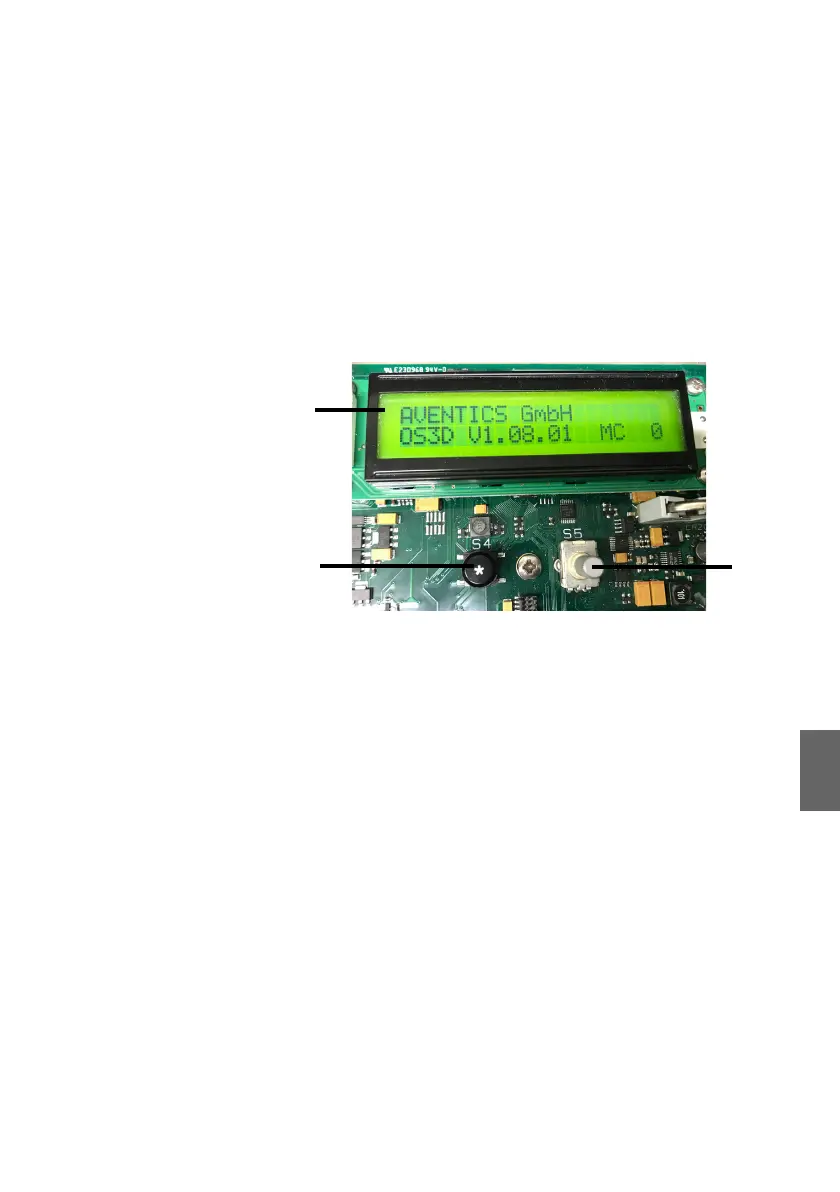
The 3D Controller provides a display which is mounted on the
electronic board. To access the display and its operation
elements the cover of the 3D Controller must be removed. The
display consists of
W 2 lines of 20 characters each
W the ESCAPE-button (on the left below the display)
W the SELECT-button (on the right below the display).
Fig. 5: 3D Controller, normal display and buttons
The display provides the following submenus:
W main display
W error display
W clock
W info hardware
W system parameter
W ESC
In this manual, the settings and parameters which are relevant
for commissioning, operating and troubleshooting Marex 3D are
explained in the corresponding chapters.
O Refer to the manual Marex OS II/III, Devices and
Adjustments, for further information on the display menues
and parameters. See also chapter 1.2, Required and
additional documentation, on page 6.
1 Display with 2 x 20 characters
2 Escape button (S4)
3 SELECT button (S5)
3D_manual_R417003094_DE_EN.book Seite 33 Freitag, 30. November 2018 11:36 11



 To Next Page