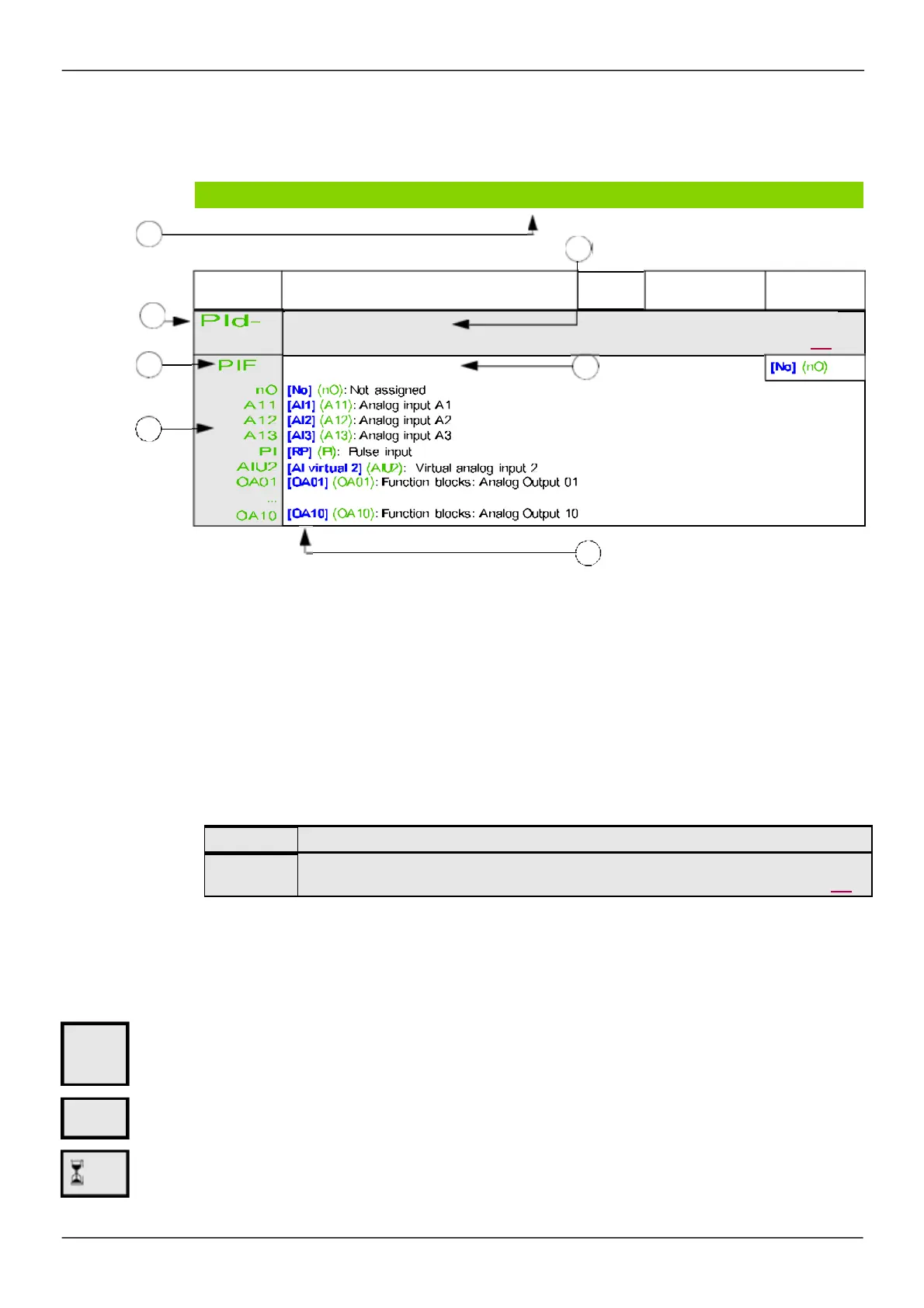
Structure of the parameter tables
The param eter tables contained in the descriptions of the various m enus are organized as follows .
Exam ple:
1 .
Way to access the parameters described in this page
5
. Name of submenu on graphic display terminal
2 .
Submenu code on 4-digit 7-segment display
6
. Name of parameter on graphic display terminal
3 .
Parameter code on 4-digit 7-segment display
7
. Value of parameter on graphic display terminal
4 .
Parameter value on 4-digit 7-segment display
Note:
The text in s quare brackets
[ ]
indicates what you will s ee on the graphic dis play term inal.
A m enu followed by the m ention "
(continued)
" appears s om etimes to locate you in the structure.
Exam ple:
In this cas e, the m ention "
(continued)
" indicates that the
[APPLICATION FUNCT.]
subm enu is above the
[PID REGULATOR]
subm enu in the s tructure.
A param eter can contain som e pictogram s. Each pictogram has its legend at the end of the table.
Main m ictogram s:
These parameters only appear if the corresponding function has been selected in another menu. When the parameters can
also be accessed and adjusted from w ithin the configuration menu for the corresponding function, their description is detailed
in these menus, on the pages indicated, to aid programming.
Parameter that can be modified during operation or w hen stopped.
To change the assignment of this parameter, press the ENT key for 2 s.
Parameters described in this page can be accessed by:
DRI- > CONF > FULL > FUN-
Code Name / Description Adjustment range
Factory setting
4
...
2 s
*
Note
: This function cannot be used w ith certain other functions. Follow the instructions on page 162.



 To Next Page