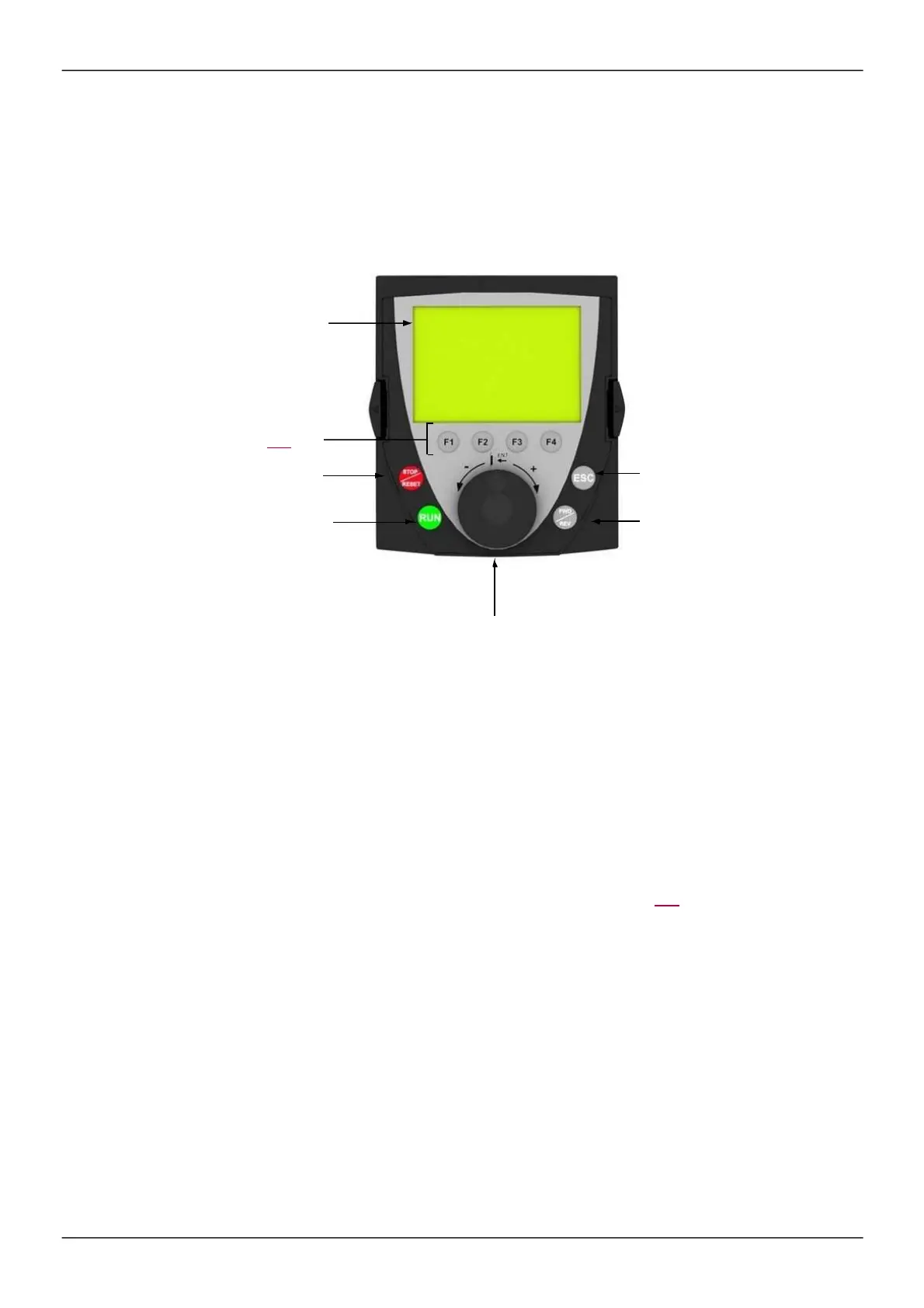
Graphic display terminal option
Description of the graphic display terminal
With the graphic dis play term inal, which works with FLASH V1.1IE26 or higher, it is pos sible to dis play m ore
detailed inform ation than can be shown on the integrated dis play term inal.
1
Graphic display
2
Function keys
F1, F2, F3, F4,
see page
157
3
STOP/RESET
key
4
RUN key
7
ESC key: Aborts a value, a
param eter or a m enu to return to
the previous s election
6
Key for revers ing the direction
of rotation of the m otor
5
Jog dial:
•
Press (ENT):
- To save the current value
- To enter the selected m enu or param eter
•
Turn +/-:
- To increm ent or decrem ent a value
- To go to the next or previous line
- To increas e or decreas e the reference if control via the graphic
dis play term inal is activated
Note
: Keys
3
,
4
,
5
and
6
can be us ed to control the drive directly, if control via the graphic dis play term inal is
activated.
To activate the keys on the rem ote dis play term inal, you first have to configure
[Ref.1 channel]
(Fr1)
=
[HMI]
(LCC). For m ore inform ation, see page 154.



 To Next Page