Configuration Mode (ConF)
JOG
Code Nam e / De s cription Adjustment range Factory s e tting
Note:
This function cannot be used w ith certain other functions. Follow the instructions on page 163.
JOG
[JOG]
[LI3]
(LI3)
nO
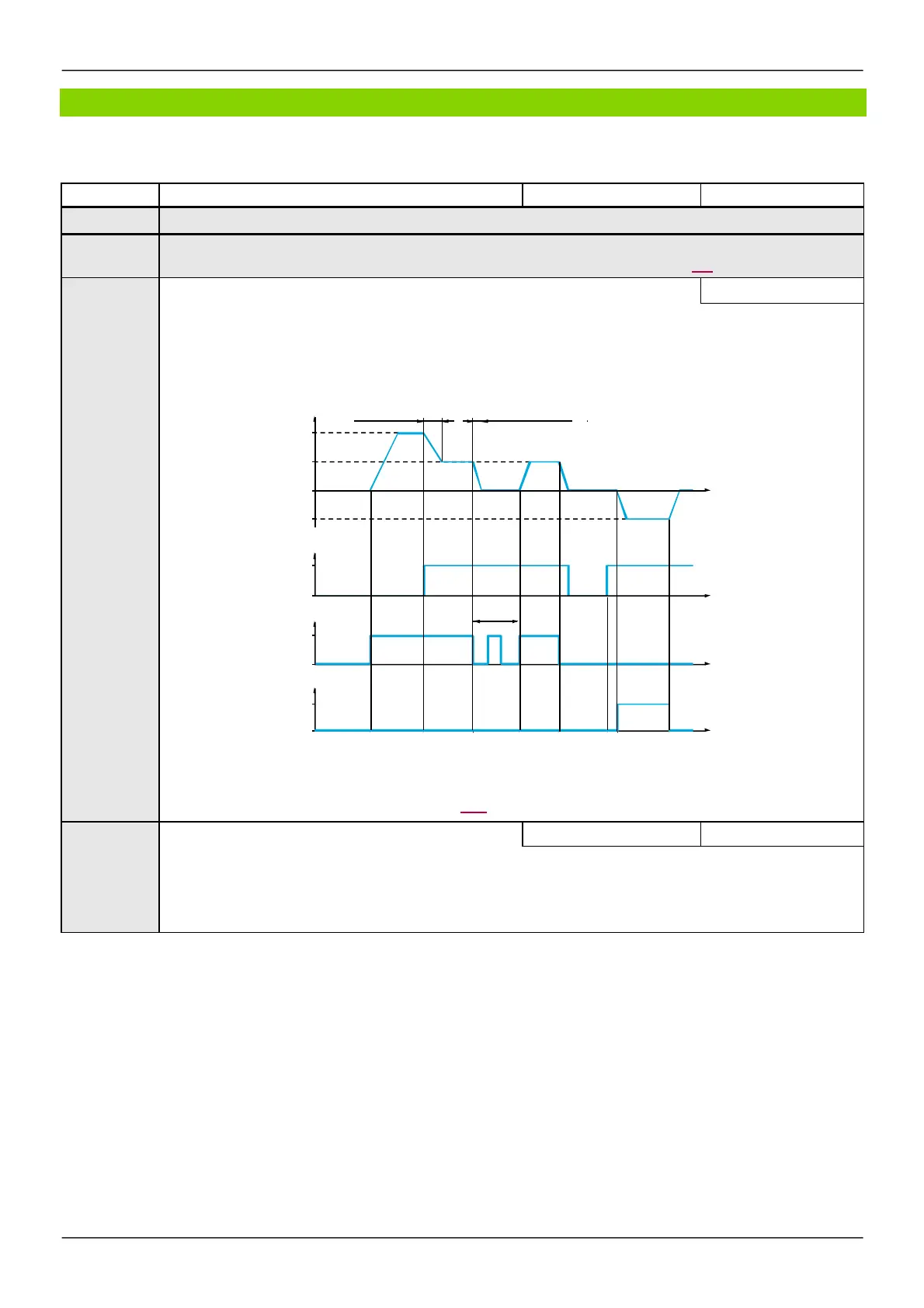
Pulse operation.
The JOG function is only active if the command channel and the reference channels are on the terminals.
The function is active w hen the assigned input or bit is at 1.
Example: 2-w ire control operation (tCC = 2C).
Motor Ramp Ramp
frequency DEC/DE2 forced to 0.1 s
Reference
JGF reference
0
JGF reference
LI (JOG)
1
0
JGt
Forw ard
1
0
Reverse
1
0
[No]
(nO): Not assigned
[LI1]
(LI1):
Logical input LI1
[...]
(...): See the assignment conditions on page 153 (not
[Cd00]
(Cd00) to
[Cd15]
(Cd15))
JGF
[Jog frequency]
0 to 10 Hz 10 Hz
Reference in jog operation.
This parameter can be accessed if
[JOG]
(JOG) is not set to
[No]
(nO).
(1)
Parameters described in this page can be accessed by:
DRI- > CONF > FULL > FUN- > JOG-



 To Next Page