6
Operation
54/108 CLS Pro 600 – Line and Contrast Sensor
6.5.3 Line Setup Mode
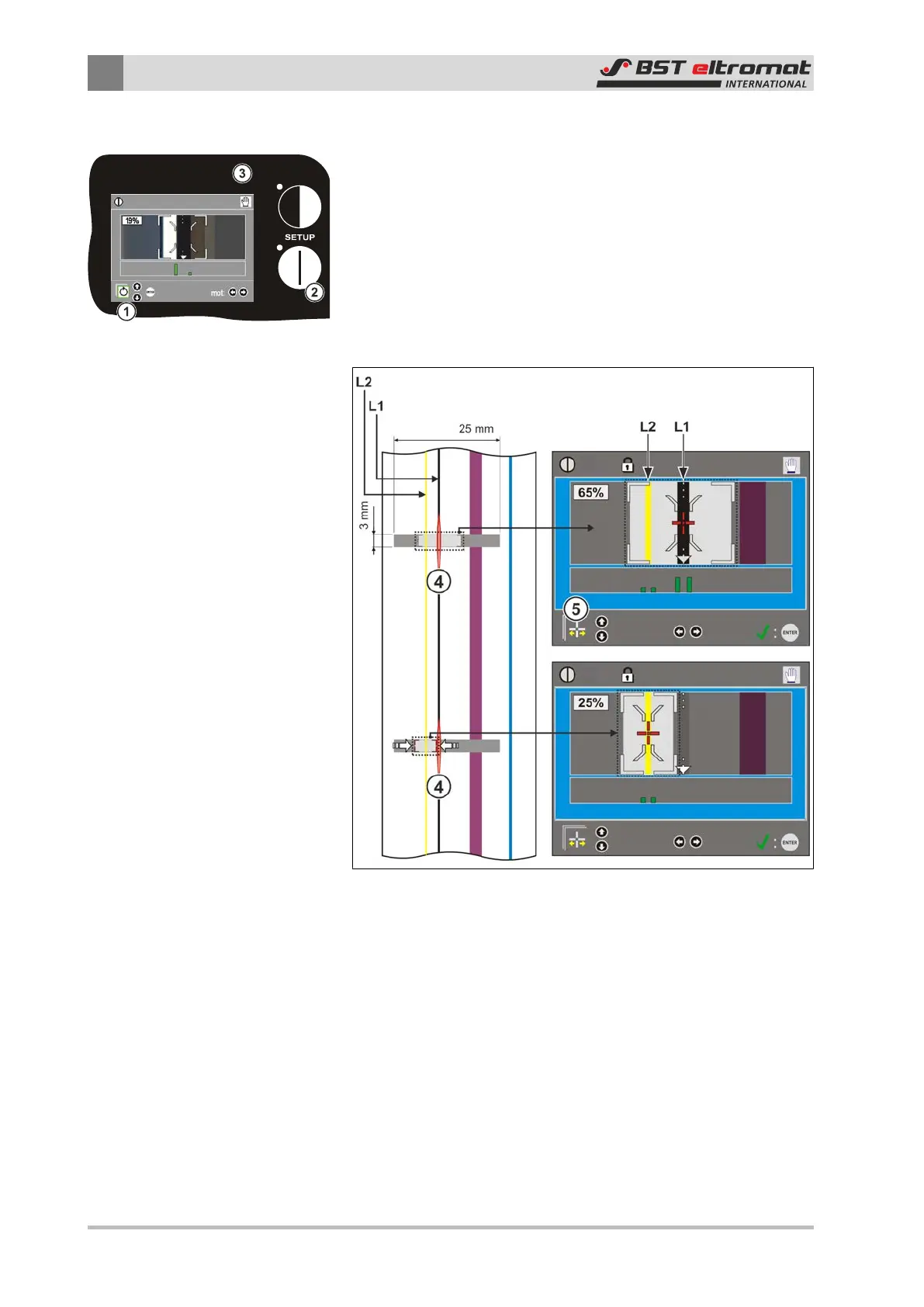
1. Use the arrow keys ① to select MAN mode.
2. The selected mode will be displayed with a green border
around it. Confirm the selection by pressing ENTER. The current
mode will be displayed in the top right of the screen ③.
3. Press LINE SETUP ②.
The LED inside the SETUP key will illuminate. The LED inside
the ENTER key will flash. The sensor light will be switched on
and it will flash. The laser is switched on and the laser line ④
will be visible simultaneously.
Fig.39: Line Setup Mode
4. Use the laser line ④ to position the camera on the required
line.
5. Use the mechanical adjustment device to fix it in position. The
line with the best contrast will be selected automatically by the
system. In this case it is line L1.
6. If the automatically pre-selected line is to be used for the con-
trolling, then no other settings have to be entered. Press the
ENTER button. The LEDs inside the ENTER and SETUP keys will
be extinguished. The display will change over from setup mode
to scanning mode.


 To Next Page