3 Setting the FlashN
182
Shutter sync.
Normally, set this to [1st curtain] so that the flash fires immediately
after the exposure starts.
If [2nd curtain] is set, the flash will fire right before the exposure
ends. When this is combined with a slow sync speed, you can create
a trail of light such as from car headlights at night. With 2nd-curtain
sync, a preflash is fired when you press the shutter button
completely. This is to determine the exposure. Then immediately
before the exposure ends, the real flash is fired. Therefore, two
flashes will be fired. However, with shutter speeds faster than 1/30
sec., 1st curtain sync will automatically take effect.
If an external Speedlite is attached, you can also set [Hi-speed]
(e). For details, see the Speedlite’s instruction manual.
Wireless flash
See “Wireless Flash Photography” on page 189.
Flash exposure compensation
See “y Flash Exposure Compensation” on page 104.
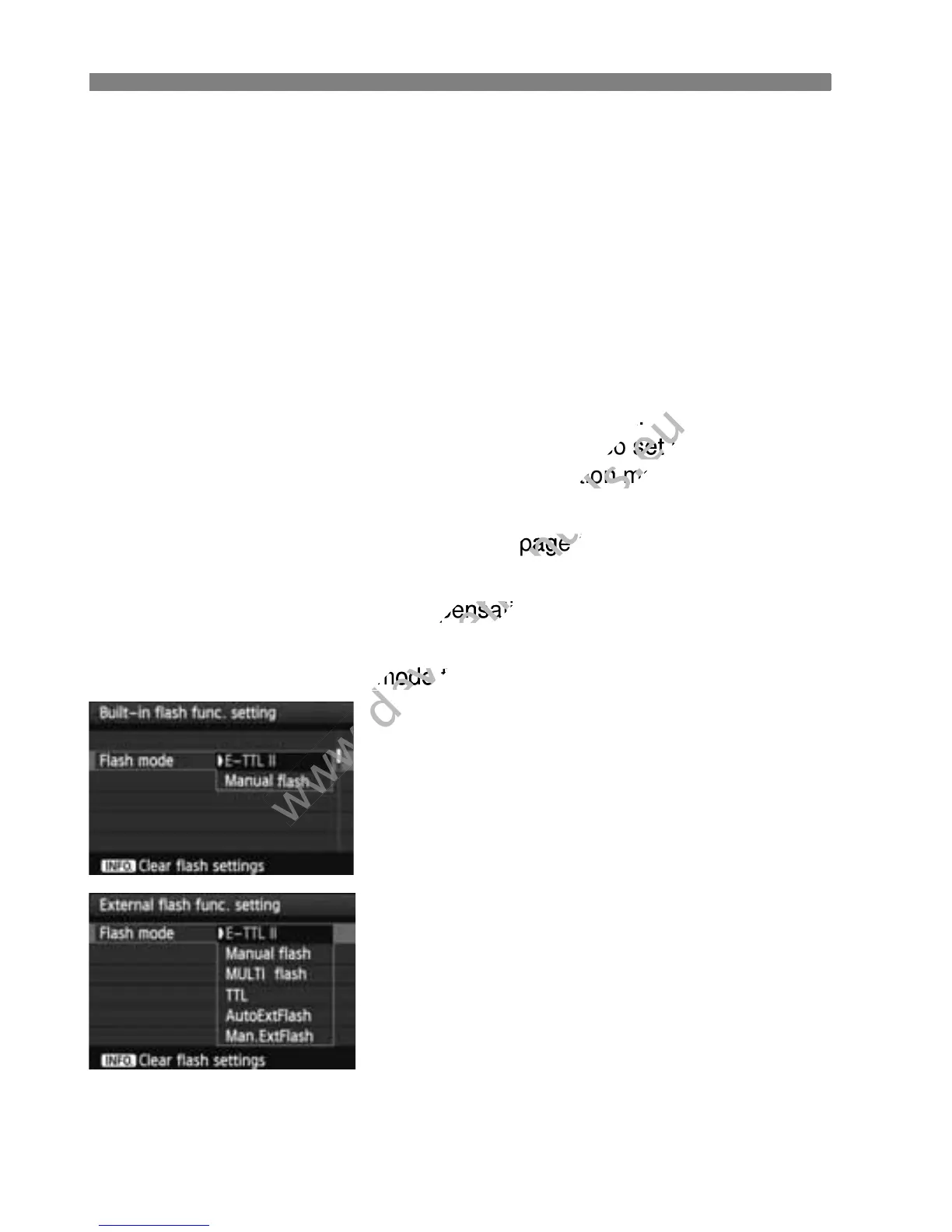
Flash mode
You can select the flash mode to suit your desired flash shooting.
[E-TTL II] is the standard mode of
EX-series Speedlites for automatic
flash shooting.
[Manual flash] is for advanced users
who want to set the [Flash output]
(1/1 to 1/128) themselves.
Regarding other flash modes, refer to
your Speedlite’s instruction manual.



 To Next Page