IMPORTANT
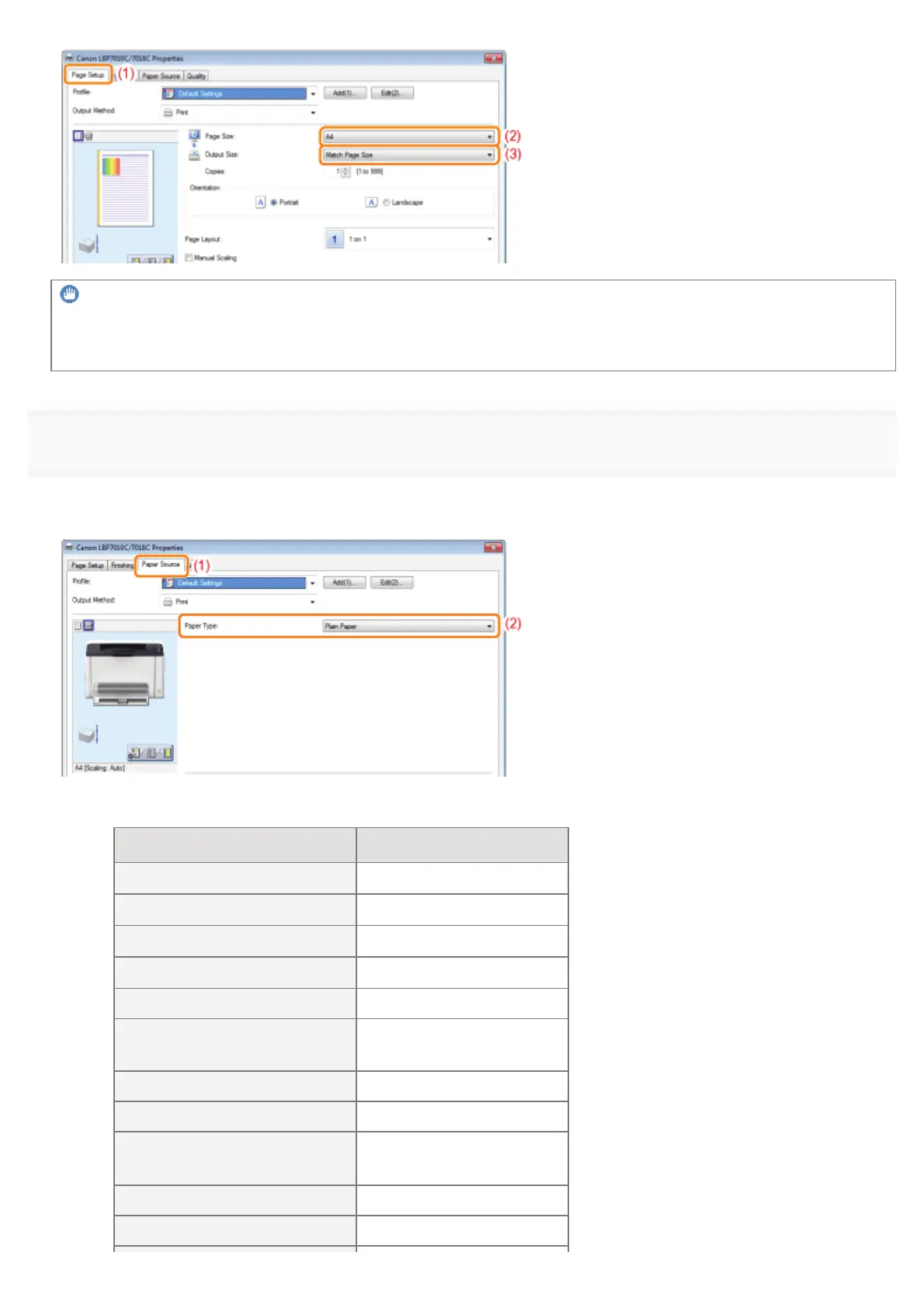
If the [Page Size] setting and [Output Size] setting are different
The print is automatically reduced or enlarged to fit on the page.
7
Specify the setting for [Paper Type].
(1) Display the [Paper Source] sheet.
(2)
Select the type of the paper loaded in the paper source.
*
*
Specify the setting according to the paper type as follows.
Paper Type Setting for [Paper Type]
Plain paper (64 to 82 g/m²)
[Plain Paper]
*1 *2
(Default)
Plain paper (60 to 69 g/m²)
[Plain Paper L]
*1
Plain paper (76 to 100 g/m²)
[Plain Paper H]
*2 *3
Heavy paper (92 to 130 g/m²)
[Heavy Paper 1]
*3
Heavy paper (131 to 163 g/m²) [Heavy Paper 2]
Transparency
(black and white printing only)
[Transparency]
Label [Labels]
Index Card [Heavy Paper 2]
Envelope
[Envelope]
[Envelope H]
*4
Coated paper (100 to 130 g/m²) [Coated Paper 1]
Coated paper (155 to 165 g/m²) [Coated Paper 2]
㻝㻡㻞㻌㻛㻌㻟㻠㻟













 To Next Page