CHAPTER 2
Phone setup
• Phone battery installation, on page 39
• Battery contact damage prevention, on page 43
• Phone battery charging, on page 44
• Phone configuration, on page 46
Phone battery installation
You must read the information in the Product Safety and Security chapter of the User Guide, before you install
or charge the battery, or use the phone.
Before you can use your phone, you must install and charge the battery. The battery may already be installed
in your phone, or you may have to install it yourself.
To maximize the battery storage capacity and lifespan, fully charge the battery before you turn on and set up
the phone.
Related Topics
Product Safety and Security, on page 135
Install the battery
Don't install the battery in a dusty or wet environment.
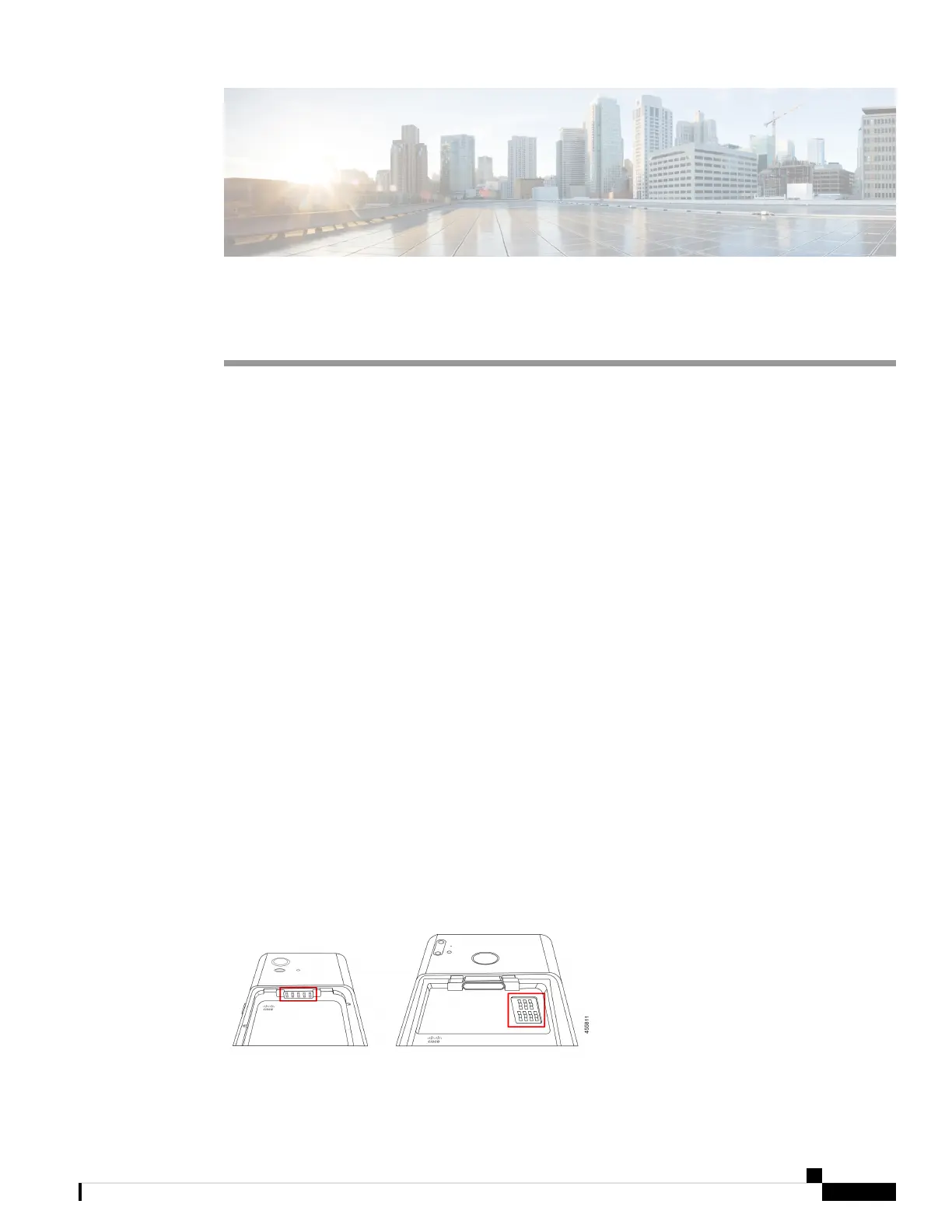
The steps to install the battery are the same for both the Cisco Wireless Phone 840 and Cisco Wireless Phone
860. However, the battery contacts are in different locations on these models, as shown in the following
illustration. The illustrations in the steps are of the Cisco Wireless Phone 860.
Figure 8: Battery contact location on the Cisco Wireless Phone 840 and Cisco Wireless Phone 860
Cisco Wireless Phone 840 and 860 User Guide
39



 To Next Page