154 Gateway and Gateway 4 Manual v1.2
© Tieline Research Pty. Ltd. 2021
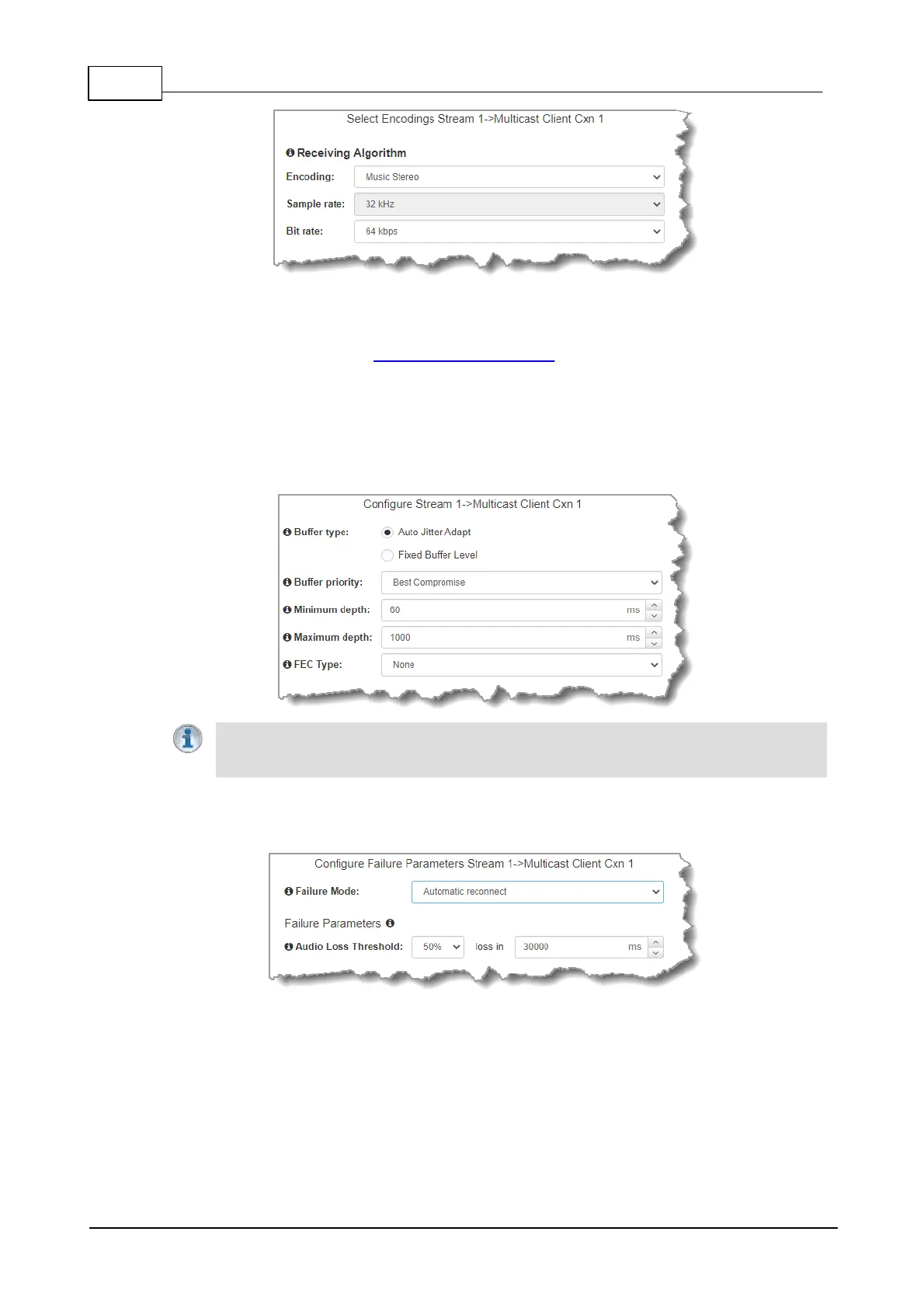
9. Click to configure:
· Auto Jitter Adapt and the preferred auto jitter setting using the drop-down arrow for Buffer
priority. It is also possible to configure the Minimum depth and Maximum depth of jitter
over the connection. See Configuring the Jitter Buffer for more details.
· Alternatively, select a Fixed Buffer Level and enter the Jitter Depth, which must be
between 12ms and 5000ms depending on the algorithm you select.
Next, select Return FEC Enabled to enable RFC2733 compliant Forward Error Correction, which is
available because multicast connections are sessionless. Follow the instructions in the right-hand
pane. When configuration is complete click Next.
Important Notes: Automatic or fixed jitter buffer settings can be adjusted on individual
client codecs as required. There is no jitter buffer setting on the server codec because it
never receives audio packets.
10. Click the Failure Mode drop-down arrow to select Automatic reconnect if required, then click
Next.
11. After configuring these settings there are 2 options:
i. Click Next to configure Rules and/or Output Audio Source options.
ii. Click Save to save the program.



 To Next Page