153
© Tieline Research Pty. Ltd. 2021
Gateway and Gateway 4 Manual v1.2
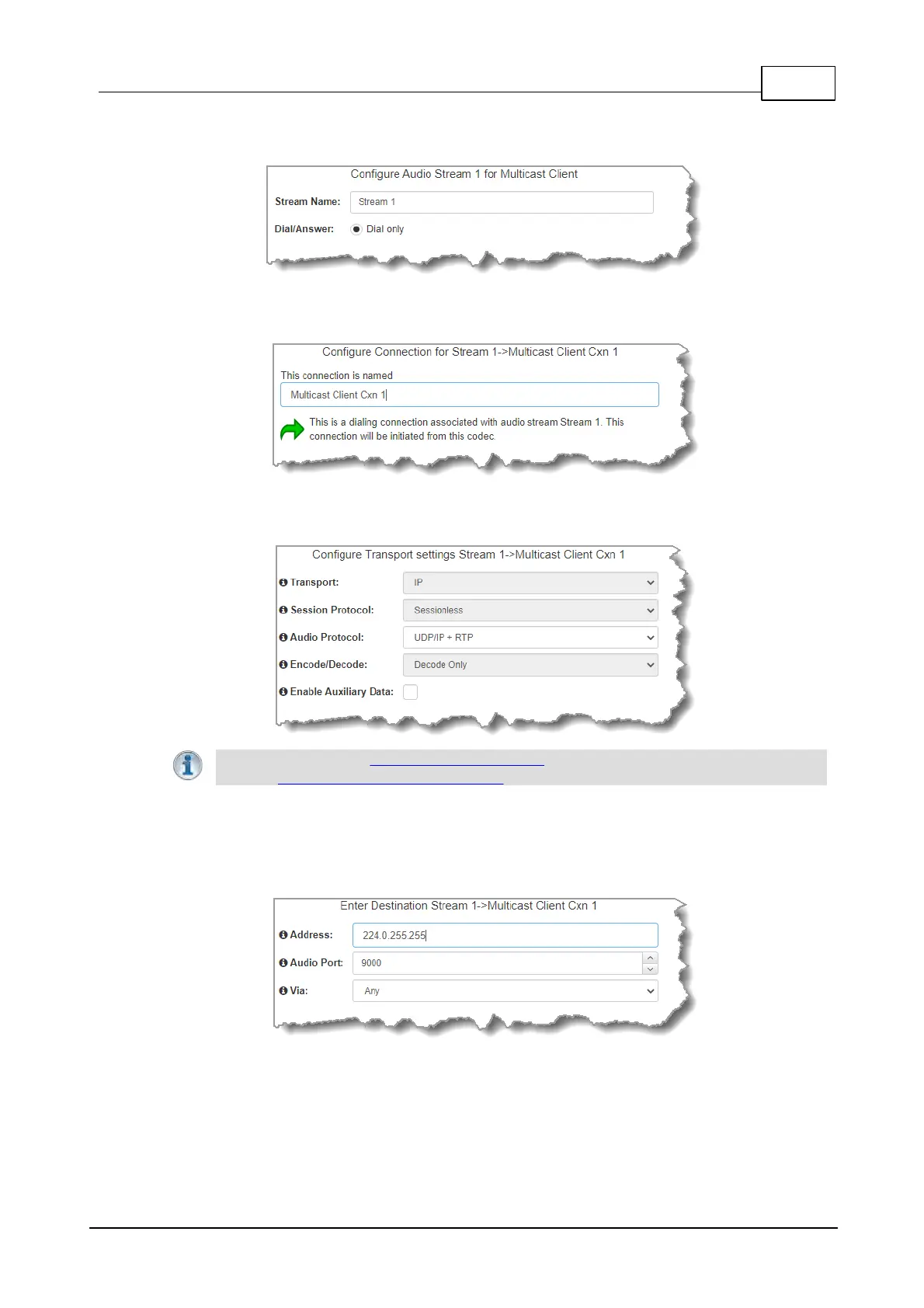
4. Enter the Stream Name, then click Next.
5. This audio stream connection in the wizard will allow the codec to dial. Enter the name of the
connection in the text box, then click Next.
6. Configure the transport settings for the connection, then click Next. Note: select UDP/IP +RTP
for RFC compliant streaming.
Important Note: See RS232 Data Configuration for detailed information on RS232 data
and see Enabling Relays and RS232 Data for more information on relay operations.
7. Configure the multicast IP address and Local Audio Port (the same multicast address and port
must be used for both the server and client programs), then specify which IP streaming interface
is used to dial this connection, e.g. Primary (port LAN1) or Secondary (port LAN2), then click
Next. Note: By default Any will select LAN1 if it is available and LAN2 if it is unavailable.
8. Click the drop-down arrows on the right-hand side of each text box to select the Encoding,
Sample rate, Bit rate or Sample size options. Click Next to continue.



 To Next Page