270 Gateway and Gateway 4 Manual v1.2
© Tieline Research Pty. Ltd. 2021
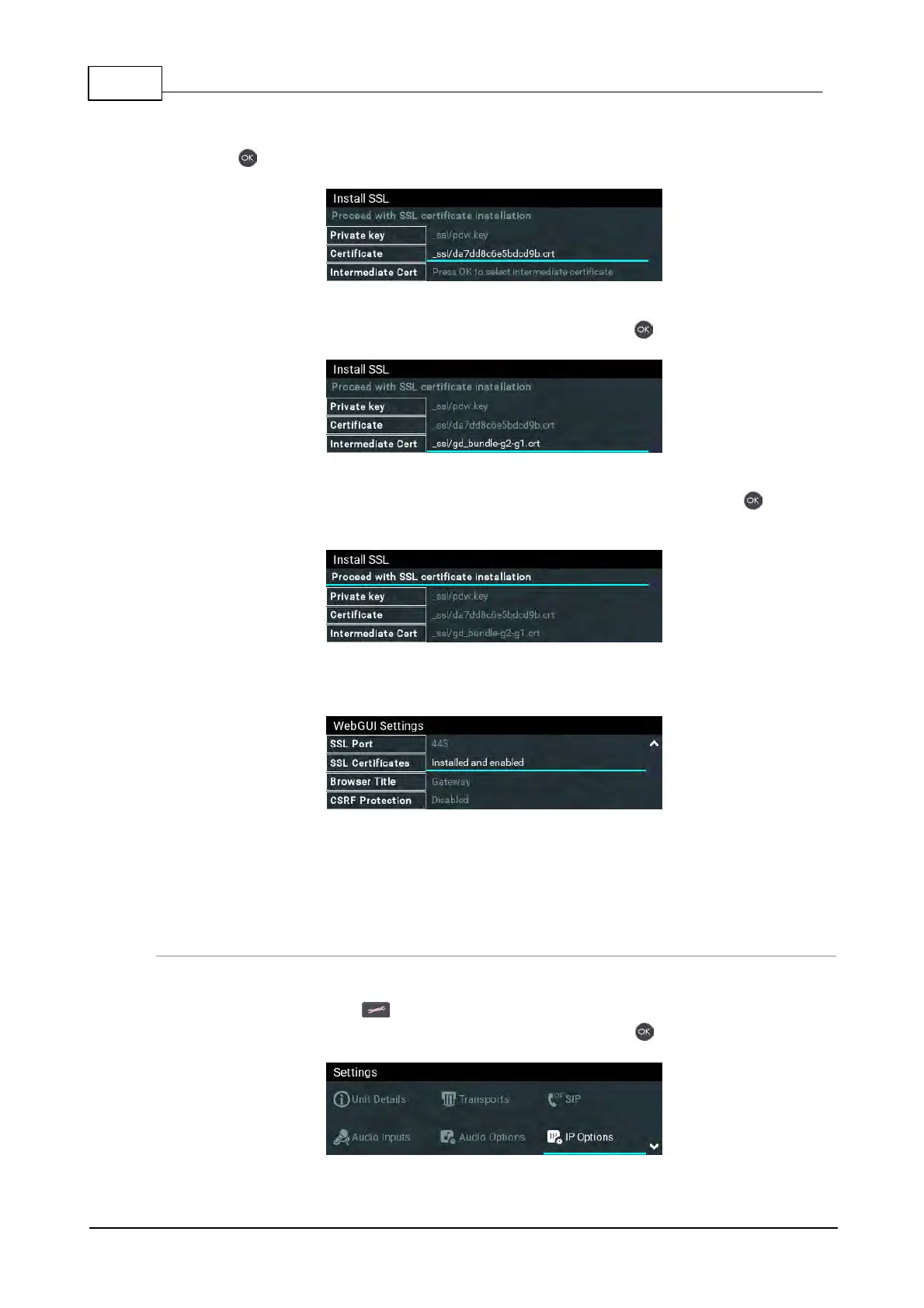
7. Select Certificate and navigate to the SSL Certificate (.crt) file on the SD card and press
the button.
8. If an Intermediate Certificate has been supplied, select Intermediate and navigate to the
Intermediate Certificate (.crt) file on the SD card and press the button.
9. After adding the private key, SSL certificate, and intermediate certificate (if supplied),
navigate up to Proceed with SSL certificate installation and press the button to
install the files.
10. The SSL Certificates menu should confirm the files are successfully Installed and
enabled.
11. To access a codec via the HTML5 Toolbox Web-GUI in a browser after installing SSL
security certificates ensure you type "https://" before the codec IP address. For example,
https://172.16.0.100.
Disable or Remove SSL Security Certificates
To disable or remove installed SSL security certificates from a codec:
1. Press the SETTINGS button.
2. Use the navigation buttons to select IP Options and press the button.



 To Next Page