56 Gateway and Gateway 4 Manual v1.2
© Tieline Research Pty. Ltd. 2021
After completing account configuration, press the Return button to exit the account
configuration menu. Then select the account and press the button to enable the SIP account
and register it with the SIP server.
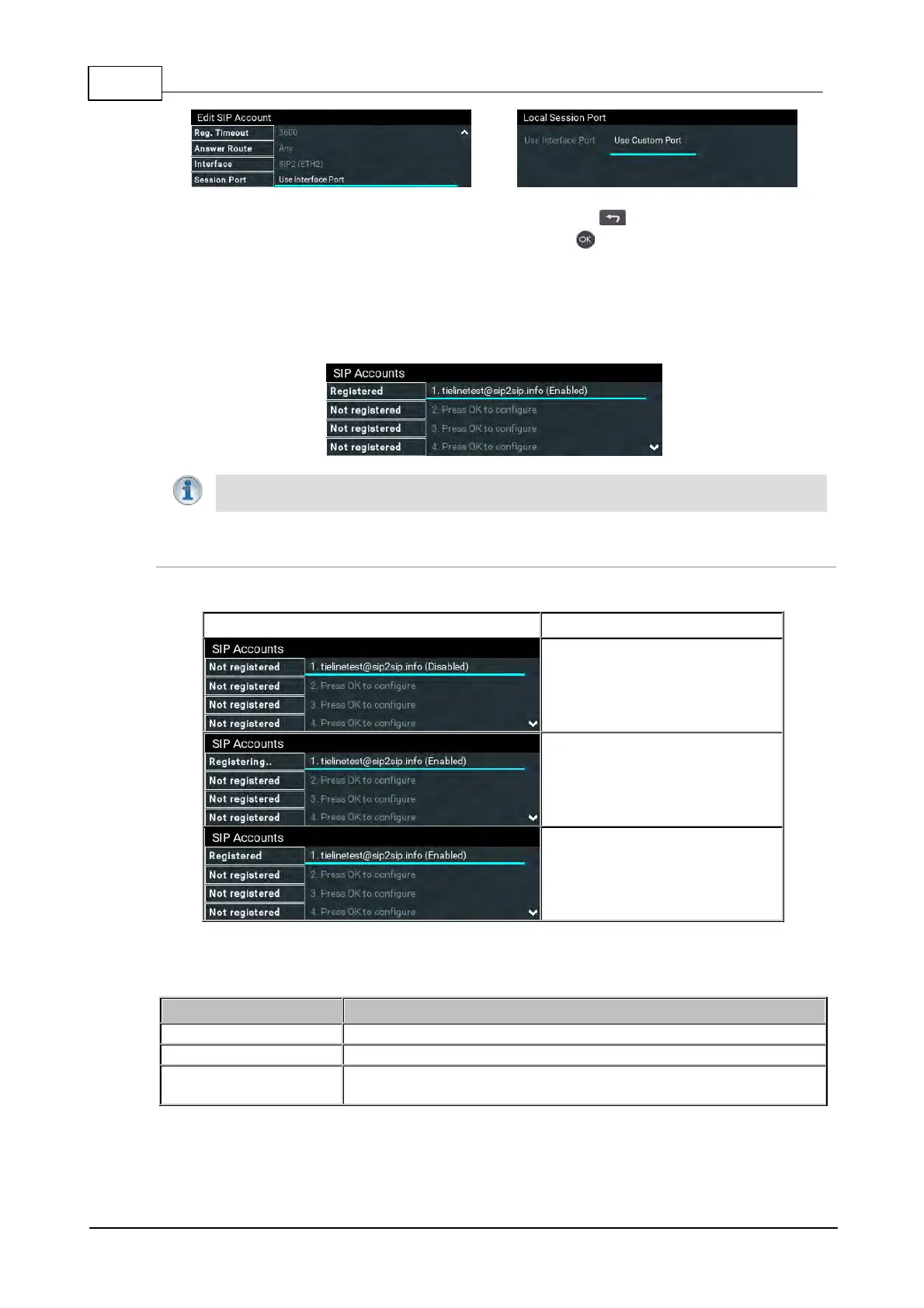
9. To confirm the account has been registered successfully, verify the SIP LED on the front
panel of the codec is illuminated solid orange. Alternatively, verify the account has a
Registered next to it in the SIP Accounts menu.
Important Note: Once enabled, the SIP account can be used when creating a new SIP
connection. Configure this menu setting via Connect > IP > SIP > Setup > Account.
Confirming Account Registration
Three SIP account registration status indications may be displayed.
Not registered is displayed
before an account is registered.
Registering is displayed when
account registration is being
attempted.
Registered is displayed when an
account is registered to a SIP
server.
The SIP LED on the front panel of the codec also displays the following SIP account registration
states:
Indicates an account is not yet registered.
Codec is in the process of registering to an active SIP server account.
Solid Orange Illumination
The codec has been successfully registered to an active SIP
account.



 To Next Page