69
© Tieline Research Pty. Ltd. 2021
Gateway and Gateway 4 Manual v1.2
Connect Panels: Load & Connect Programs & Manage Audio Streams
Connections Panel
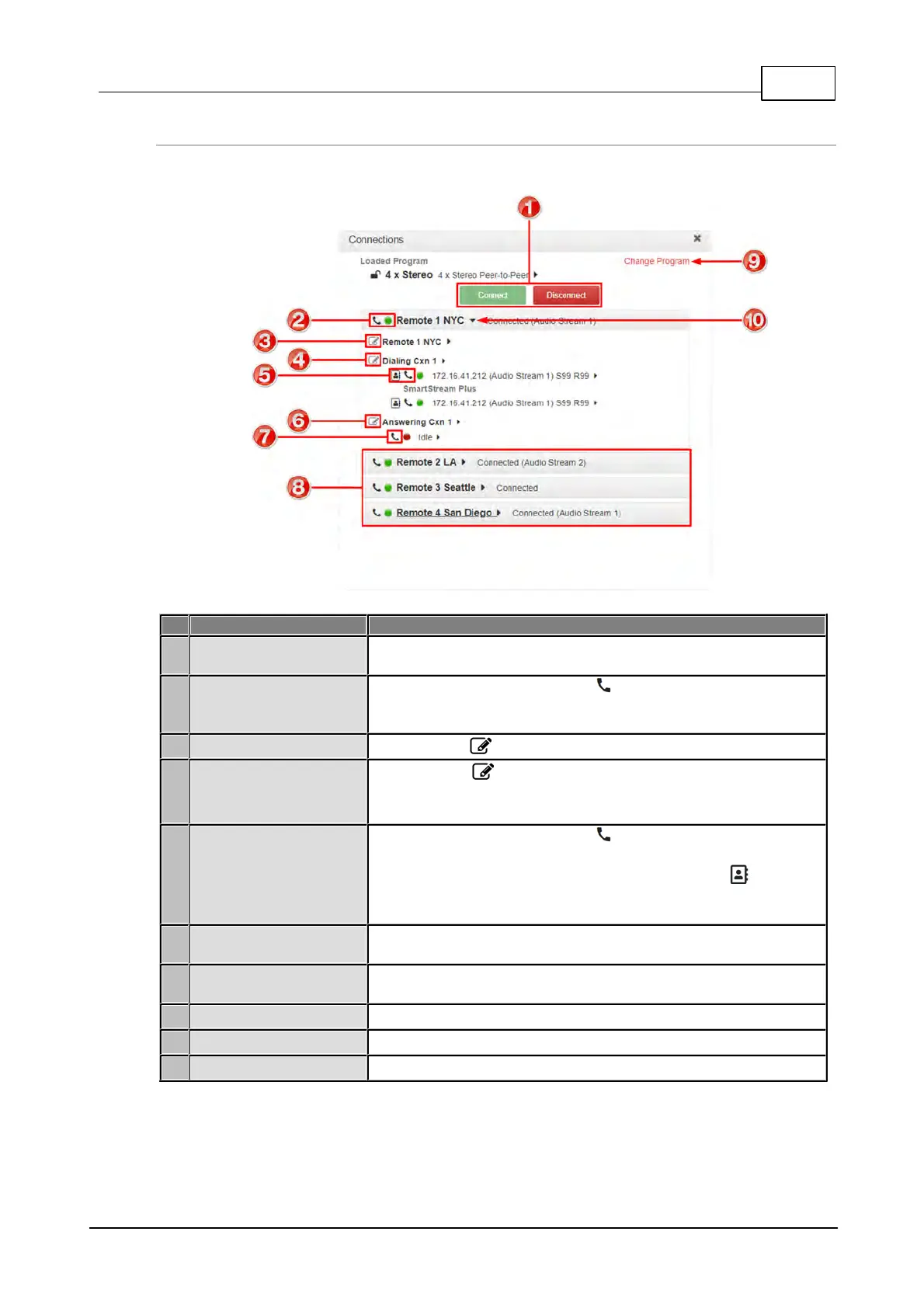
Program Connect /
Disconnect buttons
Click to connect or disconnect all audio streams in a program.
Connect / Disconnect
button and Connection
State LED
Click the Connect/Disconnect button to connect/disconnect
all connections in an audio stream. The Connection State LED
displays status of an audio stream connection.
Click the Edit button to edit audio stream settings.
Connection Edit button
(dialing connection)
Click the Edit symbol to edit audio stream settings, including
the IP address, or select a contact if a TieLink Traversal Server
contact list is configured.
TieLink Contact List
and Connection
Connect / Disconnect
button
Click the Connect/Disconnect button to connect/disconnect
an individual connection. Also adjust the connection bit-rate when
a connection is active. Click the Address Book button to
select a contact if a TieLink Traversal Server contact list is
configured.
Answering connection
Edit button
Click to edit answering connection settings
Answering Connection
Disconnect button
Click to disconnect an answering connection
Click to unload the current program and load a new program.
Click to show/hide audio stream and connection details.



 To Next Page