User Manual: WaveLinx Lite (4.0)
110
Sensor Operation
The daylight sensor response can be tested by placing the sensor into test mode. During test mode, the daylight fade rate is lowered to 10
seconds and the time delays for dim-to-off functionality is reduced.
82
The faster response allows the sensor operation to be quickly verified on
site. If left on, test mode will automatically time out after 10 minutes.
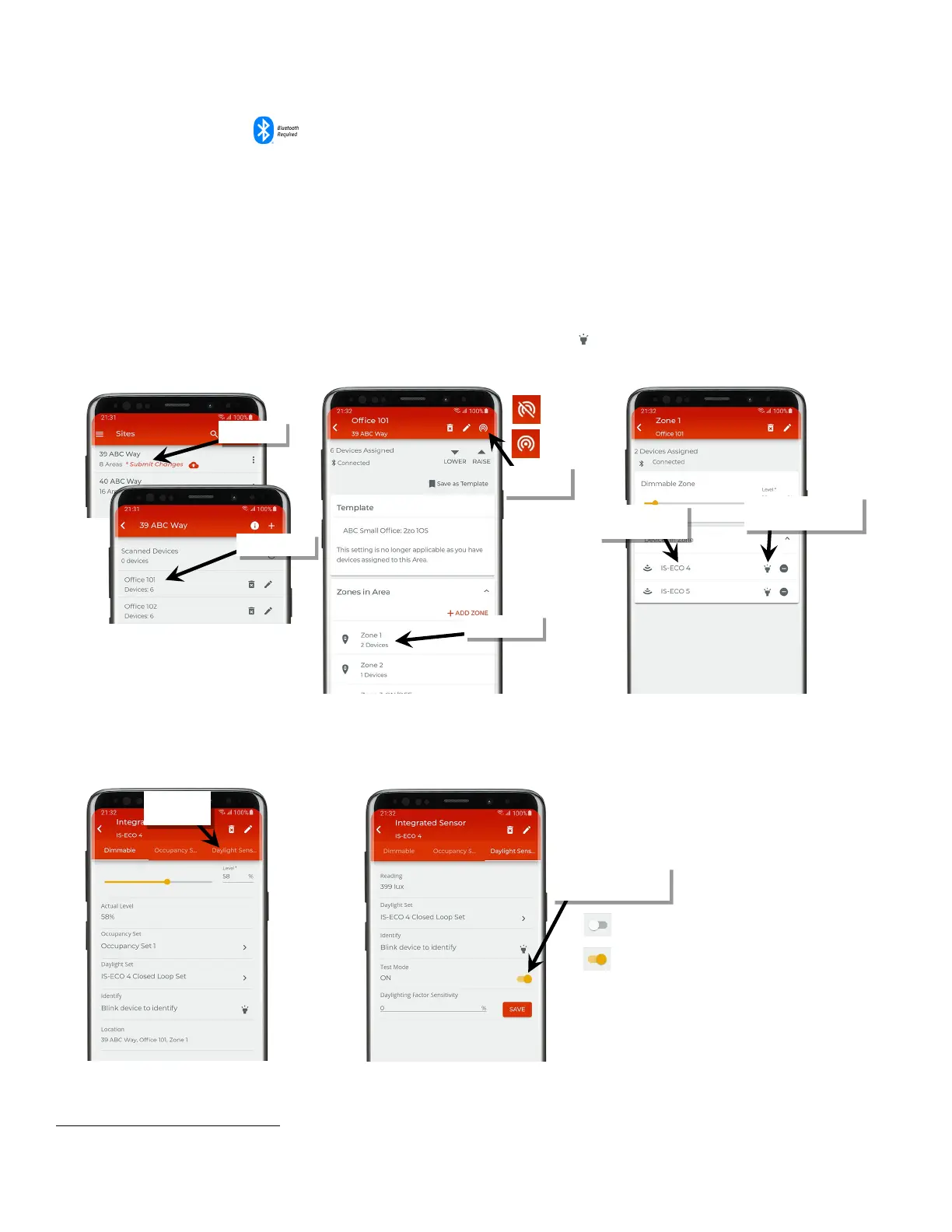
To use test mode:
1: Bring the mobile device within range (within 60 feet) of any line voltage powered provisioned WaveLinx Lite device in the desired area.
2: Ensure that the mobile device Bluetooth is turned on, and then open the WaveLinx Lite Mobile Application.
3: In the site list, select a site.
4: In the area list, select the desired area and verify that there is a network connection.
5: In the zone list, select the desired zone.
6: In the list of devices, locate the daylight sensor device. If needed, use the identify icon ‘ ‘ to flash the loads until the correct one is found,
and then tap the device to open the device details.
7: Tap ‘Daylight Sensor’ at the top of the device details pages to open to the daylight sensor view.
8: Slide the switch next to ‘Test Mode’ to the ON position and proceed to test the sensor. Once testing is complete, slide the switch to OFF or
allow test mode to automatically time out after 10 minutes.
82
If the device allows dim-to-off, when the measured light level exceeds 150% of the calibrated light level for more than 30 seconds, the sensor will turn lighting OFF. Lighting
will be turned back ON when one of the two conditions occurs. Condition 1: The measured light level falls between 100% and 50% of the calibrated light level for more than
20 seconds. Condition 2: The measured light level falls below 50% of the calibrated light level for longer than 5 seconds
If needed, use ‘identify’ to
locate the correct device
Verify network
connection
the device details
Sensor’
Slide ‘Test Mode’ switch to
activate or deactivate



 To Next Page