User Manual: WaveLinx Lite (4.0)
115
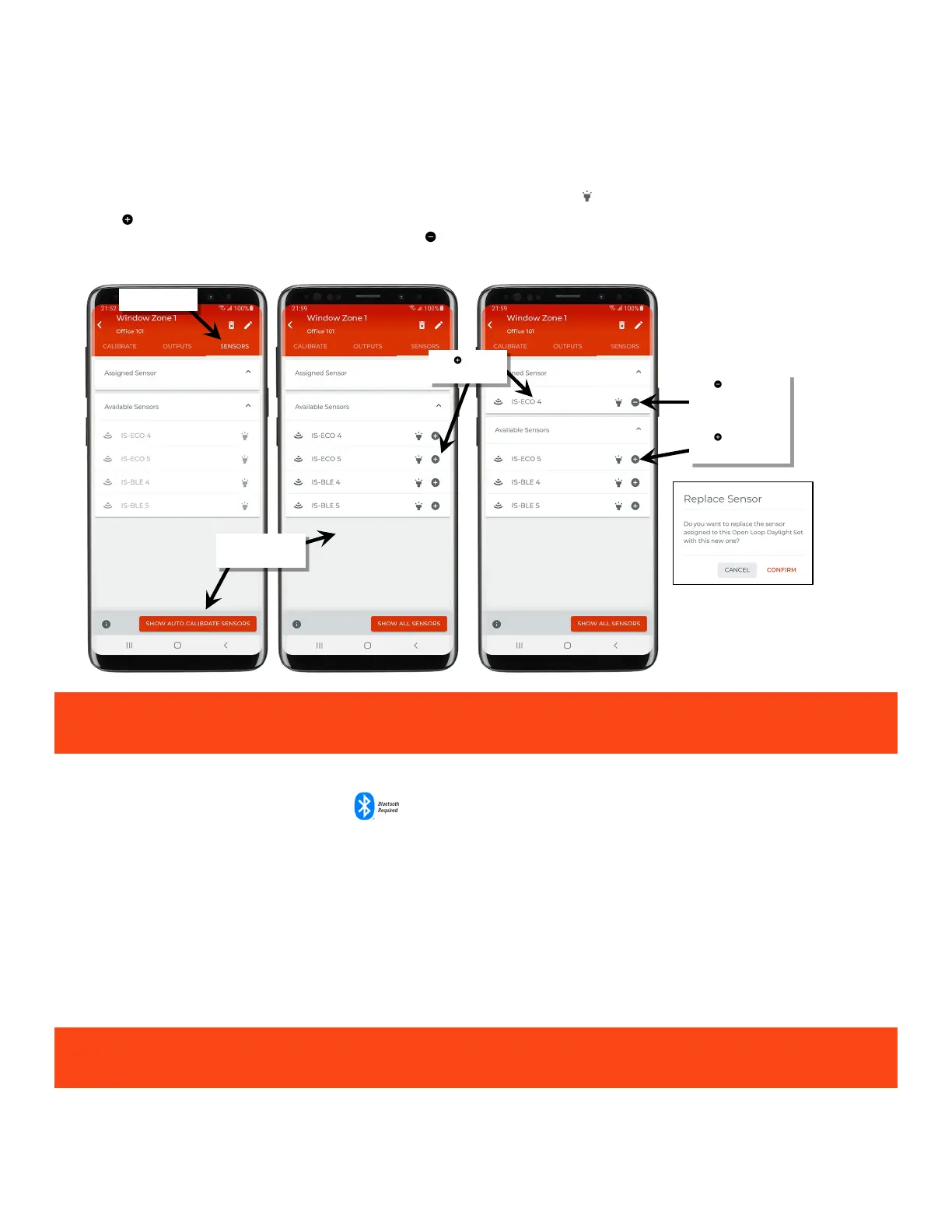
7: Select the ‘Sensors’ tab.
8: At the bottom of the screen, tap the ‘Show Auto Calibrate Sensors’ to check for open loop compatibility amongst the sensors in the area. The
compatible sensors will be shown.
Note: To switch back to show sensors that do not support auto calibration, tap the ‘Show all Sensors’ button.
9: In the ‘Available Sensors’ list, locate the desired device. If needed, use the identify icon ‘ ‘ to flash the device until the correct one is found.
Tap the ‘ ’ next to the desired daylight sensor to add it to be the ‘Assigned Sensor’. Only one sensor may be assigned to an open loop
daylight set. To remove an already assigned sensor, tap the ‘ ‘ to remove the device, or select a different sensor to replace the assigned
sensor.
IMPORTANT: When a device is assigned as the open loop daylight sensor, its associated load output is automatically
assigned to the open loop daylight set unless it has already been assigned to a different open loop daylight set.
Step 5: Adjust the Amount of Lighting Response
Daylight sensors that have updated firmware provided with WaveLinx Lite 4.0 will have the ability to automatically calibrate. Dynamic auto
calibration assumes that the space has been designed such that the fixture light level at 100% with no contributed daylight is the desired light
level for the space.
When a sensor is assigned to an open loop daylight set, it automatically is set for auto calibration. The auto calibration allows the sensor to
distinguish between electric light and daylight allowing it to respond with the desired open loop behavior. Out-of-the-box, the sensor will begin
gathering the data used for auto calibration as soon as it is powered. This allows the sensor to gather the necessary data ahead of time. The
sensor/fixture should be powered for at least 24 hours before enabling the open loop daylight set. The auto calibration can only occur if the dim
level of the fixture is over 30%. If the space has low occupancy during the 24-hour period where the fixture light level is below the 30%, the
sensor may take longer (several days) to adjust the optimal value.
If the auto calibrated light level is not the level desired, the daylight set’s response can be manually adjusted.
IMPORTANT: Before adjusting, review the specific device recommendations for when daylight adjustments should be
performed. See “WaveLinx Lite Device Reference Sheets” beginning on page 9 to find the suggestions for that device.
compatible sensors
a sensor
sensor
OR
Tap ‘ ’ to replace with
a different sensor



 To Next Page