User Manual: WaveLinx Lite (4.0)
116
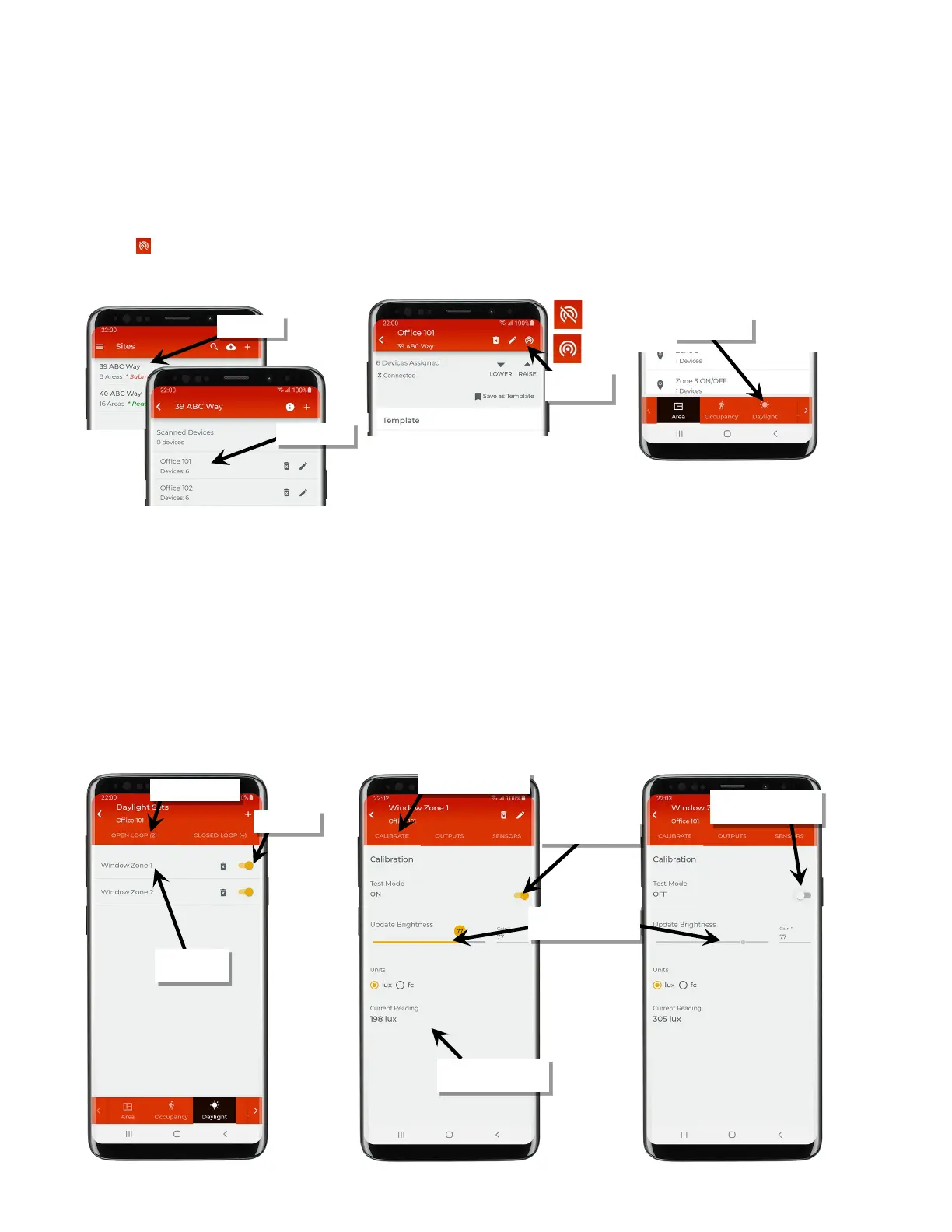
To adjust the daylight set’s lighting response to daylight:
1: Ensure that the fixtures have been powered and operational (either out-of-the-box or provisioned operation) for at least 24 hours.
2: Bring the mobile device within range (within 60 feet) of any line voltage powered provisioned WaveLinx Lite device in the desired area.
3: Ensure that the mobile device Bluetooth is turned on, and then open the WaveLinx Lite Mobile Application.
4: In the site list, select a site.
5: In the area list, select the desired area. After a short delay, verify that the area shows that the mobile application is connected to the network.
Tap on the icon if it is necessary to refresh the connection.
6: Tap ‘Daylight’ to open the daylight set list.
7: Select the ‘Open Loop’ tab. Verify that the desired sensors are ‘Enabled’ and then tap the row for the open loop daylight set to adjust.
8: In the calibration screen, switch ‘Test Mode’ to ON. Test mode invokes a faster dimming response to allow the adjustment to be made in real-
time.
9: Any adjustments in this screen are immediately saved. Use the slider to adjust the lighting response to daylight. After making an adjustment,
wait approximately 10 seconds before making another adjustment to allow the light level to stabilize. Continue to adjust the slider as needed
until the light level is in the desired range using a light meter at the work surface to verify.
• Lower the slider level (gain) to lower the electric light level and increase sensitivity to daylight (ideal for zones closer to windows).
• Raise the slider level (gain) to increase the electric light level and decrease sensitivity to daylight (ideal for zones further from windows).
The screen allows visibility of the current sensor reading in either lux or foot-candles for quick reference. This is an approximate reading at
the sensor, not the worksurface.
10: Tap ‘Test Mode’ to turn it OFF. If not turned off, test mode will time out automatically after 10 minutes. Repeat these steps for additional
open loop daylight sets.
Verify network
connection
Tap to open the
daylight set
reading in lux or fc
dimming response
Turn off ‘Test Mode’ once
adjustments are done



 To Next Page