User Manual: WaveLinx Lite (4.0)
45
Modifying Templates from the Area
This method will modify the template for future use AND will automatically update existing areas created from the template that have no
provisioned devices. This includes areas in other sites if the same template was used. Areas that have provisioned devices will not update and
will need to be modified manually if the same changes are desired.
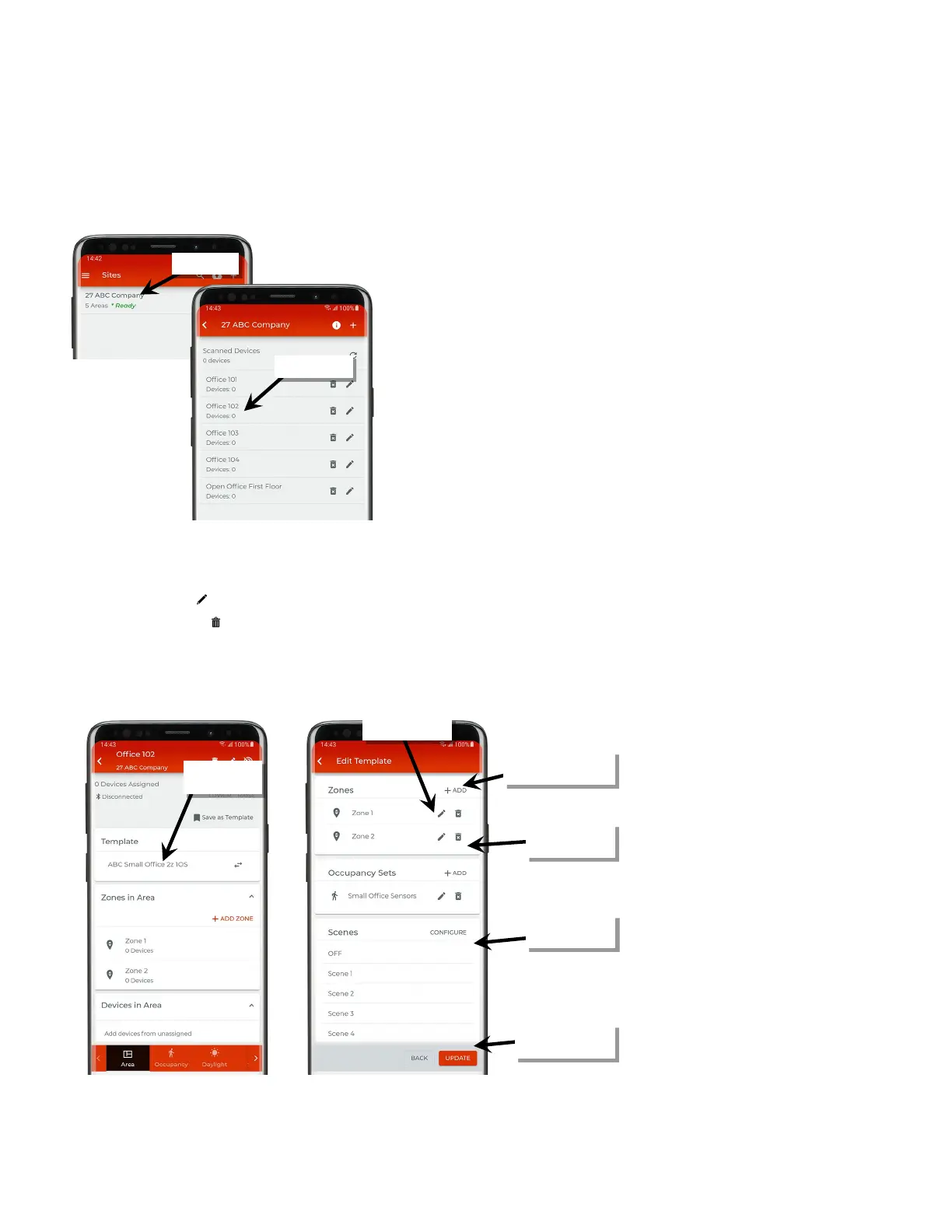
1: In the site list, select a site.
2: In the area list, select the desired area. The area does not need to be connected to the WaveLinx Lite device or network in the area.
3: In the ‘Template’ section of the screen, tap the template name.
4: Use the ‘Edit Template’ screen to make the modifications:
• Tap the edit icons ‘ ’ to modify existing settings.
• Tap the delete icons ‘ ’ to delete zones or occupancy sets.
• Tap the ‘+ ADD’ option to add additional zones or occupancy sets.
• Tap ‘Configure’ to modify scene levels.
5: Once the changes are complete, tap ‘Update’ to update the template.
template
or occupancy sets
or occupancy sets
modify scenes
changes are complete



 To Next Page