User Manual: WaveLinx Lite (4.0)
55
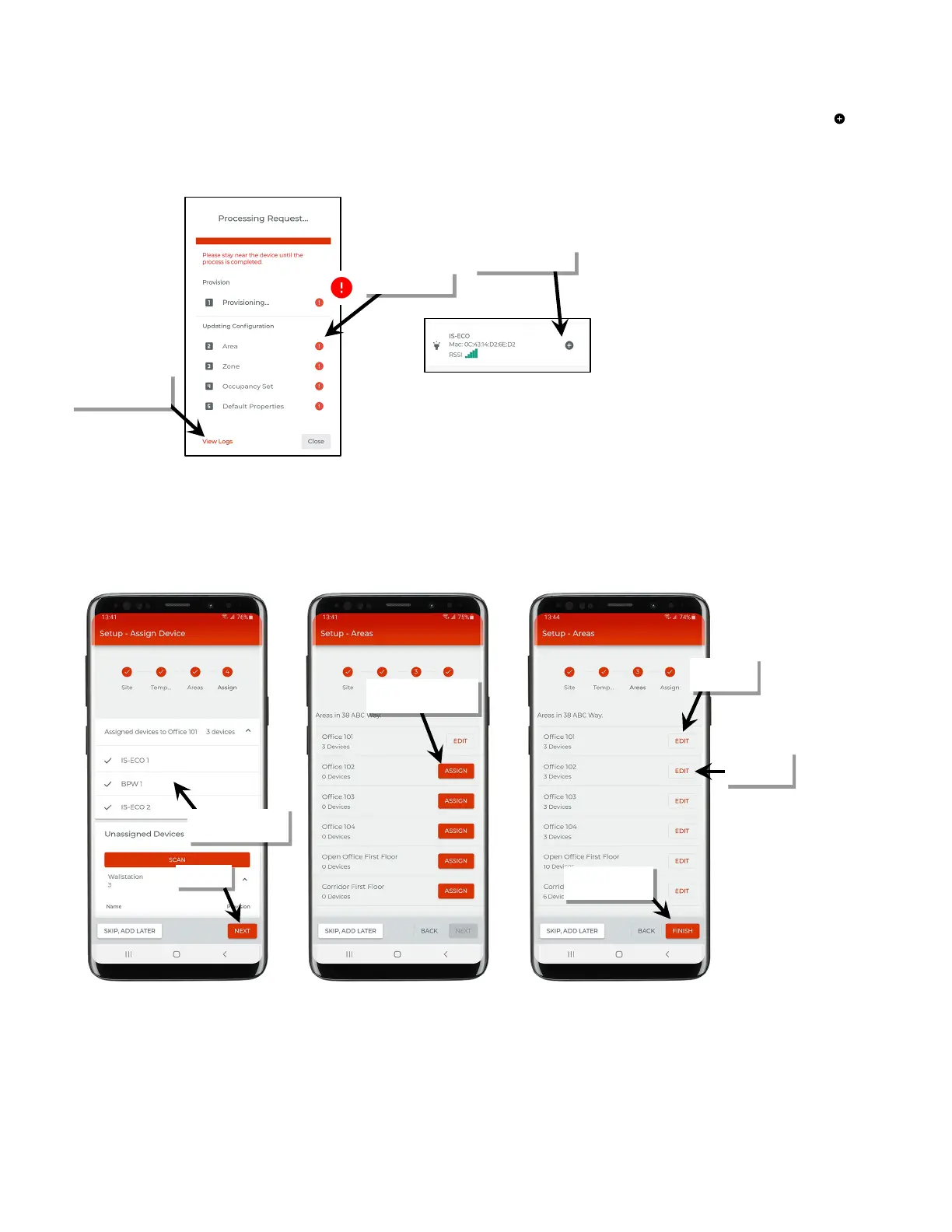
If the provisioning fails, the screen will show exclamation points. Close the screen. If able, move closer to the device, and then tap ‘ ’ to start
the provisioning again until the process is successful. If the error continues, try closing the mobile application and then turn off and then on
the mobile device Bluetooth. Open the mobile application and try again. If the error continues, select ‘View Logs’ for further information and
contact technical support.
9: Move close to the next device and repeat steps 4 through 9 to provision the device to the area and repeat for all devices that should belong to
the area.
10: Once that area is complete, tap ‘Next’. Select the next area and then repeat these steps until all devices have been provisioned. If needed,
tap ‘Edit’ next to any area to add additional devices.
11: Tap ‘Finish’ or ‘Skip Add Later’ to exit the setup wizard.
information
the area
Tap ‘Assign’ to provision
the next area
to assign
add devices
Add Later’ to exit



 To Next Page