User Manual: WaveLinx Lite (4.0)
68
Final Steps:
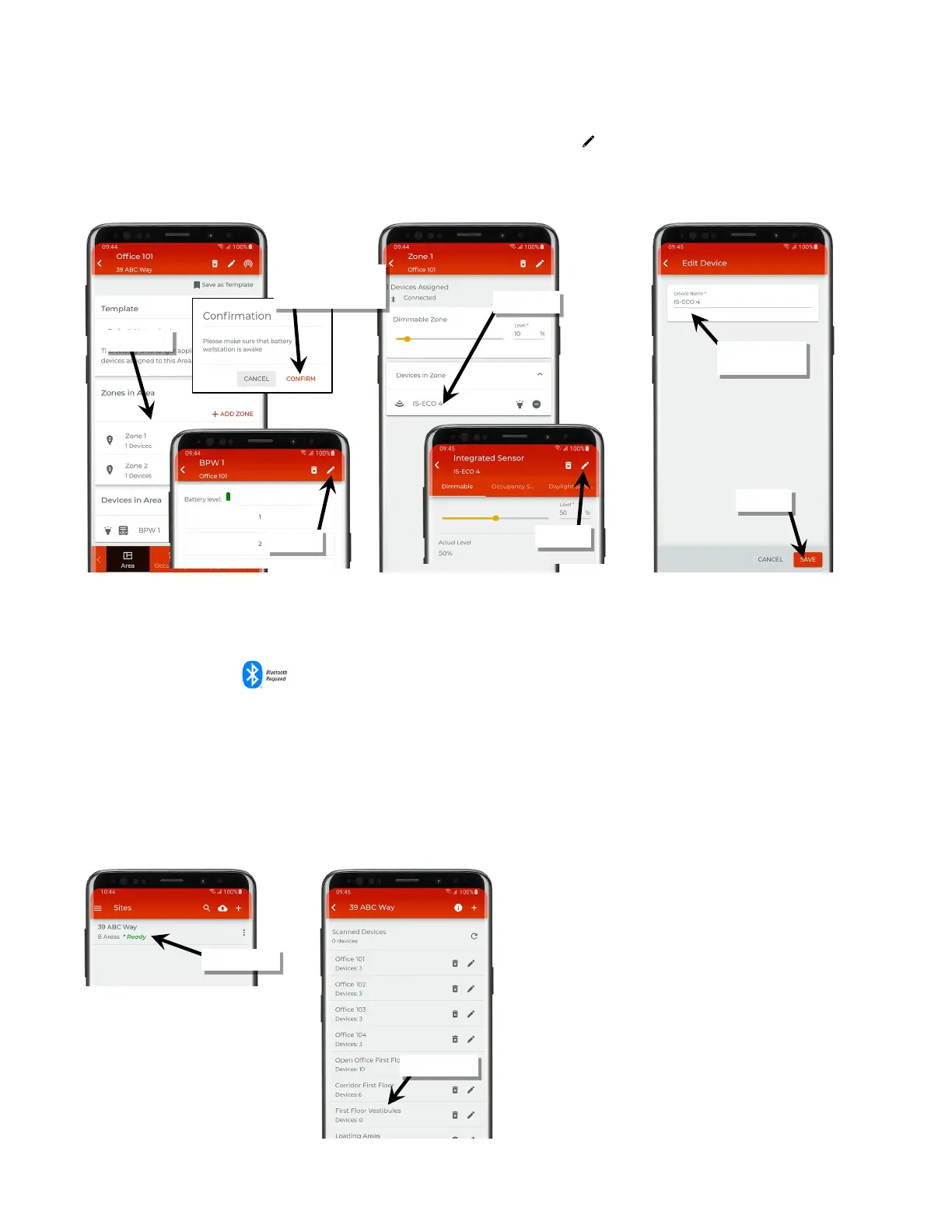
19: (Optional/Recommended) Tap each device to open the details page and then tap edit ‘ ’ to give the device a descriptive name making
each device easier to recognize in the mobile application. (For battery powered wallstations, press any button on the wallstation when
prompted to wake up the device).
Once devices are provisioned and assigned to the areas, the devices will begin operating with the default provisioned behavior or with the
behavior programmed into the template used for the areas.
Standalone Area Provisioning
Once a standalone area is created, provision the devices that need to operate independently.
Internet connection is not necessary but connection to the WaveLinx Lite device is required. The mobile device will need to be in range and as
close as possible (within 60 feet) to the WaveLinx Lite device being provisioned. Wallstations have no use in a standalone area and will not
appear as an available device.
To provision the area devices:
Ensure that the mobile device’s Bluetooth is turned on.
1: In the site list, select a site.
2: In the area list, select an area.
Fixture Mount or Integrated Sensor
wallstations only: press
any button then confirm



 To Next Page