92
44000-UG-01-01-EN_CPI_Paypod Embedded Pay Station_User Guide_V1.1.pdf
Paypod™ Embedded Pay Station
Handling Cash
Published by CPI
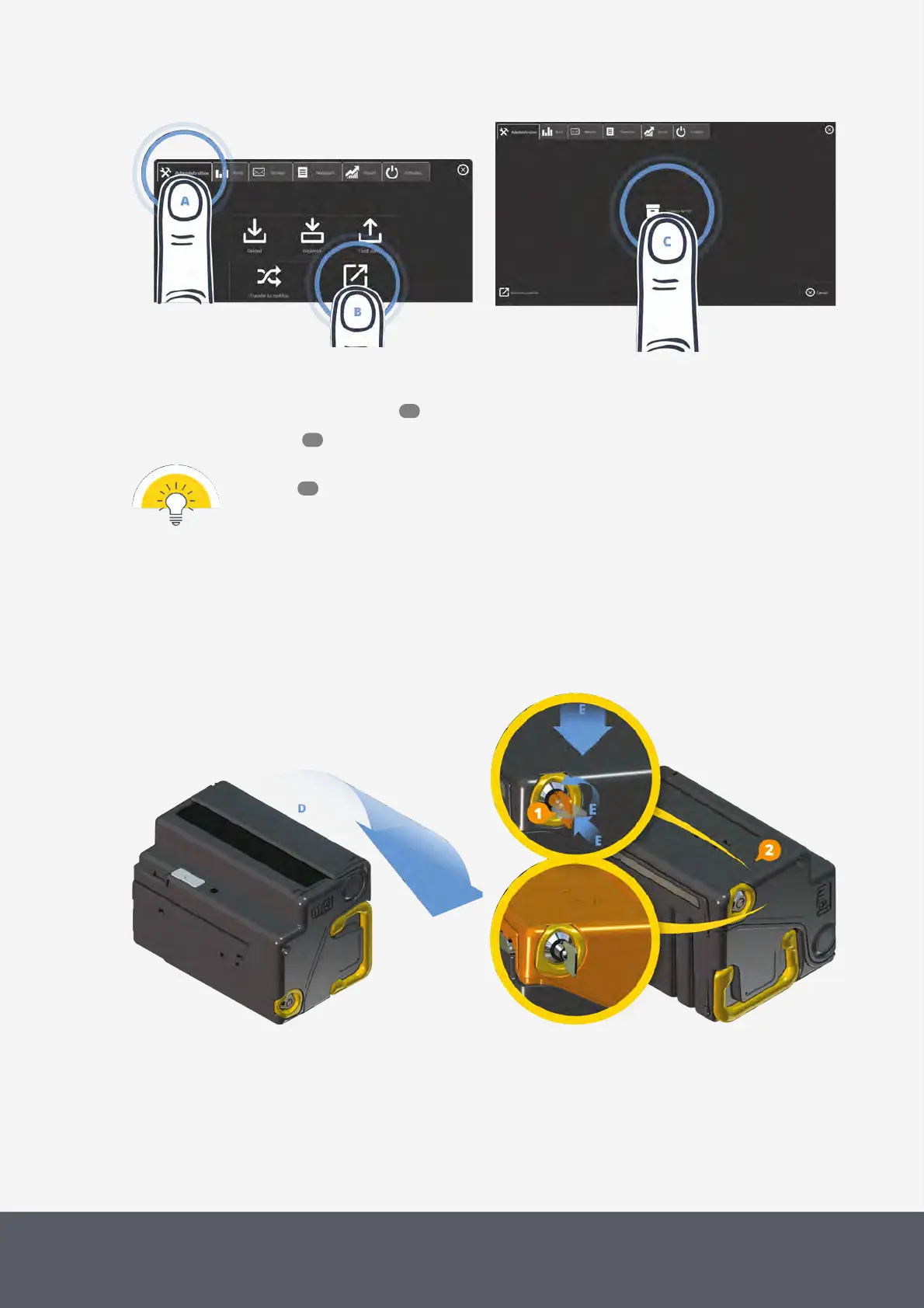
Opening POSlinq™ Cash Box Removal Screen
Starting Removal Process of Banknote Cash Box
4 Follow the quick guide on the screen or the detailed next steps:
5 Gain access to the banknote recycler .
6 Remove the cash box .
To replace the full cash box with another empty cash box follow the re-installation steps for the
cash box .
7 To open the cash box, turn the cash box cassette[D] and lay it on its right hand side to allow for solid standing
when opening the cassette.
8 Insert the key[1] in the lock.
9 Slightly press on the top of the cassette[E] and
10 simultaneously push the key[E] and turn it counter-clockwise as far as it will go[E].
Turning E23/E24 Banknote Cash Box to its Righ Hand Side
Unlocking E23/E24 Banknote Cash Box
11 Leave the key in the lock.
12 Open the cassette by unfolding its cover[2][F].
13 Remove all banknotes[G].
The cash box must be completely empty.
53
65
66



 To Next Page