93
44000-UG-01-01-EN_CPI_Paypod Embedded Pay Station_User Guide_V1.1.pdf
Handling Cash
Paypod™ Embedded Pay Station
Published by CPI
Opening E23/E24 Banknote Cash Box
Emptying E23/E24 Banknote Cash Box
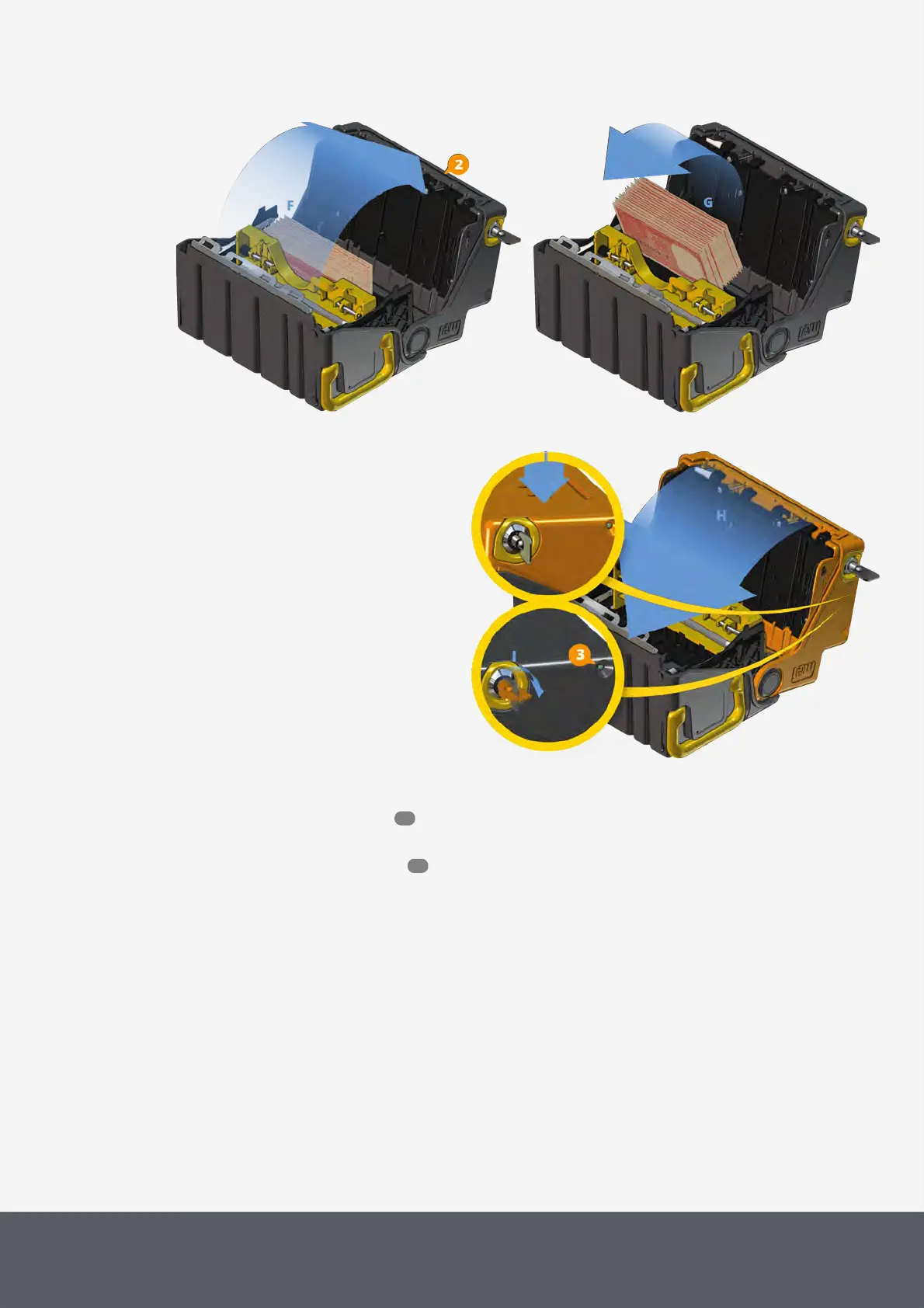
14 Close the cassette cover again[H].
15 Press on the top of the cassette[I] to
fully close the cassette and
16 simultaneously turn the key clockwise as
far as it will go[I].
The indicator[3] above the lock must be
green to reinsert the cassette into the re-
cycler. If it is grey, reopen and empty the
cash box (see above).
Closing E23/E24 Banknote Cash Box
17 Pull the cash box key out of the lock and store it in a safe place.
18 Reinstall the empty cash box .
The banknote recycler is reset.
19 Close the Paypod™ pay station again.
20 Confirm upcoming message with YES[J].
The middleware returns to the administration screen.
21 Tap the X button to close screen[K].
66
55



 To Next Page