ECHO Series Ultrasonic Thickness Gages
79
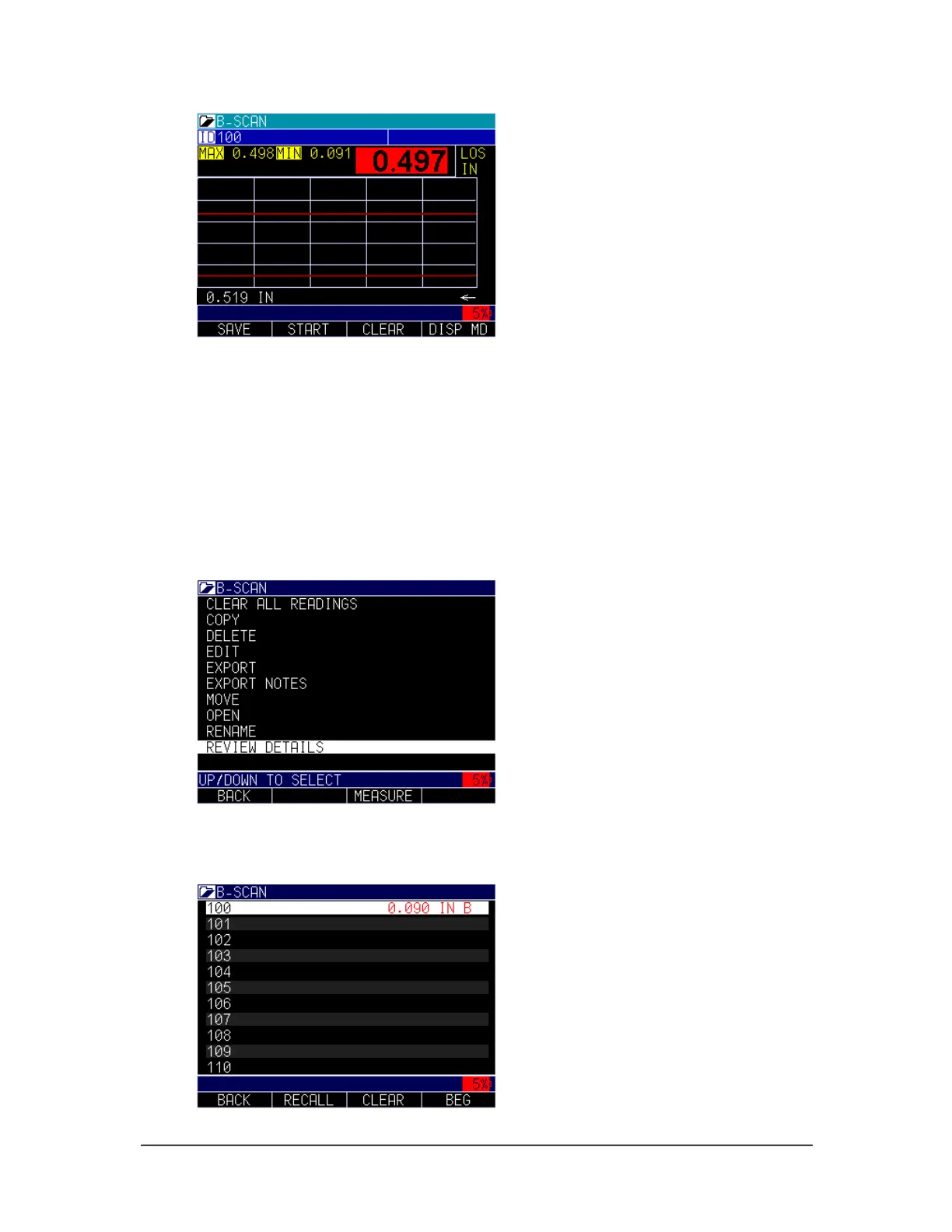
To set up a B-scan, go to measurement and turn B-scan on. Once B-scan is set to manual
or (optional encoder), you will have other screen choices to select maximum thickness
you expect to encounter. The max thickness should be set slightly higher than your
maximum thickness so that the screen resolution on the vertical axis is maximized. The
ECHO defaults to 0.500" or 12.7mm. You can also adjust direction left to right or right to
left, B-scan LOS as pause (default) or continue and Save A-scan on Min, Max or Alarm.
If you choose Min or Max, only 1 A-scan is saved. If you choose an alarm, you can save
the B-scan by simply pressing the F1 - Save key. The B-scan will be saved to the
Datalogger file. Next, go to MENU/OK, Dataloggger, Datlogger Dir, and highlight the
file. Click the Review Details options, as shown below.
The image below shows the ID where the entire B-scan image is saved; it is indicated by
the letter “B” to the right of the file. Press MENU/OK to review the image.



 To Next Page