RS20iInstallationandOperatingGuide
Page 14
RS20i Installation & Operating Guide Document # 9301H52900 Ver. 1.02
Is the power to the equipment rack ON? Has the circuit breaker to the audio rack been tripped?
Is the power cable connected?
Is the front panel power switch lighted?
Have the fuses blown? (Note: Confirm that the voltage input setting on the rear panel power
entry module has been set correctly for either 115VAC or 230VAC).
1.3 Operating the Touch Screen
Since the RS20i is equipped with a touch screen display, you can navigate easily through the menus by
touching any button with your finger. A non-abrasive stylus that will not scratch the screen can also be
used, if you prefer.
1.4 The Home Screen
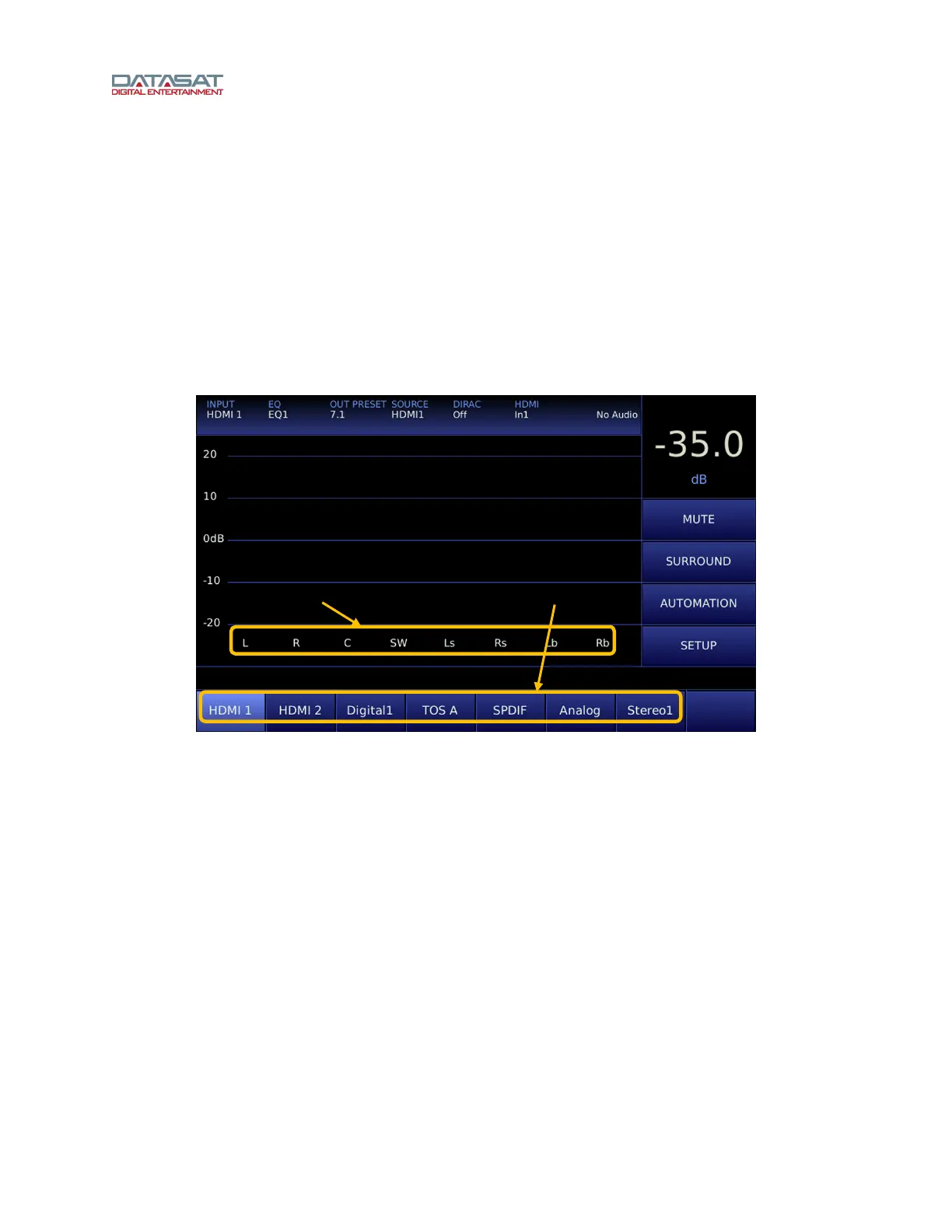
Figure 5. Home Screen
When the system has finished booting up, the Home screen will appear, as shown in the above example.
Your Home screen may look somewhat different, due to user-configurable channel names and audio
inputs.
The Home screen of the RS20i provides one-touch access to the following features:
• MUTE: Master volume mute/unmute
• SURROUND: Surround Decoder options
• AUTOMATION: Manual control of automation
• SETUP: Opens Setup menu (may be password protected)
• Input Preset selections
The Home screen also displays the following information:
• Volume Control level (-70dB to 0 dB)
• Vu bars for all output channels associated with the current audio input.
User-assigned
Channel Names
User-assigned
Input Presets



 To Next Page