RS20iInstallationandOperatingGuide
Page 98
RS20i Installation & Operating Guide Document # 9301H52900 Ver. 1.02
To change the date or time, select a field and use the Volume Control knob on the front panel to change
the entry.
4.10 Network Configuration
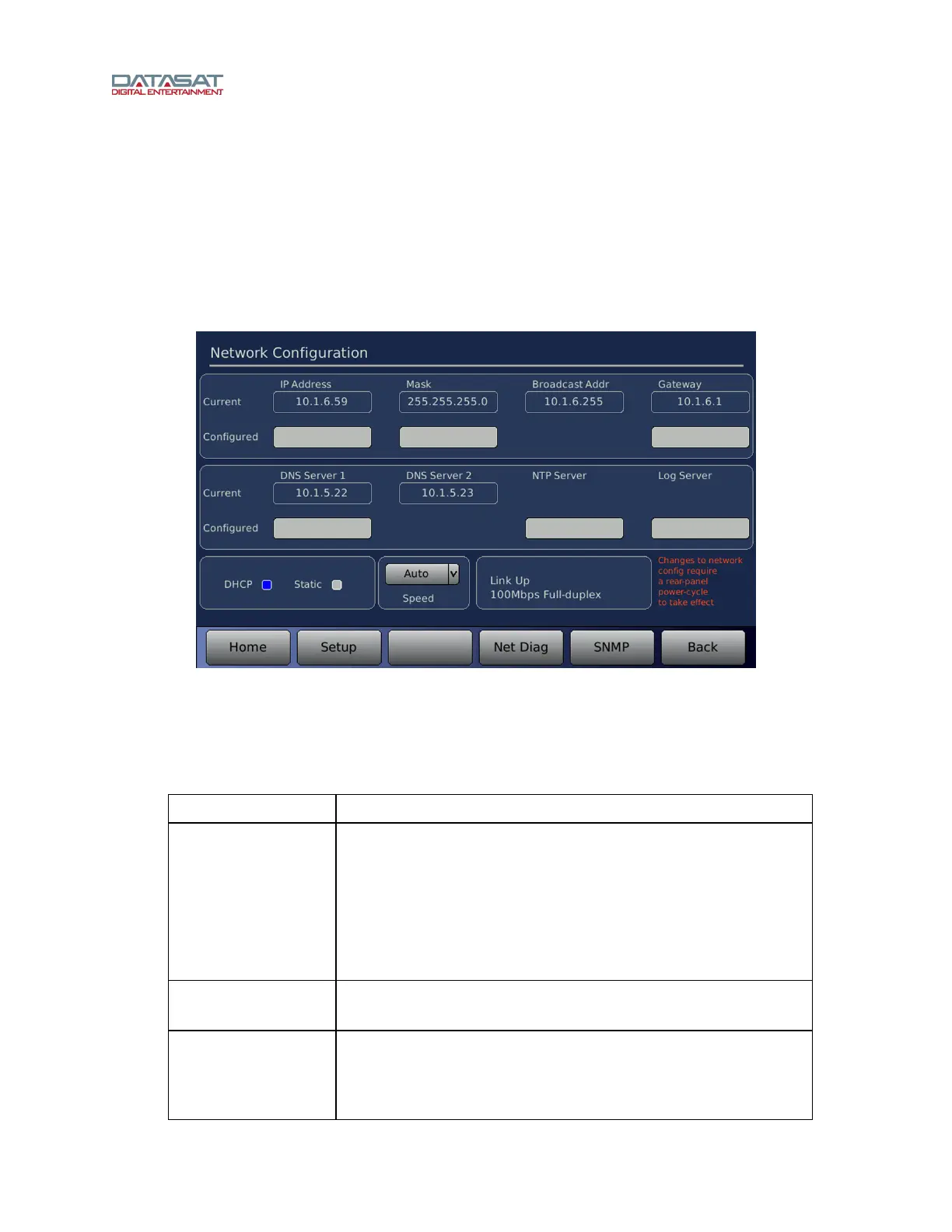
The Network Configuration screen is used to configure and check the network connection to the RS20i. A
properly configured network connection is required to use any RS20i network features, including VNC
(Virtual Network Connection), remote network control from an automation unit, and remote software
update. To access this screen:
Setup > Network
Figure 66. Network Screen, DHCP Selected
To change or enter a value, touch the box under the appropriate label.
The DNS Server, NTP server and Log file server can be entered whether using DHCP or
Static modes.
Table 36. Network Configuration
Field Description
IP Address
Current and configured IP address. The Configured IP address is
one you have entered (while in Static mode). The Current IP
address is the one obtained from the server when in DHCP mode,
or the Configured IP address when in Static mode.
Note: If you switch from DHCP to Static and enter a new IP
address into Configured, the IP address shown in Current will not
change until you reboot.
Mask
Current and configured netmask, specifies the size of the network.
For simple networks this is: 255.255.255.0
Broadcast Addr
This is a single address for devices to communicate with all other
devices on the LAN at once. For simple networks, the first 3
number groups are the same as the IP addresses and the 4th
group is 255.



 To Next Page